
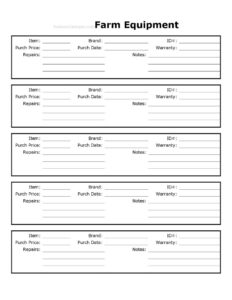
Farm Equipment Record
Track every tractor, implement, and tool with this free Farm Equipment Record template, logging purchase, warranty, and repairs — free download.
PDF
DOCX
13 downloads
0
likes
Download Files
- DOCX
A Farm Equipment Record is a simple tracking sheet farmers and ranchers use to document each machine, implement, and tool they own — from purchase date and price to warranty coverage and repair history. Most people reach for it to keep one organized place where every piece of equipment can be looked up at a glance, which makes maintenance planning, insurance claims, and tax records far easier. It’s free to download here in both PDF and DOCX, with no signup required.
What Is a Farm Equipment Record?
A Farm Equipment Record is a logging document that captures the key details of a farm’s machinery and tools in a consistent format. It is typically maintained by the farm owner, equipment manager, or bookkeeper and is updated whenever an item is bought, repaired, or retired. The record documents what each piece of equipment is, who made it, when it was acquired, what was paid, what warranty applies, and how it has been serviced over time. Its purpose is practical: to give an operation a reliable reference for budgeting, depreciation, resale, insurance, and routine upkeep, so nothing important is lost to memory or scattered receipts.
When Do You Need a Farm Equipment Record?
This record proves its worth in many everyday situations on a working farm:
- Buying new equipment: Log a newly purchased tractor, baler, or seeder right away so the purchase date, price, and warranty are captured while paperwork is fresh.
- Planning maintenance: Review repair notes to spot machines that need recurring attention or are due for service before a busy season.
- Filing an insurance claim: Provide brand, ID number, and purchase price documentation after theft, fire, or storm damage.
- Preparing taxes: Hand purchase dates and prices to an accountant for depreciation and expense calculations.
- Selling or trading equipment: Show a documented repair and warranty history to support a fair asking price.
- Managing a growing fleet: Keep dozens of implements and tools organized when memory alone can no longer track what was bought when.
What a Farm Equipment Record Should Have
A complete record balances enough detail to be useful with enough simplicity to actually keep updated. At minimum it should identify each item clearly, distinguish similar machines from one another, and capture the financial and service facts you’ll need later. The fields in this template are built around that goal: a brand and item name to identify the machine, an ID number to make it unique, purchase date and price for financial records, warranty details for coverage, and a running notes and repairs area for service history. Together these turn a pile of receipts and mental notes into a single, searchable reference you can trust.
How to Fill Out a Farm Equipment Record
- Item: Write what the equipment is — for example, “60 HP utility tractor,” “round baler,” or “grain auger.” Be specific enough to tell similar items apart.
- Brand: Enter the manufacturer, such as John Deere, Kubota, Case IH, or New Holland.
- ID#: Record the serial number, VIN, or your own internal asset tag so the entry points to one exact machine.
- Purch Date: Note the date you acquired it, which matters for warranty windows and tax depreciation.
- Purch Price: Enter the amount paid, including any major attachments if they were part of the deal.
- Warranty: List the coverage term, expiration date, and what it covers — for instance, “powertrain, 5 years / 2,000 hrs.”
- Repairs: Log each service event with a date and brief description, building a running history over the equipment’s life.
- Notes: Use this field for anything else useful — hours of operation, dealer contact, attachment compatibility, or condition observations.
Tips for Keeping Your Equipment Records Useful
A record is only as good as its upkeep. Update entries the same week you buy, repair, or retire a machine rather than letting paperwork accumulate. Keep your receipts and warranty cards in a labeled folder or scanned file that mirrors the ID numbers on this sheet, so you can pull supporting documents instantly. If you run several machines of the same model, lean on the ID# field to keep them distinct, and consider painting or tagging that number on the equipment itself. For larger operations, store a copy of the completed DOCX file in shared cloud storage so the bookkeeper, mechanic, and owner all see the same up-to-date information.
Equipment Records and Depreciation
Farm equipment is a significant capital investment, and the purchase date and price you record here are exactly what an accountant needs to calculate depreciation over the asset’s useful life. Keeping accurate, dated entries also helps you separate a repair (often deductible in the year incurred) from a capital improvement that may need to be capitalized. Because tax treatment varies and rules change, the record itself isn’t a tax decision — it’s the clean source data that makes those decisions easier and defensible if your return is ever questioned.
Common Mistakes to Avoid
- Skipping the ID number: Without a serial or asset number, two identical tractors become impossible to tell apart in your records and in an insurance claim.
- Letting repairs go unlogged: A blank repair field hides patterns that warn you a machine is becoming a money pit.
- Rounding or guessing the purchase price: Estimated figures undermine tax and insurance accuracy — use the actual amount paid.
- Forgetting warranty expiration dates: Missing a coverage window means paying out of pocket for a repair that should have been free.
- Vague item descriptions: “Tractor” tells you little; “60 HP utility tractor with loader” is searchable and clear.
- Never updating the file: An out-of-date record is worse than none because it creates false confidence.
Frequently Asked Questions
What is a Farm Equipment Record used for? It is used to track every machine, implement, and tool on a farm in one organized place. The record documents purchase details, warranty coverage, and repair history so you can plan maintenance, file insurance claims, and prepare tax information efficiently.
How do I fill out the Farm Equipment Record? Enter the item description and brand, add a unique ID or serial number, then record the purchase date and price. Fill in the warranty terms, log each repair as it happens, and use the notes field for any extra details such as operating hours or dealer contacts.
Is this Farm Equipment Record free to download? Yes. You can download the template free in both PDF and DOCX formats, with no signup or account required. The DOCX version is fully editable so you can adapt the columns to your operation.
Does a Farm Equipment Record need to be notarized? No. This is an internal recordkeeping document, not a legal contract, so it does not require notarization or witnesses. Its value comes from being accurate and consistently updated rather than formally signed.
What information should I record for warranty tracking? Note the warranty length, its expiration date, and what it covers — for example, powertrain versus full coverage and any hour limits. Keeping the dealer name and contact in the notes field makes it faster to act before coverage lapses.
Can I use this record for tax and depreciation purposes? The purchase date and price fields provide the source data your accountant needs for depreciation and expense calculations. The record organizes that information clearly, though you should confirm specific tax treatment with a qualified professional.
This Farm Equipment Record template is a general example provided for informational purposes only and is not legal, financial, or tax advice. Recordkeeping, depreciation, and insurance requirements vary by jurisdiction and circumstance — consult a qualified professional for guidance specific to your operation.
Related Forms
- Animal Profile Record
- Field Productivity Record
- Farm Inventory Record
- Field Planning Worksheet
- Spray Record
- Apiary Record Form
Browse more in Agriculture.