
Church Tithe Tracker
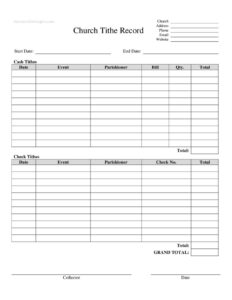
Track member giving and offerings accurately with our free Church Tithe Tracker template, available as a free download in PDF and DOCX.
PDF
DOCX
11 downloads
0
likes
Download Files
- DOCX
A Church Tithe Tracker is a simple record-keeping form that documents the tithes, offerings, and donations given by members of a congregation over a defined period. The most common reason people use it is to keep accurate, organized giving records for year-end contribution statements and church bookkeeping. It is free to download here in both PDF and DOCX formats, with no signup required.
What Is a Church Tithe Tracker?
A Church Tithe Tracker is a giving log used by churches, ministries, and faith-based organizations to record the financial contributions of members and visitors. It is typically maintained by a treasurer, financial secretary, or volunteer counting team, and it documents who gave, how much, when, and through what method. The tracker helps a church account for tithes (often understood as a regular portion of income), general offerings, and designated gifts to specific funds or campaigns. By keeping a consistent record throughout the year, a church can prepare contribution receipts, reconcile bank deposits, support budgeting decisions, and demonstrate transparency to its membership and governing board.
When Do You Need a Church Tithe Tracker?
Churches and ministries reach for a tithe tracker in many practical situations. Common scenarios include:
- Recording weekly offerings after each Sunday or midweek service so deposits match what was counted.
- Preparing year-end giving statements that members may use for their personal records and tax filing.
- Tracking pledges or commitments made during a building campaign, missions drive, or special appeal.
- Managing designated funds such as benevolence, youth ministry, or facility maintenance gifts.
- Onboarding a new treasurer who needs a clear, consistent system to continue the church’s records.
- Auditing or reviewing finances when a board, deacon team, or external reviewer examines giving history.
Types of Contributions a Tracker Captures
Not every gift is the same, and a good tracker distinguishes between them. Tithes are regular, recurring gifts members commit to the general fund. Offerings are additional gifts given above a tithe, often spontaneously. Designated or restricted gifts are earmarked for a specific purpose, such as missions or a building fund, and generally must be used for that stated purpose. In-kind or non-cash gifts, like donated supplies or property, may also be noted separately. Recording each category correctly protects the church and gives donors accurate information about how their generosity is applied.
What a Church Tithe Tracker Should Have
A complete and useful tracker contains a few essential elements. It should identify the church and the reporting period it covers. It needs a way to identify each giver, whether by name or assigned envelope number, while keeping sensitive information secure. It should capture the date of each gift, the amount, the payment method (cash, check, online, or card), and the fund or category the gift supports. Running totals, weekly subtotals, and a year-to-date column make reconciliation and statement preparation far easier. Finally, space for notes lets you flag special circumstances, such as a one-time memorial gift or a corrected entry.
How to Fill Out a Church Tithe Tracker
Because giving records must stay accurate and auditable, fill the tracker out consistently every time you record contributions:
- Enter the church name and reporting period at the top, such as the month, quarter, or full year the log covers.
- Record the giver’s identity using either a full name or an envelope/member number, depending on how your church protects privacy.
- Add the date of each gift so the entry matches the corresponding service and bank deposit.
- Note the contribution amount exactly as received, double-checking against checks and counted cash.
- Select the payment method — cash, check, online transfer, or card — to simplify deposit reconciliation.
- Assign the gift to a fund or category, such as general tithe, missions, or building fund.
- Update running and year-to-date totals for each giver so statements are ready when needed.
- Add a note for anything unusual, like a corrected entry or a restricted gift, then have a second counter verify the figures.
Tips for Accurate and Secure Recordkeeping
Sound stewardship goes beyond filling in numbers. Whenever possible, have two unrelated people count and verify offerings together so no single person handles funds alone. Record gifts promptly after each service while details are fresh, and reconcile the tracker against bank deposits regularly. Store the completed records securely, since giving information is personal and confidential. Keeping the file backed up, whether in a locked cabinet for printed copies or a password-protected folder for the DOCX version, protects both members and the church. Consistency matters more than complexity: a simple system used faithfully every week is far more valuable than an elaborate one used inconsistently.
How It Differs From a Donation Receipt
A tithe tracker is an internal log, while a contribution receipt or year-end statement is the document you provide to the giver. The tracker is the source data; the receipt is the summary produced from it. Many churches use the tracker throughout the year and then generate individual statements from its totals when the period closes. Keeping the two distinct helps you maintain clean internal records while still meeting members’ expectations for documentation of their generosity.
Common Mistakes to Avoid
- Recording gifts inconsistently — skipping weeks or batching entries leads to errors that are hard to trace later.
- Mixing designated and general funds, which can misdirect money intended for a specific purpose.
- Letting one person handle counting alone, which removes accountability and increases risk.
- Failing to reconcile the tracker against actual bank deposits each period.
- Storing records carelessly and exposing members’ private giving information.
- Forgetting year-to-date totals, making year-end statement preparation slow and error-prone.
Frequently Asked Questions
What is a Church Tithe Tracker used for? It is used to record and organize the tithes, offerings, and designated gifts given by members and visitors. Churches rely on it for bookkeeping, deposit reconciliation, and preparing year-end giving statements. It serves as the internal source record behind any contribution receipts you issue.
How do I fill out a Church Tithe Tracker? Start by entering your church name and the reporting period, then record each gift with the giver’s name or envelope number, the date, the amount, the payment method, and the fund it supports. Update running and year-to-date totals as you go. Having a second person verify the entries adds an important layer of accuracy.
Is a Church Tithe Tracker legally binding? The tracker itself is an internal recordkeeping tool, not a contract, so it is not binding in the way an agreement would be. However, accurate giving records are important for transparency and may support the contribution statements members use for their own purposes. Recordkeeping and reporting requirements vary by jurisdiction.
Can members use this for tax purposes? The tracker is the internal record from which a church typically generates individual year-end contribution statements. Members generally need that formal statement rather than the tracker itself when documenting charitable giving. Always check the current rules in your country or region, as requirements differ.
How much does this template cost? Nothing — the Church Tithe Tracker template is completely free to download here in both PDF and DOCX formats. There is no signup, subscription, or account required. You can edit the DOCX version to match your church’s funds and categories.
Who should maintain the tithe tracker? Typically a treasurer, financial secretary, or designated counting team maintains it. Best practice is to involve at least two trusted people so that counting and recording are verified independently. This protects both the church and those handling the funds.
This Church Tithe Tracker template is a general example provided for informational purposes only and is not legal, financial, or tax advice. Recordkeeping and reporting requirements vary by jurisdiction. Consult a qualified accountant or professional advisor to ensure your church’s practices meet applicable rules.
Related Forms
- Sacrament Of Baptism Card (2 per page)
- Ordination Anniversary Card (2 per page)
- Holy Confirmation Card (2 per page)
- My Holy Confirmation (2 per page)
- St Joseph Funeral Card (2 per page)
- My Holy Confirmation Card (2 per page)
Browse more in Church.