
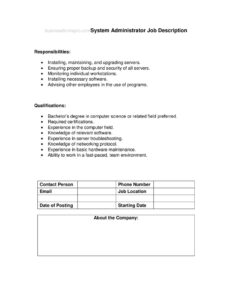
System Administrator Job Description
Download a free System Administrator job description template in PDF and DOCX to clearly define IT responsibilities and qualifications and hire faster.
PDF
DOCX
0
likes
Download Files
- DOCX
A System Administrator job description is a hiring document that defines the duties, technical skills, and qualifications expected of an IT professional who keeps servers, networks, and systems running. Companies most often use it to attract qualified candidates and set clear expectations before posting an opening. You can download this template free in both PDF and DOCX formats — no signup required.
What Is a System Administrator Job Description?
A System Administrator job description is a structured outline of a sysadmin role, typically organized into two core sections: Responsibilities and Qualifications. It is issued by an employer, HR department, or hiring manager and is used to communicate exactly what the job involves — the day-to-day technical work, the systems being maintained, and the credentials a candidate needs. The document doubles as a recruiting tool for job boards, an internal reference for performance reviews, and a benchmark for setting compensation. A well-written version helps both sides understand the role: applicants self-select based on fit, and managers screen resumes against a consistent standard rather than guesswork.
When Do You Need a System Administrator Job Description?
This template is useful any time you need to formalize or communicate the responsibilities of a system administration role. Common situations include:
- Posting a new opening — you need a clear, professional listing for LinkedIn, Indeed, or your careers page.
- Replacing a departing admin — you want to document what the previous person actually handled before backfilling.
- Growing your IT team — adding a second or junior sysadmin and need to define overlapping versus distinct duties.
- Restructuring roles — separating help-desk support from server and infrastructure ownership.
- Setting performance expectations — giving an existing employee a written reference for their goals and evaluations.
- Working with recruiters or staffing agencies — handing over a precise spec so they source the right candidates.
Types of System Administrator Roles
“System administrator” covers a range of specializations, and tailoring the description to the right type sharpens your hiring. A Windows administrator focuses on Active Directory, Group Policy, and Microsoft server environments. A Linux/Unix administrator manages open-source servers, shell scripting, and configuration tools. A network administrator leans toward routers, switches, firewalls, and connectivity. A cloud systems administrator works with AWS, Azure, or Google Cloud infrastructure. Many small businesses need a generalist who touches all of these. Decide which profile fits your environment before you fill in the responsibilities and qualifications, because the emphasis you choose drives which candidates apply.
What a System Administrator Job Description Should Have
A complete, effective job description goes beyond the two header fields and includes:
- A short role summary describing the position and where it reports.
- A detailed Responsibilities list covering daily, weekly, and on-call duties.
- A Qualifications section split into required and preferred items.
- Specific technologies, platforms, and tools the candidate must know.
- Education and certification expectations (e.g., degree level, vendor certs).
- Years of relevant experience and any supervisory scope.
- Soft skills such as communication, documentation, and incident response under pressure.
How to Fill Out a System Administrator Job Description
Use the template’s two main fields as a framework and expand each into a focused, scannable list:
- Add a title and summary first. Above the provided sections, confirm the exact job title and write one or two sentences describing the role and reporting line.
- Complete the Responsibilities section. List concrete duties such as installing and maintaining servers, managing user accounts and permissions, monitoring system performance, applying patches and security updates, backing up data, and resolving incidents. Use action verbs and keep each bullet to one clear task.
- Group related duties. Cluster items by theme — infrastructure, security, support, documentation — so applicants grasp the scope quickly.
- Complete the Qualifications section. Separate “required” from “preferred.” Include education, years of experience, specific operating systems, scripting languages, and certifications.
- Specify your environment. Name the actual platforms (Windows Server, Ubuntu, VMware, AWS) so candidates know if they match.
- Review and trim. Cut vague phrases, confirm everything reflects the real job, and proofread before posting.
Tips for Writing Responsibilities That Attract the Right Candidates
The Responsibilities section is where most descriptions either succeed or fall flat. Avoid generic lines like “maintain systems” — instead, write what success looks like: “administer a 30-server Windows and Linux environment supporting 200 users.” Quantify scale where you can, since experienced admins want to know the size and complexity of what they’ll manage. Be honest about on-call rotations, after-hours maintenance windows, and any physical data-center work, because surprising a hire later leads to early turnover. Limit the list to the duties that genuinely define the role; a wall of fifty bullets reads as a wish list and deters strong applicants who assume the job is unrealistic.
Setting Realistic Qualifications
Overloading the Qualifications section is a common way to shrink your candidate pool unnecessarily. Distinguish between must-haves and nice-to-haves. A specific certification like CompTIA Server+, Microsoft, Red Hat, or a cloud credential may be required for some roles and merely preferred for others. Consider whether a degree is truly necessary or whether equivalent hands-on experience suffices — many excellent admins are self-taught or come up through help-desk roles. Listing a reasonable experience range (for example, three to five years) rather than an arbitrary high number keeps capable mid-level applicants from self-screening out.
Common Mistakes to Avoid
- Being too vague — “handle IT tasks” tells candidates nothing; name the systems and duties.
- Listing every skill imaginable — an impossibly long requirements list scares off qualified people.
- Confusing roles — mixing help-desk, developer, and admin duties into one posting.
- Omitting on-call or shift expectations — leading to mismatched expectations after hiring.
- Forgetting to update it — reusing an old description that no longer reflects your stack.
- Skipping the summary and reporting line — candidates can’t gauge seniority or fit.
Frequently Asked Questions
What does a system administrator do? A system administrator installs, configures, and maintains an organization’s servers, operating systems, and networks. Typical duties include managing user accounts, applying security patches, monitoring performance, running backups, and troubleshooting outages. The exact mix depends on whether the role is Windows, Linux, network, or cloud focused.
How do I fill out this job description template? Start by confirming the job title and adding a short summary, then expand the Responsibilities field into a grouped list of concrete duties and the Qualifications field into required and preferred items. Name the specific platforms and certifications your environment uses, then review for accuracy before posting. The template gives you the structure so you only supply the details.
What qualifications should a system administrator have? Most roles list a relevant degree or equivalent experience, several years of hands-on administration, and familiarity with the specific operating systems and tools in use. Certifications such as CompTIA, Microsoft, Red Hat, or cloud-vendor credentials are common requirements or preferences. Separate the genuine must-haves from the nice-to-haves to keep your candidate pool healthy.
Is this job description legally binding? A job description is generally a descriptive hiring and management document, not a contract or guarantee of employment. Employment terms are usually governed by a separate offer letter or agreement. Because labor and employment rules vary by location, confirm any compliance language with HR or a qualified professional.
How is a system administrator different from a network administrator? A system administrator focuses primarily on servers, operating systems, and the software environment, while a network administrator concentrates on connectivity infrastructure like routers, switches, and firewalls. In smaller organizations one person often covers both. The template lets you weight responsibilities toward whichever focus fits your team.
How much does this template cost? It is completely free to download from Business Forms Pro in both PDF and DOCX formats, with no signup or payment required. You can edit the DOCX version to match your company branding, environment, and specific requirements before posting it.
This template is a general example provided for informational purposes only and does not constitute legal, HR, or employment advice. Employment laws and hiring requirements vary by jurisdiction — consult a qualified HR or legal professional before finalizing or posting a job description.
Official resource: for the rules that apply to your situation, see the U.S. Department of Labor.
Related Forms
- Physical Therapist Job Description
- Dental Hygienist Job Description
- Sales Manager Job Description
- Store Manager Job Description
- Landscaper Job Description
- Account Development Manager Job Description
Browse more in Job Descriptions.