
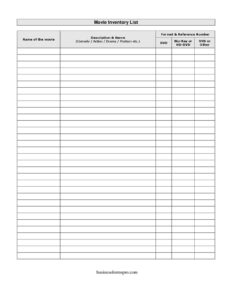
Movie Inventory List
Catalog your DVDs, Blu-rays, and films with this free Movie Inventory List template, free download in PDF and DOCX to track every title.
PDF
DOCX
4 downloads
0
likes
Download Files
- DOCX
A Movie Inventory List is a simple tracking document that records every film in your personal or shared collection, including its title, genre, and format. People most often use it to keep their growing DVD, Blu-ray, and digital library organized so they always know what they own and where to find it. You can download this template free in both PDF and DOCX formats, with no signup required.
What Is a Movie Inventory List?
A Movie Inventory List is a structured record used by collectors, families, libraries, schools, and small rental businesses to catalog the movies they own. It documents each title alongside a short description, its genre, the physical or digital format, and a reference number that ties the entry to a shelf, case, or storage box. The goal is straightforward: turn a scattered pile of discs and tapes into a searchable, at-a-glance overview. Whether you have a dozen favorites or thousands of titles across DVD, Blu-ray, HD-DVD, and VHS, the list gives you a single dependable place to confirm what is in your collection and how it is stored.
When Do You Need a Movie Inventory List?
This template fits a wide range of everyday situations where keeping track of films matters:
- Managing a large home collection so you avoid buying duplicate titles you already own.
- Lending movies to friends or family and tracking which ones are out and who has them.
- Insurance documentation after a fire, flood, or theft, where a detailed list helps prove the value of a collection.
- Selling or downsizing a collection, where buyers want to see exactly what titles and formats are available.
- Running a small video rental, classroom, or library shelf that loans films and needs a reference number for each item.
- Migrating formats, such as moving from VHS or HD-DVD to Blu-ray or digital, where you track which titles still need to be replaced.
Types of Collections This List Suits
The format-friendly design works equally well for a hobbyist with a few hundred discs, a film buff archiving rare releases, or an organization managing a shared media library. Because the list captures multiple format types, it adapts to mixed collections that span decades of home video technology.
What a Movie Inventory List Should Have
A complete and useful Movie Inventory List captures enough detail to identify each title quickly without becoming cluttered. At minimum it should include the movie name, a brief description and genre, the format the film is stored on, and a reference number that links the entry to its physical location. The list should be consistent—use the same genre labels and the same numbering scheme throughout—so it stays easy to sort and search. A clear header with your name, the collection name, and the date the inventory was taken adds context and makes future updates simpler.
How to Fill Out a Movie Inventory List
- Name of the movie: Enter the full official title exactly as it appears on the case or label, including any subtitle or edition (for example, “Director’s Cut” or “Special Edition”).
- Description & genre: Add a short note about the film and tag its genre—comedy, action, drama, mystery, horror, documentary, and so on. A consistent genre label makes the list easy to filter later.
- Format & reference number: Record the storage format and assign a reference number that matches the shelf, case, bin, or box where the item lives. The number is your shortcut for locating the physical copy.
- Format detail (DVD, Blu-ray or HD-DVD): Mark the disc type so you know which player or device it requires and whether it is high definition.
- VHS or other: Note tape-based or unusual formats here, including digital or streaming-only titles, so nothing falls outside your tracking.
Work through the collection one shelf at a time, completing each row before moving on, and save or print the finished list once every title is logged.
Tips for Keeping Your Inventory Accurate
An inventory is only valuable if it stays current. Update the list whenever you buy, sell, lend, or replace a title rather than waiting for an annual overhaul. If you lend movies frequently, add a simple status column or note beside the reference number so you can see at a glance what is checked out. Keep a backup copy of the file in cloud storage or email it to yourself, especially if you are using the list for insurance purposes. When organizing a large collection, sort the list by genre or format first—this often reveals duplicates and gaps you would otherwise miss.
How It Differs From a Simple Watchlist
A Movie Inventory List is not the same as a watchlist of films you plan to see. The inventory documents what you physically or digitally own, including format and storage location, while a watchlist tracks future viewing intentions. Because of this, the inventory emphasizes reference numbers and formats rather than ratings or release dates, making it the right tool for organization, insurance, and lending rather than casual film discovery.
Common Mistakes to Avoid
- Skipping reference numbers, which makes it impossible to match an entry to its physical location.
- Using inconsistent genre labels (“comedy” in one row, “funny” in another) that break sorting and searching.
- Forgetting to note the format, leaving you unsure whether a title is DVD, Blu-ray, HD-DVD, VHS, or digital.
- Letting the list go stale by not updating it after purchases, sales, or loans.
- Recording only the title without a description, so editions and box sets become hard to tell apart.
- Keeping just one copy with no backup, risking the whole inventory if the file is lost.
Frequently Asked Questions
What is a Movie Inventory List used for? It is used to catalog the movies you own, recording each title’s name, genre, format, and a reference number tied to its storage location. People use it to avoid buying duplicates, track lent titles, document a collection for insurance, and keep large libraries organized.
How do I fill out the Movie Inventory List template? Enter each film’s title, add a short description and genre, then record the format and a reference number that matches its shelf or case. Mark whether it is a DVD, Blu-ray, HD-DVD, VHS, or other format, and complete one row per title until your entire collection is logged.
Is this Movie Inventory List free to download? Yes. The template is completely free to download in both PDF and DOCX formats, and no signup or account is required. You can print it as-is or edit the DOCX version to fit your collection.
Can I use it for digital or streaming titles? Absolutely. Use the “VHS or other” field to note digital downloads, streaming-only purchases, or any format that is not a standard disc. This keeps your entire collection in one consolidated list regardless of how each title is stored.
Will a Movie Inventory List help with insurance claims? A detailed inventory can support a claim by documenting the titles, formats, and reference numbers of your collection after loss or theft. Keep a backup copy and consider attaching photos or receipts for valuable or rare items to strengthen your records.
How often should I update the list? Update it whenever you add, sell, lend, or replace a movie so it always reflects your actual collection. Many collectors do a quick review every few months and a full check once a year to catch any missing or misplaced titles.
This Movie Inventory List template is a general example provided for informational purposes only and is not legal, financial, or insurance advice. Requirements for documentation, especially for insurance or business use, vary by provider and jurisdiction—consult a qualified professional for guidance specific to your situation.
Related Forms
- Employee Computer Accounts Tracker
- Individual Computer Inventory
- Casino Earnings Log
- Submission Tracker Received
- Restroom Cleaning Checklist
- Depreciable Assets Log
Browse more in Log and Inventory.