
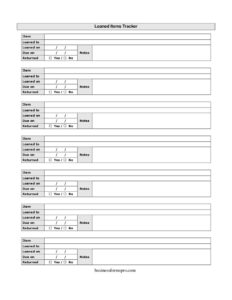
Loaned Items Tracker
Track who borrowed your equipment, tools, and supplies with this free Loaned Items Tracker template available as a free download in PDF and DOCX.
PDF
DOCX
1 downloads
0
likes
Download Files
- DOCX
A Loaned Items Tracker is a simple log used to record items you lend out, who borrowed them, and whether they have been returned. People most often use it to keep tabs on equipment, tools, books, or office gear that leaves their possession temporarily and needs to come back. It is free to download in both PDF and DOCX formats, with no signup required.
What Is a Loaned Items Tracker?
A Loaned Items Tracker is a record-keeping document that captures every item handed out on loan along with the borrower’s name, the date it left, when it is due back, and whether it has been returned. It is used by office managers, IT departments, libraries, teachers, tool cribs, event coordinators, and households alike. Rather than relying on memory or scattered sticky notes, the tracker creates a single, dated reference you can scan at a glance. It documents accountability, helps you follow up on overdue items, and gives you a clear history of where your belongings have gone and who currently holds them.
When Do You Need a Loaned Items Tracker?
Almost any situation where possessions leave your control temporarily benefits from a written log. Common scenarios include:
- Office and IT equipment: Tracking laptops, monitors, projectors, phones, or chargers issued to employees and contractors.
- Tool and equipment loans: Managing power tools, ladders, or testing gear checked out from a shop, warehouse, or maintenance crib.
- Classroom and library use: Lending textbooks, tablets, calculators, or instruments to students who must return them by a set date.
- Events and productions: Distributing cameras, radios, props, or supplies to volunteers and staff during a shoot or event.
- Personal lending: Keeping a record when you loan books, games, kitchen gear, or yard tools to friends, neighbors, and family.
- Audits and inventory checks: Reconciling what is out on loan versus what is physically in stock during a periodic count.
What a Loaned Items Tracker Should Have
A useful tracker stays simple while capturing the essentials needed to follow up and reconcile. At minimum it should identify the item clearly enough that anyone can recognize it, name the person responsible for it, and record both the loan date and a return-by date. A returned status column lets you see open versus closed loans instantly, and a notes field absorbs the real-world details that make each loan unique. Together these columns answer the four questions that matter most: what went out, who has it, when should it come back, and has it been returned yet.
How to Fill Out a Loaned Items Tracker
- Item: Write a clear description of what is being loaned. Include a model, serial number, asset tag, or distinguishing detail when several items look alike, such as “Dell laptop #A-204” rather than just “laptop.”
- Loaned to: Enter the full name of the borrower, and add a department, room number, or phone contact if you may need to reach them later.
- Loaned on: Record the date the item left your possession. Use a consistent date format throughout the log to avoid confusion.
- Due on: Enter the date you expect the item back. Even an estimate helps you prioritize follow-ups.
- Returned (Yes/No): Mark No when the item goes out, then change it to Yes the moment it comes back. Add the return date in the notes if you need a paper trail.
- Notes: Capture anything relevant — condition at loan and return, accessories included, extensions granted, or a reminder that the borrower signed for it.
Tips for Keeping Your Tracker Accurate
A tracker is only as reliable as the discipline behind it. Update the log at the moment of the transaction rather than later, when details blur. Keep one master copy so two people never maintain competing versions. If you lend frequently, scan the Returned column regularly and follow up on anything past its due date before the item is forgotten. For valuable equipment, note the condition in the notes field when the item goes out and again when it returns, so you can spot damage and have a record to reference. Consider asking the borrower to initial the row for high-value loans — it reinforces accountability without requiring a separate form.
Digital vs. Paper Tracking
The DOCX version of this Loaned Items Tracker works well if you want to type entries, sort by due date, or share the file across a team. The PDF version is ideal for printing and keeping at a checkout desk, tool window, or front office where people sign items out in person. Many teams use both: a printed sheet at the point of loan and a digital copy that someone updates from those entries. Whichever you choose, store the log somewhere consistent so it is easy to find when you need to chase a missing item or reconcile inventory.
Common Mistakes to Avoid
- Vague item descriptions: Writing “cable” or “book” makes it impossible to tell which one is outstanding when you have several.
- Forgetting a due date: Without a target return date you have nothing to measure overdue items against.
- Not updating the Returned status: A log full of “No” entries that were actually returned quickly becomes useless.
- Skipping the borrower’s contact: A name alone may not be enough to follow up weeks later, especially in larger organizations.
- Leaving notes blank for damaged items: Without a condition note, disputes over wear or breakage become your word against theirs.
- Keeping multiple uncoordinated copies: Competing versions of the same log lead to double-counting and missed returns.
Frequently Asked Questions
What is a Loaned Items Tracker used for? It is used to record items you lend out so you can see who has them and whether they have been returned. Businesses use it for equipment and tools, while schools, libraries, and individuals use it for books, devices, and personal belongings. The goal is a single dependable record instead of guesswork.
How do I fill out the Loaned Items Tracker? Enter the item, the borrower’s name, the loan date, and the due date on each row as the item goes out. Mark the Returned column as No initially, then change it to Yes when the item comes back. Use the notes field for condition, extensions, or any other detail worth remembering.
Is this Loaned Items Tracker free to download? Yes. You can download it free in both PDF and DOCX formats, with no signup or account required. Use the PDF for printing at a checkout point and the DOCX if you prefer to type and sort entries digitally.
Does a Loaned Items Tracker need to be signed? Signatures are optional and depend on how formal your process is. For everyday loans a name and date are usually enough, but for high-value equipment you may want the borrower to initial or sign their row as proof they accepted responsibility.
How is this different from a loan agreement? A Loaned Items Tracker is a running log that summarizes many loans at a glance, while a loan agreement is a detailed contract covering one specific arrangement. The tracker is for visibility and follow-up; an agreement is for legal terms, liability, and conditions of use.
Can I use it for both business and personal items? Absolutely. The same simple columns work whether you are issuing company laptops, lending classroom tablets, or keeping track of tools you loaned to a neighbor. Just adapt the item descriptions and notes to fit what you are lending.
This template is provided as a general example for informational purposes only and does not constitute legal, financial, or professional advice. Record-keeping needs and any related obligations vary by organization and jurisdiction; consult a qualified professional for guidance specific to your situation.
Related Forms
- Used Truck Inventory Card
- Inventory Tracking Spreadsheet
- Submission Tracker Sent
- Hazardous Chemical Inventory
- Beauty Salon Manicure And Pedicure Inventory Card
- Large-Print Packing List
Browse more in Log and Inventory.