
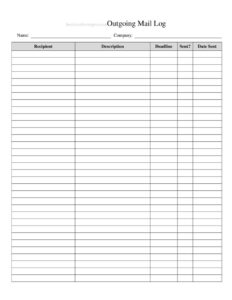
Outgoing Mail Log
Track every letter and parcel sent with our free Outgoing Mail Log template, available as a free download in PDF and DOCX for easy office records.
PDF
DOCX
5 downloads
0
likes
Download Files
- DOCX
An Outgoing Mail Log is a simple tracking sheet used to record every letter, package, and document that leaves your office or mailroom. People most often use it to keep a clear, dated trail of what was sent, to whom, and by what method—reducing disputes over missing or delayed mail. You can download it free in PDF and DOCX, with no signup required.
What Is an Outgoing Mail Log?
An Outgoing Mail Log is a record-keeping form, typically kept in a mailroom, reception area, or front office, that documents all mail and parcels dispatched from an organization. It is usually maintained by a receptionist, administrative assistant, or mailroom clerk who notes details each time an item is sent. The log captures essentials such as the date, recipient, sender or department, mailing method, and tracking information. Its purpose is to create an accountable paper trail so anyone can quickly confirm whether a specific item was sent, when it left, and how it was handled. Over time, the log also reveals mailing patterns, supports postage budgeting, and provides evidence if a recipient claims something never arrived.
When Do You Need an Outgoing Mail Log?
Almost any office that sends physical mail regularly benefits from a log. Common scenarios include:
- Busy mailrooms handling dozens of letters and packages each day across multiple departments.
- Legal, medical, or financial offices that must prove time-sensitive documents were mailed by a deadline.
- Small businesses shipping invoices, contracts, or customer orders and needing a reference for follow-up questions.
- Schools and nonprofits sending out enrollment letters, donation receipts, or official notices.
- Tracking certified or registered mail, where recording the tracking number is critical for confirming delivery.
- Audits and recordkeeping reviews, where management wants a verifiable history of outgoing correspondence.
What an Outgoing Mail Log Should Have
A complete log balances thoroughness with ease of use. The most important elements include the date each item is sent, the recipient’s name and address (or at least a city/company reference), the sender or originating department, the type of item being mailed, and the mailing method or carrier. Where relevant, it should also capture a tracking or reference number, the postage cost, and the initials of the person who processed the item. Many logs add a notes column for special instructions—such as “return receipt requested” or “hand-delivered to courier.” Keeping consistent columns across every entry is what makes the log searchable and dependable.
How to Fill Out an Outgoing Mail Log
- Enter the date. Record the calendar date the item physically leaves the office, not the date it was prepared.
- Identify the recipient. Write the addressee’s name and, ideally, the company or destination so the entry is unambiguous later.
- Note the sender or department. Indicate who is sending the item, which is helpful when several teams share one mailroom.
- Describe the item. Specify what was sent—letter, invoice, contract, package—and any quantity if multiple items go to one recipient.
- Record the mailing method. List the carrier and service level, such as first-class, priority, certified, or courier.
- Add the tracking number. For tracked or certified items, copy the tracking or reference number exactly.
- Log postage or cost if your office monitors mailing expenses.
- Initial the entry. Have the person who processed the mail add their initials for accountability, and use the notes column for any special handling.
Tips for Keeping an Accurate Mail Log
The value of an Outgoing Mail Log depends entirely on how consistently it is filled in. Designate a single point of entry—one person or a clearly labeled clipboard or binder at the dispatch point—so items don’t slip through unrecorded. Fill in each row at the moment the mail is handed off, rather than reconstructing the day from memory. Write tracking numbers carefully and double-check them against the carrier receipt, since a single transposed digit makes the number useless for lookups. If you use the DOCX version on a computer, consider sorting by date or recipient so you can find entries instantly. Archive completed log sheets by month or quarter rather than discarding them; a few minutes of filing can save hours when a delivery dispute arises.
Paper vs. Digital Logs
The PDF version of this template is ideal for a printed binder at the mailroom counter, where staff can jot entries by hand throughout the day. The DOCX version suits offices that prefer to type entries, copy tracking numbers directly from carrier websites, and store records electronically. Many organizations use both: a printed sheet captures entries in real time, and the data is later transferred into a digital file for backup and easy searching. Whichever you choose, keep the column order identical so historical records stay consistent and comparable from one period to the next.
Common Mistakes to Avoid
- Skipping entries on busy days—the one piece you forget to log is usually the one that goes missing.
- Recording tracking numbers inaccurately, which defeats the purpose of certified or tracked mail.
- Leaving the recipient field vague, so you cannot tell two similar entries apart weeks later.
- Forgetting to note the mailing method, making it impossible to know whether an item was tracked.
- Failing to initial entries, which removes accountability when questions arise.
- Throwing away old logs too soon instead of archiving them for future reference.
Frequently Asked Questions
What is an Outgoing Mail Log used for? It is used to document every letter and package an organization sends, creating a dated, searchable record of the recipient, method, and tracking details. This helps confirm that items were mailed, resolve disputes about non-delivery, and monitor postage activity over time.
How do I fill out an Outgoing Mail Log? Add one row each time an item is dispatched, recording the date, recipient, sender or department, item description, mailing method, and any tracking number. Have the person processing the mail initial the entry so there is clear accountability for who handled it.
Is an Outgoing Mail Log a legal document? It is primarily an internal recordkeeping tool rather than a formal legal instrument. That said, a carefully maintained log can serve as supporting evidence that an item was sent on a particular date, which can be useful in deadline or delivery disputes.
Does an Outgoing Mail Log need to be signed or notarized? No notarization is required. The most useful practice is simply to have staff initial each entry as they log it, which adds accountability without any formal signing or witnessing process.
How much does this template cost? Nothing—it is completely free to download from Business Forms Pro in both PDF and DOCX formats, with no signup or account required. You can print it for a mailroom binder or type entries directly into the editable file.
How long should I keep completed mail logs? Retention depends on your organization’s policies and any industry recordkeeping rules that apply to you. Many offices keep logs for at least a year, while those handling sensitive or regulated correspondence retain them longer; check your internal guidelines to decide.
This template is provided as a general example for informational purposes only and does not constitute legal, financial, or professional advice. Recordkeeping and document-retention requirements vary by jurisdiction and industry, so consult a qualified professional to ensure your practices meet applicable rules.
Related Forms
- Warranty Log
- Employee Covid Attestation Log
- List of Insurance Policies
- Salad Bar Items Inventory Spreadsheet
- Janitorial Checklist
- Beauty Salon Manicure And Pedicure Inventory Card
Browse more in Log and Inventory.