
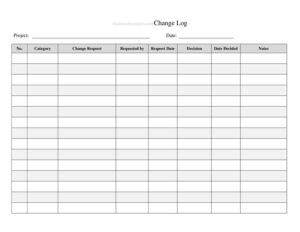
Change Log
Track every modification with a free Change Log template that records dates, descriptions, and approvals — free download in PDF and DOCX, no signup.
PDF
DOCX
2 downloads
0
likes
Download Files
- DOCX
A Change Log is a structured record that documents every modification made to a document, project, system, or product over time. People most often use one to maintain a clear history of what changed, when, why, and who authorized it — so nothing slips through the cracks. You can download this Change Log free in both PDF and DOCX formats, with no signup required.
What Is a Change Log?
A Change Log is a running record used to capture and organize each change applied to a controlled item — such as a contract, software application, engineering drawing, policy manual, or project plan. It is typically maintained by a project manager, document controller, developer, or team lead, and reviewed by anyone who needs to understand the evolution of the item. Rather than relying on memory or scattered emails, the log centralizes the details of every revision: the date, a description, the person responsible, and the approval status. This creates accountability, supports audits, and makes it easy to trace a problem back to the change that caused it. A well-kept Change Log turns a chaotic series of edits into a transparent, searchable timeline.
When Do You Need a Change Log?
A Change Log becomes valuable any time multiple revisions occur and you need to track them deliberately. Common scenarios include:
- Software and IT projects: recording bug fixes, feature updates, and configuration changes between releases so users and developers know what’s new.
- Document control: tracking edits to policies, procedures, contracts, or manuals where version history must be auditable.
- Engineering and manufacturing: logging design revisions, part substitutions, or specification updates that affect production.
- Project management: documenting scope changes, schedule adjustments, and budget revisions throughout a project’s lifecycle.
- Regulatory or quality compliance: demonstrating to auditors that changes were reviewed and approved according to a defined process.
- Website and content updates: keeping a history of published edits so teams can revert or explain modifications later.
Types of Change Logs
Although the core purpose is the same, Change Logs are often tailored to their context. A software change log (sometimes called a changelog) focuses on version numbers and release notes. A document change log emphasizes revision letters, page references, and approval signatures. A project change log, sometimes paired with a change request register, tracks the impact of each change on scope, cost, and timeline. This template is intentionally general, so you can adapt the columns to whichever workflow you manage.
What a Change Log Should Have
A complete Change Log entry should make each change self-explanatory months or years later. The essential elements include a unique entry or change number, the date the change was made or logged, a clear description of what changed, the reason or reference behind it, the person who made or requested the change, the version or revision identifier, the approval or review status, and the name of the approver. Including a notes or comments column gives room for context, such as related tickets or affected sections. Consistency across entries is what makes the log truly useful.
How to Fill Out a Change Log
Follow these steps to record a change clearly and consistently:
- Assign a change number: give each entry a sequential ID so it can be referenced unambiguously in discussions and audits.
- Enter the date: record the date the change took effect or was logged, using a consistent format such as YYYY-MM-DD.
- Identify the item and version: note the document, system, or component affected, along with its version or revision number before and after the change.
- Describe the change: write a concise but specific description — what was added, removed, fixed, or modified.
- State the reason: explain why the change was made, citing a request number, defect, or business need where applicable.
- Name the author: record who made or requested the change for accountability.
- Capture approval: note the approval status (approved, pending, rejected) and the name of the person who authorized it.
- Add notes: include any extra context, links, or follow-up actions, then save the updated log.
Tips for Keeping a Reliable Change Log
The value of a Change Log depends entirely on discipline. Update it as soon as a change happens rather than batching entries later, when details are easy to forget. Use plain, specific language in the description column so a reader who wasn’t involved can still understand what occurred. Keep version numbering consistent — decide early whether you use whole numbers, decimals, or revision letters, and stick to it. Store the log where the whole team can access it, and protect it from accidental edits by restricting who can delete rows. Finally, review the log periodically to confirm that pending approvals have been resolved.
Change Log vs. Version History
People sometimes confuse a Change Log with an automatically generated version history. A version history (such as the one built into word processors or code repositories) records technical snapshots, but it rarely explains why a change was made or who approved it. A Change Log is a deliberate, human-readable summary that adds context, reasoning, and accountability. The two complement each other: the version history shows the raw evidence, while the Change Log tells the story. For audits and stakeholder communication, the narrative clarity of a Change Log is usually what people actually need.
Common Mistakes to Avoid
- Vague descriptions: entries like “updated file” provide no value — always say what specifically changed.
- Skipping entries: logging only some changes destroys the log’s reliability and creates gaps in the audit trail.
- Inconsistent dates or versions: mixing formats makes the timeline confusing and hard to sort.
- Omitting approvals: leaving the approver field blank undermines accountability and compliance.
- Editing past entries: a Change Log should be append-only; correct mistakes with a new entry rather than overwriting history.
- Storing it where no one can find it: a log that isn’t shared or backed up defeats its purpose.
Frequently Asked Questions
What is a Change Log used for? A Change Log is used to document every modification made to a document, system, or project, including the date, description, author, and approval. It creates a transparent history that supports audits, troubleshooting, and team communication. It is especially useful when multiple people contribute to the same item over time.
How do I fill out a Change Log? Add a new row for each change, then record a sequential change number, the date, the affected item and version, a clear description, the reason, the author, and the approval status. Save the updated log promptly so details stay accurate. Keep formatting consistent across every entry.
What is the difference between a Change Log and a changelog for software? They are essentially the same concept; “changelog” is the common one-word term in software development for release notes. A general Change Log can track any kind of change, while a software changelog focuses on version numbers, features, and bug fixes. Both aim to communicate what changed and when.
Does a Change Log need to be approved or signed? It depends on your organization’s process. In regulated or quality-controlled environments, each entry often requires a named approver or sign-off, which is why this template includes an approval field. For informal projects, recording the author may be enough.
How much does this Change Log template cost? It is completely free to download from Business Forms Pro in both PDF and DOCX formats. There is no signup, subscription, or payment required. You can edit the DOCX version to match your own columns and workflow.
Can I customize the Change Log template? Yes. The DOCX version is fully editable, so you can add or remove columns such as version numbers, ticket references, or impact ratings. Adapt it to fit software releases, document control, or project management as needed.
This Change Log template is provided as a general example for informational purposes only and does not constitute legal, financial, or compliance advice. Recordkeeping and audit requirements vary by industry and jurisdiction; consult a qualified professional to ensure your change-control process meets the standards that apply to you.
Related Forms
- Stock Requisition Form
- Book Inventory
- Elder Care Daily Log
- Yearly Project Timetable
- Home Inventory List of Possessions
- Project Timeline
Browse more in Log and Inventory.