
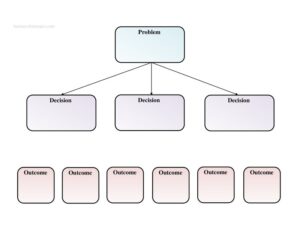
Decision Tree
Map out choices and outcomes with our free Decision Tree template, available as a free download in PDF and DOCX to clarify any decision.
PDF
DOCX
1 downloads
0
likes
Download Files
- DOCX
A decision tree is a simple visual tool that breaks a problem into branching choices and their possible outcomes, helping you weigh options side by side before committing. People most often reach for one when a decision feels tangled and they want to see every path laid out clearly. This decision tree template is free to download in both PDF and DOCX formats, with no signup required.
What Is a Decision Tree?
A decision tree is a diagram that starts with a single problem or question and branches outward into the decisions you could make and the outcomes each one leads to. It is used by individuals, teams, project managers, analysts, and educators to turn an abstract choice into a structured map. Rather than holding competing factors in your head, you commit them to paper so you can compare them objectively. Each branch represents a possible course of action, and each endpoint represents where that action realistically leads. The result is a clear, shareable picture of how a decision unfolds — useful for personal planning, business strategy, troubleshooting, or teaching others how to reason through trade-offs systematically and transparently.
When Do You Need a Decision Tree?
A decision tree shines whenever a choice has multiple branches and consequences worth comparing. Common scenarios include:
- Business strategy: evaluating whether to launch a product, enter a market, or hold off, and mapping the likely outcome of each.
- Project planning: deciding between vendors, tools, or approaches when each comes with different costs and risks.
- Hiring and HR decisions: comparing candidates or organizational changes against likely results.
- Troubleshooting and support: guiding staff or customers step by step from a problem to the correct resolution.
- Personal choices: working through a career move, a major purchase, or a relocation by laying out options and outcomes.
- Teaching and training: showing students or new employees how a structured reasoning process produces consistent results.
Types of Decision Trees
Although the underlying logic is the same, decision trees take a few common forms. A strategic decision tree compares high-level business options and their projected outcomes. A diagnostic or troubleshooting tree walks a user from a reported problem through yes/no questions to a fix. A classification tree sorts items into categories based on their attributes, while a personal decision tree helps an individual reason through a life choice. This template keeps things deliberately flexible with three core columns — Problem, Decision, and Outcome — so you can adapt it to any of these styles without reformatting.
What a Decision Tree Should Have
A complete and useful decision tree captures three essential elements. First, a clearly stated problem or root question that everything else branches from — vague problems produce vague trees. Second, the decisions or options available at each branch point, written as distinct, mutually exclusive choices. Third, the outcome attached to each decision, describing what realistically happens if you choose that path. The strongest trees also note any assumptions, the date they were created, and who built them, so reviewers understand the context. Keeping each branch honest — including the unfavorable outcomes — is what makes a decision tree genuinely decision-useful rather than a way to justify a choice you already made.
How to Fill Out a Decision Tree
- Define the Problem: In the Problem field, write the single question or challenge you are facing in plain language, such as “Should we hire a contractor or build in-house?” Keep it specific and answerable.
- List the Decisions: In the Decision field, record each option you could realistically take in response to the problem. Give every branch its own row so options stay separated and comparable rather than blurred together.
- Map the Outcome: For every decision, fill in the Outcome field with the likely consequence of choosing that path — the cost, benefit, risk, or result. Be honest about downsides as well as upsides.
- Add sub-branches if needed: If an outcome leads to a further choice, treat it as a new problem and repeat the Problem–Decision–Outcome cycle beneath it.
- Review and compare: Read across the completed branches, weigh the outcomes against your goals, and mark the path that best fits your priorities and constraints.
Tips for Building a Stronger Tree
Start broad and refine. Begin with two or three main branches and only add detail where a decision genuinely splits into further choices — an overgrown tree becomes as hard to read as no tree at all. Where possible, attach a rough measure to each outcome, such as estimated cost, time, or likelihood, so comparisons are grounded rather than purely intuitive. If you are working with a team, build the tree collaboratively so different perspectives surface outcomes one person might miss. Finally, date your tree and keep it; revisiting it after the decision plays out is one of the best ways to sharpen your judgment for next time.
Decision Tree vs. Pros-and-Cons List
A pros-and-cons list weighs the merits of a single option, while a decision tree compares multiple options and follows each to its consequences — and, where relevant, to the next decision down the line. Use a pros-and-cons list when you are deciding whether to do one specific thing. Reach for a decision tree when you have several competing paths, when choices cascade into further choices, or when you need to explain your reasoning to others. The branching structure makes the logic visible, which is why decision trees are common in both quick personal planning and formal analysis.
Common Mistakes to Avoid
- Stating the problem too broadly, which produces branches that overlap and outcomes that are impossible to compare.
- Listing options that aren’t truly distinct, so two decisions lead to essentially the same outcome and add clutter.
- Ignoring unfavorable outcomes and only mapping the paths that support a preferred choice.
- Overcomplicating the tree with too many branches until it becomes unreadable and unusable.
- Skipping the outcomes entirely and listing only decisions, which removes the whole point of the exercise.
- Treating the finished tree as final rather than revisiting it when new information arrives.
Frequently Asked Questions
What is a decision tree used for? A decision tree is used to map a problem into its possible decisions and the outcomes each one produces, so you can compare options clearly. It is helpful for business strategy, project choices, troubleshooting, teaching, and personal planning. The visual structure makes complex trade-offs easier to understand and explain.
How do I fill out this decision tree template? Start by writing your core question in the Problem field, then list each available option in the Decision field. For every decision, describe the likely result in the Outcome field. If an outcome leads to a further choice, repeat the cycle to create a new branch.
Is this decision tree template free? Yes. You can download it free from Business Forms Pro in both PDF and DOCX formats, with no signup or payment required. The DOCX version is fully editable so you can rename columns and add as many branches as your decision needs.
Do I need special software to use it? No. The PDF can be printed and filled in by hand, and the DOCX opens in common word processors so you can type directly into the Problem, Decision, and Outcome fields. Many people start with this simple table before moving to dedicated diagramming software for larger trees.
How detailed should a decision tree be? Detailed enough to compare your real options, but no more. Begin with the main branches and only add sub-branches where a decision genuinely splits into further choices. An overly complex tree is harder to read and use than a focused one.
Can a decision tree guarantee the right choice? No tool can guarantee outcomes, since real-world results depend on factors outside your control. A decision tree improves your reasoning by making options and consequences explicit, reducing blind spots and helping you choose with clearer eyes. Treat it as a thinking aid, not a crystal ball.
This decision tree template is a general example provided for informational purposes only and does not constitute legal, financial, or professional advice. Outcomes and best practices vary by situation and industry — consult a qualified professional before making significant decisions.
Related Forms
- Membership Cancellation Form
- Nomination Card
- Basic Entry Form
- Babysitting Instructions
- Accident Claim Worksheet
- Raffle Ticket
Browse more in Miscellaneous.