
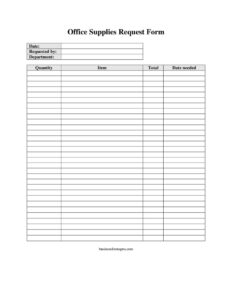
Office Supplies Request Form
Download a free Office Supplies Request Form template in PDF and DOCX to track, approve, and order workplace supplies quickly — free download, no signup.
PDF
DOCX
17 downloads
0
likes
Download Files
- DOCX
An Office Supplies Request Form is a simple document employees use to ask for the supplies they need to do their jobs, recording what is needed, how much, and when. It is most commonly used to route supply requests to a manager or office administrator for approval before purchasing. You can download this Office Supplies Request Form free in both PDF and DOCX formats, with no signup required.
What Is an Office Supplies Request Form?
An Office Supplies Request Form is an internal document that captures and standardizes requests for workplace materials such as paper, pens, printer cartridges, folders, and other consumables. It is typically filled out by an employee, then reviewed by a supervisor, department head, or procurement contact who approves the order and places it with a vendor. The form documents who asked for what, on behalf of which department, in what quantity, and by when. Rather than relying on emails or verbal requests that are easily lost, the form creates a paper trail that keeps spending organized, supports budgeting, and helps the person managing supplies avoid running out of essential items at the wrong moment.
When Do You Need an Office Supplies Request Form?
This form is useful any time supply purchasing needs to be tracked or approved rather than handled ad hoc. Common situations include:
- Restocking routine consumables — when the copy room runs low on paper, toner, or sticky notes and someone needs to reorder.
- Onboarding a new hire — requesting a starter set of supplies like a notebook, pens, a desk organizer, and a stapler for a new employee’s workstation.
- Department-level budgeting — when each team’s supply spending must be tracked separately for accounting or cost-center reporting.
- Special projects or events — ordering extra materials such as binders, name badges, or markers for a presentation, training session, or company event.
- Replacing worn or broken items — requesting a new keyboard, mouse, or whiteboard markers to replace equipment that no longer works.
- Centralized purchasing approval — in organizations where a single administrator or procurement team must sign off before any order is placed.
What an Office Supplies Request Form Should Have
A complete supply request form gives the approver everything they need to act without follow-up questions. The essentials include the request date, the name of the person requesting, the department or cost center, a clear description of each item, the quantity needed, a running or line total, and the date the supplies are needed by. Many organizations also add an approval signature line and a space for the supplier or unit price. The clearer and more itemized the form, the faster it can be approved and the easier it is to reconcile against invoices later. Leaving room for multiple line items lets one form cover several products at once instead of forcing separate requests.
How to Fill Out an Office Supplies Request Form
- Date: Enter the date you are submitting the request. This timestamps the request and helps the approver prioritize based on urgency.
- Requested by: Write your full name so the approver knows who to contact with questions and who to notify when the order arrives.
- Department: Identify your team, division, or cost center. This is essential when supply costs are charged back to specific budgets.
- Item: List each product clearly and specifically — for example, “Letter-size white copy paper, 20 lb” rather than just “paper.” Add brand, size, or model numbers when they matter.
- Quantity: State how many of each item you need, using consistent units such as boxes, reams, packs, or each.
- Total: Enter the line total or overall cost if you know the pricing; otherwise leave it for the purchasing contact to complete.
- Date needed: Indicate when the supplies must be on hand so the order can be timed and shipping options chosen accordingly.
Tips for Faster Approval and Better Tracking
A few habits make supply requests smoother for everyone. Group related items onto a single form instead of submitting a separate request for each pen and notepad — this saves the approver time and keeps records tidy. Be specific in the item description so the purchaser orders exactly what you mean; vague entries lead to wrong products and returns. Give realistic lead time in the date needed field, since rush orders often cost more or may not be possible. If your organization tracks budgets, double-check that the department field matches the correct cost center. Finally, keep a copy of each submitted form so you can confirm what was ordered when the shipment arrives and flag any discrepancies quickly.
How It Fits Into the Purchasing Process
The request form is usually the first step in a larger purchasing workflow. Once an employee submits it, an approver reviews the items and quantities against the budget and either approves, adjusts, or denies the request. Approved requests are then turned into a purchase order or placed directly with a vendor. When the goods arrive, the original form serves as a reference to verify the delivery is complete and correct. Storing completed forms — digitally or in a binder — gives finance and office managers a running history of supply spending that supports budgeting, identifies recurring needs, and helps negotiate better pricing with frequent vendors over time.
Common Mistakes to Avoid
- Vague item descriptions — writing “folders” instead of specifying size, color, or type, which leads to the wrong product being ordered.
- Forgetting the date needed — without a deadline, the request may sit unprocessed and arrive too late.
- Omitting the department — making it impossible to charge the cost to the right budget or cost center.
- Combining personal and work items — requesting items that are not legitimate office supplies, which slows approval.
- Skipping approval — placing an order before the form is signed off in organizations that require authorization.
- Not keeping a copy — leaving you unable to verify the delivery against what you actually requested.
Frequently Asked Questions
What is an Office Supplies Request Form used for? It is used to formally request workplace supplies and route that request to a manager or administrator for approval before purchasing. The form records who asked, what they need, the quantity, and the deadline, creating a clear record for ordering and budgeting.
How do I fill out an Office Supplies Request Form? Enter the date, your name under “requested by,” and your department, then list each item with its quantity and total cost if known. Finish by noting the date you need the supplies so the order can be timed appropriately, and submit it to your approver.
Does an Office Supplies Request Form need to be signed or notarized? Notarization is never required because this is an internal business document, not a legal instrument. Many organizations do require an approval signature from a manager or purchasing contact, but signature rules depend entirely on your company’s own procedures.
Is this Office Supplies Request Form free to download? Yes. You can download it free in both PDF and DOCX formats with no signup required. The DOCX version is editable, so you can add your company logo, extra line items, or an approval section to match your workflow.
Can one form cover multiple items? Yes, and it is usually better to do so. List each product on its own line with its quantity and total, then combine them on a single form rather than submitting separate requests, which saves the approver time and keeps your records consolidated.
Who should approve the request? That depends on your organization, but it is typically a supervisor, department head, office manager, or procurement contact who controls the relevant budget. Check your company’s purchasing policy to confirm who has authority to approve supply orders before submitting.
This Office Supplies Request Form template is provided as a general example for informational purposes only and does not constitute legal, financial, or procurement advice. Internal purchasing policies and approval requirements vary by organization — consult your company’s procedures or a qualified professional to ensure the form meets your needs.
Official resource: for the rules that apply to your situation, see the U.S. Small Business Administration.
Related Forms
- 2025 Postal Holidays
- Equipment Damage Report Form
- Venue Reservation Request
- Room Reservation Form
- Annual Appointment Reminder Card
- Red Appointment Reminder Card
Browse more in Office.