
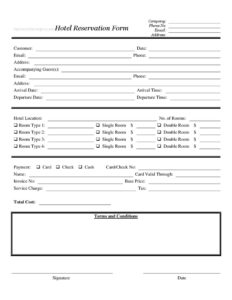
Hotel Reservation Form
Download a free Hotel Reservation Form template in PDF and DOCX to capture guest details, room types, dates, and payment for confirmed bookings.
PDF
DOCX
6 downloads
0
likes
Download Files
- DOCX
A Hotel Reservation Form is a document hotels and booking agents use to capture a guest’s details, stay dates, room preferences, and payment information so a room can be confirmed and held. It is most commonly used to lock in a booking and record everything needed to prepare for arrival and billing. You can download this Hotel Reservation Form free in PDF and DOCX, with no signup required.
What Is a Hotel Reservation Form?
A Hotel Reservation Form is a structured request-and-confirmation document that records who is staying, when they arrive and depart, what type of room they need, and how they intend to pay. It is typically issued by a hotel’s front desk or reservations team, or completed by a company travel coordinator on behalf of an employee or client. The form documents the guest’s contact details, the hotel location, the number and type of rooms, and a cost breakdown including base price, service charge, and tax. Once signed, it serves as a written record of the agreement between the guest and the property, reducing disputes over what was booked and at what rate.
When Do You Need a Hotel Reservation Form?
- Corporate travel bookings — when a company arranges accommodation for an employee attending a conference or client meeting and needs a paper trail for expense reporting.
- Group reservations — when a single party books multiple rooms for a wedding block, sports team, or family gathering and wants the details on one form.
- Advance deposits — when a hotel needs card or check details on file to guarantee a room ahead of a peak-season stay.
- Front-desk walk-ins — when a guest arrives without an online booking and the hotel records their stay manually.
- Long stays or extended bookings — when arrival and departure times, room types, and totals must be itemized clearly for an invoice.
- Event venue packages — when accommodation is bundled with a meeting or banquet and the reservation needs to be tracked separately.
What a Hotel Reservation Form Should Have
A complete Hotel Reservation Form should clearly identify the company or individual making the booking and the customer staying, along with full contact details. It must capture the hotel location, arrival and departure dates and times, and the number of rooms with their types specified. A valid form also includes a payment method, a cost breakdown (base price, service charge, tax, and total), an invoice number for accounting, the terms and conditions governing cancellations and changes, and a signature with date to confirm acceptance. Including all of these elements turns a simple request into a confirmable, billable record.
How to Fill Out a Hotel Reservation Form
- Enter the Company name, plus its Phone No., Email, and Address if the booking is made by an organization.
- Fill in the Customer name and the booking Date, then add the guest’s Email, Phone, and Address.
- List any Accompanying Guest(s) with their own email, phone, and address where the form provides space.
- Record the Arrival Date and Arrival Time, then the Departure Date and Departure Time.
- Specify the Hotel Location and the total No. of Rooms required.
- For Room Type 1 through Room Type 4, indicate whether each is a Single Room or Double Room.
- Select the Payment method — Card, Check, or Cash — and enter the Card/Check No, the cardholder Name, and the Card Valid Through date.
- Add the Invoice No, then itemize the Base Price, Service Charge, Tax, and Total Cost.
- Review the Terms and Conditions, then provide a Signature and Date to confirm the reservation.
Understanding the Cost Breakdown
The payment section of this form is built to be transparent. The Base Price reflects the nightly room rate multiplied by the number of nights and rooms, before any extras. The Service Charge covers fees the hotel adds for amenities or staffing, and Tax reflects applicable lodging or occupancy taxes, which vary widely by city and country. The Total Cost is the sum the guest agrees to pay. Itemizing these lines separately makes the invoice easier for travelers to reconcile against company expense policies and helps the hotel demonstrate exactly how the final figure was calculated. When card details are recorded, confirm the Card Valid Through date covers the stay so the guarantee does not lapse before arrival.
Reservation vs. Confirmation vs. Invoice
It helps to know how this document fits alongside related paperwork. A reservation form captures the request and the guest’s commitment to a booking. A confirmation is the hotel’s acknowledgment that the room is held, often referencing the reservation details. The invoice — which this form anticipates with its Invoice No and cost fields — is the final billing record presented at or after checkout. Because this template combines request, terms, and a cost breakdown in one place, it can act as both a booking record and the basis for the eventual invoice, simplifying your paperwork.
Common Mistakes to Avoid
- Leaving arrival and departure times blank — this affects check-in availability and whether a late arrival is held.
- Mismatched room counts — the No. of Rooms should match the room types selected to avoid overbooking or shortfalls.
- Skipping the cost breakdown — omitting service charge or tax leads to disputes when the total differs from the expected room rate.
- Using an expired card — always check the Card Valid Through date covers the full stay.
- Forgetting the signature and date — without acceptance of the terms, the form is not a binding confirmation.
- Ignoring cancellation terms — guests should read the terms and conditions before signing to understand penalties.
Frequently Asked Questions
What is a Hotel Reservation Form used for? It is used to record and confirm a guest’s booking, including who is staying, the dates and times of the stay, the number and type of rooms, and how payment will be made. It serves as a written record that both the guest and hotel can reference if questions arise.
How do I fill out a Hotel Reservation Form? Start with the company and customer contact details, add accompanying guests, then enter arrival and departure dates and times, the hotel location, and the rooms required. Finish by selecting a payment method, completing the cost breakdown, reviewing the terms, and signing and dating the form.
Is a Hotel Reservation Form legally binding? Once signed, the form documents the guest’s agreement to the booking and its terms, including any cancellation policy. Whether it is enforceable depends on the terms stated and applicable local consumer and hospitality rules, so read the terms and conditions carefully before signing.
Does this form need to be notarized? No. A hotel reservation is a commercial booking and does not require notarization or witnesses. A signature from the guest or booking agent and a date are sufficient to confirm acceptance.
How much does this Hotel Reservation Form cost? The template is completely free to download here in both PDF and DOCX formats, with no signup required. You only pay the hotel for the actual room charges shown in the cost breakdown.
Can I edit the form to add my hotel’s logo or extra fields? Yes. Download the DOCX version to add branding, custom room categories, loyalty program fields, or specific cancellation language. The PDF version is ideal if you simply want a clean, ready-to-print form.
This Hotel Reservation Form template is a general example provided for informational purposes only and does not constitute legal, financial, or tax advice. Hospitality regulations, lodging taxes, and cancellation requirements vary by jurisdiction — consult a qualified professional to ensure your form meets local requirements.
Official resource: for the rules that apply to your situation, see the U.S. Small Business Administration.
Related Forms
- Employee Attendance Record
- Phone Memo
- Postal Holidays
- Wedding Reservation Form
- 2024 Postal Holidays
- Meeting Agenda Portrait
Browse more in Office.