
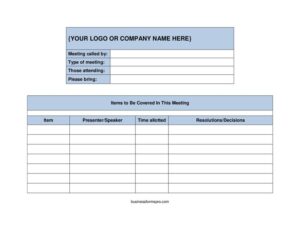
Meeting Agenda Landscape
Download a free Meeting Agenda Landscape template in PDF and DOCX to plan, time, and run organized, productive meetings with no signup required.
PDF
DOCX
4 downloads
0
likes
Download Files
- DOCX
A Meeting Agenda Landscape template is a wide-format planning document that lists what will be discussed in a meeting, who is presenting each item, and how much time each topic gets. People most often use it to keep meetings focused and on schedule by giving everyone a clear roadmap before they walk in the room. It’s free to download here in both PDF and DOCX formats, with no signup required.
What Is a Meeting Agenda Landscape?
A Meeting Agenda Landscape is a structured outline of a meeting’s purpose, topics, and timing, laid out in a horizontal (landscape) orientation that gives extra room for columns like presenter, time allotted, and resolutions. It is usually prepared by whoever called the meeting—a manager, project lead, committee chair, or administrative assistant—and shared with attendees in advance. The document records the type of meeting, who is attending, what materials to bring, and the agenda items themselves. Because it captures decisions and resolutions alongside each topic, it doubles as a lightweight record of what the group agreed to, bridging the gap between an agenda and formal minutes.
When Do You Need a Meeting Agenda Landscape?
This format is especially handy whenever you want more horizontal space for time columns and notes. Common situations include:
- Weekly team or staff meetings where recurring topics, owners, and time limits keep the session efficient.
- Project status reviews that assign each milestone a presenter and a fixed number of minutes.
- Board or committee meetings that need a clean place to log resolutions and decisions next to each item.
- Client or vendor calls where you list talking points and the materials each side should bring.
- Department planning or budget sessions with multiple speakers covering different areas in sequence.
- Cross-functional kickoffs where attendees from several teams need to know exactly who owns each portion of the discussion.
What a Meeting Agenda Should Have
A complete agenda gives readers enough context to prepare and participate. The essentials include a header for your logo or company name, the name of the person who called the meeting, the type of meeting, and the list of those attending. A strong agenda also tells people what to bring, then breaks the body into clearly numbered items. For each item, list a short title, the presenter or speaker, the time allotted, and space to capture resolutions or decisions. The landscape layout shines here because the wide columns keep all of that information readable on a single page without crowding.
How to Fill Out a Meeting Agenda Landscape
- Add your logo or company name at the top so the agenda looks official and is easy to identify.
- Enter the meeting called by field with the name (and title) of the organizer responsible for the session.
- Specify the type of meeting—for example, weekly standup, board meeting, project review, or budget planning.
- List those attending by name or role so participants know who will be present and can prepare accordingly.
- Use the please bring field to note required materials: reports, laptops, prior minutes, budget figures, or printed handouts.
- Under items to be covered in this meeting, summarize the overall scope or goals before listing specifics.
- For each row, fill the item column with a concise topic title, one line per agenda point.
- Assign a presenter/speaker to each item so ownership is clear and no topic is left unassigned.
- Set a realistic time allotted for every item; totaling these should match the meeting’s scheduled length.
- During or after the meeting, record outcomes in the resolutions/decisions column to capture action items and agreements.
Tips for Running a Tighter Meeting
An agenda only works if you use it actively. Send the completed document to attendees at least a day ahead so they can review topics and gather anything in the “please bring” list. Order items by priority, not by who asks loudest—put decisions that need full attention near the start when energy is high. Keep the time allotted column visible during the meeting and gently call out when a topic runs long; this trains the group to stay disciplined. Finally, fill in the resolutions and decisions column in real time. Capturing outcomes as they happen prevents the all-too-common situation where everyone leaves with a different memory of what was agreed.
Agenda vs. Minutes: Knowing the Difference
It’s worth understanding how this template relates to meeting minutes. The agenda is the plan you create before the meeting—the topics, owners, and timing. Minutes are the formal record produced during or after the meeting, documenting attendance, discussion, votes, and action items. Because this landscape template includes a resolutions/decisions column, it can serve as a hybrid for informal gatherings: you plan in advance, then annotate outcomes on the same sheet. For meetings with legal or governance significance, such as corporate board votes, you may still want separate, formally adopted minutes alongside the agenda.
Common Mistakes to Avoid
- Overloading the agenda with too many items so nothing gets meaningful discussion time.
- Leaving the presenter column blank, which creates awkward silences when no one knows who leads a topic.
- Skipping the time allotted values, letting early items consume the whole meeting.
- Forgetting the “please bring” field, so attendees show up without the reports or data needed to decide.
- Never recording resolutions, leaving the group with no clear record of what was decided or who owns follow-up.
- Distributing the agenda too late, giving participants no time to prepare and reducing the meeting’s value.
Frequently Asked Questions
What is a Meeting Agenda Landscape template? It is a horizontal-format document that outlines a meeting’s topics, presenters, time allocations, and decisions. The wide layout gives extra room for columns like time allotted and resolutions, making it ideal for meetings with several speakers or detailed agenda items.
How do I fill out a Meeting Agenda Landscape? Start with your company name, who called the meeting, the meeting type, attendees, and what to bring. Then list each agenda item with its presenter, time allotted, and space for resolutions. Send it to participants before the meeting and update the decisions column as outcomes are reached.
What’s the difference between landscape and portrait agenda formats? The landscape (horizontal) orientation provides more width, which suits agendas that use multiple columns for presenter, timing, and decisions. A portrait layout is taller and narrower, better for simple lists. Choose landscape when you need side-by-side detail on a single readable page.
Is a meeting agenda legally binding? An agenda itself is generally a planning and organizational tool, not a binding contract. However, the resolutions or decisions you record may carry weight in governance contexts, especially for boards or committees. For formal votes, follow your organization’s bylaws and keep official minutes.
How much time should I allot per agenda item? Base it on the topic’s complexity and the meeting’s total length, ensuring all items add up to your scheduled time. A common approach is to give brief updates a few minutes and reserve larger blocks for discussions or decisions. Build in a small buffer for overruns and questions.
How much does this template cost? It is completely free to download here in both PDF and DOCX formats, with no signup or payment required. You can customize the DOCX version with your own logo, recurring agenda items, and column headings, then reuse it for every meeting your team holds.
This Meeting Agenda Landscape template is provided as a general example for informational purposes only and does not constitute legal, financial, or professional advice. Organizational requirements and governance rules vary by company and jurisdiction, so consult your bylaws or a qualified professional when a meeting involves formal decisions or official records.
Official resource: for the rules that apply to your situation, see the U.S. Small Business Administration.
Related Forms
- Project Schedule
- Equipment Damage Report Form
- Meeting Minutes Form
- Blue Appointment Reminder Card
- Phone Memo
- Market Map
Browse more in Office.