
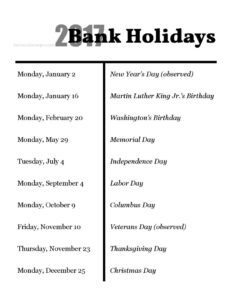
Bank Holidays
Use our free Bank Holidays template to plan, track, and communicate office closures all year — clean PDF and DOCX free download, no signup needed.
PDF
DOCX
0
likes
Download Files
- DOCX
A Bank Holidays template is a simple, ready-to-use calendar that lists the official public holidays for a given year so your team always knows when banks, offices, and many services are closed. The most common reason people download one is to plan staffing, payroll deadlines, and customer communications around days when business slows or stops. It’s completely free to download in both PDF and DOCX, with no signup required.
What Is a Bank Holidays Template?
A Bank Holidays template is a one-page reference document that records the recognized public holidays observed in a particular country or region during a calendar year. It is typically issued or maintained by an office manager, HR coordinator, or administrative team and posted somewhere visible so everyone works from the same dates. The document captures each holiday’s name and the date on which it falls, making it easy to see closures at a glance. Unlike a full leave policy, it does not assign individual time off — it simply documents the days when the business itself is expected to be closed or running on reduced operations, which then feeds into scheduling, payroll cut-offs, and client notices.
When Do You Need a Bank Holidays Template?
This deceptively simple document earns its place in almost any office, because so many operational decisions hinge on knowing the closure dates in advance. Common situations include:
- Annual planning: Mapping out the year so managers can schedule projects, deadlines, and team coverage around known closures.
- Payroll and finance: Adjusting pay run dates, invoice due dates, and bank transfers, since payments often won’t clear on a holiday.
- Customer communications: Posting closure notices on your website, email signatures, or voicemail greetings ahead of time.
- Staff rota and shift planning: Arranging skeleton crews, holiday pay, or alternative working days for teams that stay partly open.
- Onboarding new employees: Giving new hires a quick, clear overview of when the office is closed throughout the year.
- Coordinating with partners and suppliers: Anticipating delays in deliveries, support, or banking when third parties also observe the same holidays.
What a Bank Holidays Template Should Have
A useful bank holidays list is short but complete. At minimum it should clearly show the calendar year it covers — in this template, 2017 Bank Holidays — so there’s no confusion about which dates apply. Each entry should pair a holiday name with its exact date, ideally including the day of the week so readers can see whether it falls on a weekend or creates a long weekend. For maximum clarity, it helps to note any holidays that are “substitute” or “in lieu” days when the actual date lands on a Saturday or Sunday. Finally, adding the company name, a posting date, and a note about regional variations keeps the document accurate and traceable.
How to Fill Out a Bank Holidays Template
This template is built around a single core element — the year heading — with room to list each holiday beneath it. Follow these steps:
- Set the year: Update the heading (shown here as 2017 Bank Holidays) to the calendar year you are planning for, so the document is unmistakably current.
- List each holiday name: Enter the official public holidays in chronological order, from January through December.
- Add the date for each: Beside every holiday name, record the exact calendar date it falls on for that year.
- Include the weekday: Note the day of the week to highlight weekend overlaps and possible substitute days.
- Flag substitute days: Where a holiday is observed on a different day because the actual date falls on a weekend, label it clearly.
- Add context: Insert your company name, the region the list applies to, and the date you posted or last updated it.
- Distribute and post: Share the finished list with staff and pin it where it’s easy to reference.
Regional Variations and Why They Matter
Public holidays are not universal. The exact dates, names, and number of bank holidays differ from one country to the next — and even between regions within the same country, where some areas observe local holidays that others do not. A list prepared for one location may be inaccurate for a branch office elsewhere. Because the dates of moving holidays change every year, a list from a previous year should never be reused without checking each date again. Always confirm your holidays against an official government or central-bank source before publishing the document, and consider maintaining separate versions if your organization operates across multiple regions or jurisdictions.
Tips for Getting the Most From Your List
Treat the bank holidays list as a living reference rather than a file you create once and forget. Build it early — ideally before the new year begins — so teams can plan around long weekends in advance. Sync the dates into your shared digital calendar so reminders surface automatically, and link the document from your intranet or staff handbook. If your business stays partially open on certain holidays, annotate those entries clearly so no one assumes a total closure. Reviewing the list at the start of each quarter helps catch any rescheduled or newly announced dates.
Common Mistakes to Avoid
- Reusing last year’s dates: Many holidays shift each year, so copying an old list without checking introduces errors.
- Forgetting substitute days: Missing the “in lieu” day when a holiday lands on a weekend can throw off staffing and payroll.
- Ignoring regional differences: Assuming one list covers every office or branch leads to mismatched expectations.
- Leaving off the year: An undated list is easy to confuse with a previous version.
- Not distributing it widely: A perfect list helps no one if it stays buried in a folder.
- Skipping verification: Failing to cross-check against an official source risks publishing wrong dates.
Frequently Asked Questions
What is a Bank Holidays template used for? It is a simple reference that lists the public holidays for a given year so a business can plan closures, staffing, payroll, and customer communications. Posting it keeps everyone working from the same set of dates. It is purely informational and does not grant time off by itself.
How do I fill out the Bank Holidays template? Start by setting the correct year in the heading, then list each official holiday in chronological order with its exact date and the day of the week. Flag any substitute days and add your company name and posting date. Verify every date against an official source before sharing.
Are bank holidays the same everywhere? No. Holiday dates and names vary by country and sometimes by region within a country. Always confirm the holidays that apply to your specific location rather than assuming one list covers all offices.
Why does the template say 2017? The template was originally prepared for the 2017 calendar year as an example. Simply replace the year heading and update each date to match the year you are planning for.
Is this Bank Holidays template free? Yes. You can download it free in PDF and DOCX formats with no signup required, then edit it to suit your organization and region.
Does a bank holidays list need any signatures or approval? No signatures are legally required, but it is good practice to have an office manager or HR lead review and approve the dates before the list is published company-wide. This reduces the chance of an incorrect date causing scheduling problems.
This template is a general example provided for informational purposes only and does not constitute legal, financial, or HR advice. Public holiday dates and observances vary by country, region, and year — always verify against an official government or central-bank source and consult a qualified professional where appropriate.
Official resource: for the rules that apply to your situation, see the U.S. Small Business Administration.
Related Forms
- Green Appointment Reminder Card
- Wedding Reservation Form
- Red Appointment Reminder Card
- Meeting Minutes Form
- Meeting Agenda List
- Meeting Agenda Landscape
Browse more in Office.