
Dinner Menu
Download a free dinner menu template to organize courses, dishes, and prices for your restaurant or event—free PDF and DOCX download, no signup needed.
DOC
0
likes
Download Files
- DOC
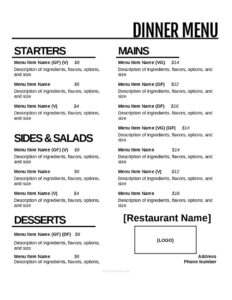
A dinner menu is a structured list of the food and drinks offered during the evening meal service, organized by course and paired with descriptions and prices. People most often use a dinner menu template to present their restaurant’s evening offerings clearly and attractively—or to plan a dinner party, banquet, or catered event. You can download this dinner menu template free in PDF and DOCX, with no signup required.
What Is a Dinner Menu?
A dinner menu is the document a restaurant, caterer, or host uses to show guests what is available to order or be served during the evening meal. It is typically issued by the restaurant owner, chef, or front-of-house manager and may also be created by event planners or private hosts. The menu documents dish names, brief descriptions, prices, and how items are grouped—appetizers, entrées, sides, desserts, and beverages. Beyond listing food, a well-built dinner menu communicates a venue’s style and price point, helps servers answer questions, and supports kitchen prep. A clear, well-organized menu reduces ordering confusion, speeds up service, and shapes the overall dining experience guests remember.
When Do You Need a Dinner Menu?
A dinner menu is useful any time food is served in the evening and guests need to know their choices. Common situations include:
- Opening or rebranding a restaurant and needing a polished printed menu for tables and the front door.
- Launching a seasonal or limited-time menu that highlights new dishes alongside established favorites.
- Hosting a private event or banquet, such as a wedding rehearsal dinner, where guests choose from a fixed set of options.
- Running a catering business and presenting clients with a clear list of dishes and per-plate pricing.
- Planning a dinner party at home and printing an elegant card so guests know what each course will be.
- Updating prices or removing sold-out items so the printed menu always matches what the kitchen can deliver.
Types of Dinner Menus
Not every dinner menu follows the same format, and the template can be adapted to several styles:
- À la carte: each dish is listed individually with its own price, letting guests build their own meal.
- Prix fixe: a set price covers a defined number of courses, often with a choice within each course.
- Tasting menu: a chef-curated sequence of small plates presented in a fixed order.
- Banquet or event menu: limited options chosen in advance for a group, often with per-guest pricing.
What a Dinner Menu Should Have
A complete, easy-to-read dinner menu generally includes the following elements:
- The restaurant or event name and, optionally, a logo or tagline at the top.
- Course headings that group dishes logically—appetizers, soups and salads, entrées, sides, and desserts.
- Dish names that are appealing yet clear about what the plate is.
- Short descriptions noting key ingredients, preparation, or accompaniments.
- Prices aligned consistently so guests can scan them quickly.
- Beverage listings for wine, cocktails, or non-alcoholic options if served.
- Dietary notes or icons for vegetarian, vegan, gluten-free, or allergen information.
How to Fill Out a Dinner Menu
Because this is a flexible template, you customize each section to match your offerings. Follow these steps:
- Add your name or branding. Replace the header placeholder with your restaurant or event name, and add a logo or short tagline if you have one.
- Set up course sections. Create headings such as Appetizers, Salads, Entrées, Sides, and Desserts in the order you want guests to read them.
- Enter each dish name. Type the title of every item under the correct course heading.
- Write descriptions. Add a brief line beneath each dish naming the main ingredients, cooking method, or sides included.
- List prices. Place a clear price next to each item, aligned to the right for easy scanning.
- Add beverages. Include a drinks section for wine, beer, cocktails, or non-alcoholic options if relevant.
- Note dietary symbols. Mark vegetarian, vegan, or gluten-free items and add an allergen note where needed.
- Proofread and finalize. Check spelling, confirm prices, then export to PDF for printing or keep the DOCX to edit later.
Tips for Designing an Effective Dinner Menu
Strong menu design influences what guests order. Keep the layout uncluttered with generous spacing so each dish has room to stand out. Lead with descriptive, sensory language—”slow-braised” or “house-made”—but keep descriptions short enough to scan in a few seconds. Group dishes by course and consider placing higher-margin or signature items where the eye naturally lands, such as the top of a section. Avoid lining up prices in a single rigid column with leader dots, which can encourage guests to shop by price alone; instead, tuck prices neatly after each description. Use a font that stays readable in dim evening lighting, and limit yourself to one or two typefaces for a clean, professional look.
Keeping Your Menu Accurate and Current
A dinner menu is a living document. Review it whenever ingredient costs shift, suppliers change, or seasonal produce comes in and out. Because this template is editable, you can update a price or swap a dish in minutes and reprint without redesigning the whole page. Keep a master DOCX file so revisions stay consistent, and date your versions internally so staff always know which menu is current. If you offer specials, consider a separate insert rather than reprinting the full menu each day.
Common Mistakes to Avoid
- Overcrowding the page with too many items, which overwhelms guests and slows ordering.
- Vague dish names with no description, leaving servers to explain every plate.
- Inconsistent pricing format, such as mixing “$12” and “12.00” across the menu.
- Forgetting dietary and allergen notes, which frustrates guests with restrictions.
- Listing items the kitchen can’t reliably produce, leading to frequent “sold out” apologies.
- Using small or decorative fonts that are hard to read in restaurant lighting.
Frequently Asked Questions
What is a dinner menu used for? A dinner menu lists the dishes and drinks available during evening service so guests can decide what to order. Restaurants use it for table service, while caterers and private hosts use it to present options for events and parties. It also helps staff and the kitchen stay aligned on what is being served.
How do I fill out this dinner menu template? Replace the header with your restaurant or event name, create course sections, then add dish names, short descriptions, and prices under each heading. Add a beverage section and dietary notes if needed, proofread, and export to PDF for printing. The DOCX version lets you edit and reuse the layout anytime.
Is this dinner menu template free to download? Yes. You can download this dinner menu template completely free in both PDF and DOCX formats with no signup or payment required. Use it as many times as you like and customize it for different services or events.
Can I edit the layout and add my own branding? Absolutely. The DOCX version is fully editable, so you can change fonts, colors, course headings, and add your logo or tagline. This makes it easy to match the menu to your restaurant’s overall style.
How many courses should a dinner menu have? There is no fixed rule—many dinner menus include appetizers, entrées, and desserts, while fine-dining or tasting menus may have more. Choose the number of courses that fits your kitchen’s capacity and your guests’ expectations, and keep each section focused.
Should I include prices on every dinner menu? For most à la carte restaurant menus, yes—clear pricing helps guests order confidently. For prix fixe or banquet menus, you may show one set price instead of pricing each dish. Whatever you choose, keep the pricing format consistent throughout.
This dinner menu template is a general example provided for informational purposes only and is not legal, financial, or tax advice. Food labeling, allergen disclosure, and pricing requirements vary by jurisdiction—consult a qualified professional or your local authority to ensure your menu meets applicable rules.
Related Forms
- Food Waste Log
- Half-Page Menu
- Takeout Menu
- Daily Food Sales Log
- Bathrooms For Customers Sign
- Wait To Be Seated Sign
Browse more in Restaurant.