
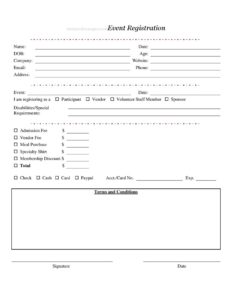
Event Registration Form
Download a free Event Registration Form template to collect attendee details, roles, fees, and payment for any event — free download in PDF and DOCX.
PDF
DOCX
1 downloads
0
likes
Download Files
- DOCX
An Event Registration Form is a document organizers use to collect attendee information, assign roles, and process fees before an event takes place. People most often use it to sign up participants, vendors, volunteers, and sponsors in one organized place. This template is free to download in PDF and DOCX with no signup required.
What Is an Event Registration Form?
An Event Registration Form is a structured intake document that captures who is attending an event, why they are attending, and what they owe. It is typically issued by an event organizer, club, nonprofit, conference host, or community group, and completed by each person who wants to take part. The form documents contact details, the specific event and date, the registrant’s role, any special accommodations, an itemized list of fees, the chosen payment method, and a signed agreement to the event’s terms. Together these details give organizers a clean record for planning headcounts, billing, scheduling meals, ordering shirts, and following up with each registrant after the event.
When Do You Need an Event Registration Form?
This form is useful any time you need to collect names, roles, and payments ahead of an organized gathering. Common scenarios include:
- Conferences and trade shows where attendees, exhibitors, and sponsors each register under different roles and fee structures.
- Community festivals or fairs that need to track participants, food vendors, and volunteer staff separately.
- Charity events and fundraisers where sponsorship levels, meal purchases, and donations are recorded on one sheet.
- Workshops, seminars, and training days that charge an admission fee and offer member discounts.
- Club or membership events where existing members receive a discount and new guests pay full price.
- Sports tournaments or 5K runs that sell specialty shirts and collect emergency contact and accessibility information.
Types of Registrants You Can Track
One strength of this form is that it lets a single template serve several audiences. The role checkboxes — Participant, Vendor, Volunteer Staff Member, and Sponsor — tell you at a glance how each person fits into the event. Participants typically pay an admission fee, vendors pay a vendor fee for booth space, volunteers may attend at no charge in exchange for working hours, and sponsors contribute funding in return for visibility. Sorting registrations by role makes it far easier to plan logistics, assign credentials, and reconcile your budget after the event.
What an Event Registration Form Should Have
A complete Event Registration Form should include the registrant’s full identity and contact details, the exact event name and date, a clear way to indicate role, space for accessibility or dietary needs, a transparent itemized fee breakdown, an accepted payment method, and a signature confirming agreement to the terms. Clear fee lines and a total prevent disputes, while the signature and date establish that the registrant accepted the conditions of attendance.
How to Fill Out an Event Registration Form
- Personal details: Enter your Name, today’s Date, your Date of Birth (DOB), and Age. Age matters for events with minimum-age requirements or youth categories.
- Affiliation: Add your Company and Website if you are registering as a vendor, sponsor, or on behalf of an organization.
- Contact information: Provide your Email, Phone, and mailing Address so the organizer can send confirmations and updates.
- Event details: Write the Event name and its Date to tie your registration to the correct gathering.
- Role: Check whether you are registering as a Participant, Vendor, Volunteer Staff Member, or Sponsor.
- Accommodations: Note any Disabilities/Special Requirements so organizers can plan accessibility or dietary needs.
- Fees: Fill in the applicable amounts — Admission Fee, Vendor Fee, Meal Purchase, Specialty Shirt, and any Membership Discount — then add the Total.
- Payment: Select Check, Cash, Card, or PayPal, and enter the Acct./Card No. and Exp. date if paying by card.
- Agreement: Read the Terms and Conditions, then Sign and Date the form.
Calculating Fees and Discounts
The fee section is built to itemize charges so registrants understand exactly what they are paying. Start with the base charge — either an Admission Fee for participants or a Vendor Fee for exhibitors — then add optional purchases such as a Meal Purchase or a Specialty Shirt. If the registrant qualifies, subtract the Membership Discount before writing the Total. Double-check that the Total reflects every line, because errors here are the most common source of payment confusion. For card and PpayPal transactions, store the Acct./Card No. securely and limit who can see completed forms to protect sensitive payment data.
Privacy and Record-Keeping Tips
Because this form collects contact details and payment information, treat completed copies as confidential. Keep paper forms in a locked location and digital copies in a restricted folder. Retain registrations until after the event is fully reconciled, then archive or securely dispose of them according to your organization’s policy. A clean, consistent set of completed forms also doubles as your master attendee list, your vendor roster, and your accounting backup.
Common Mistakes to Avoid
- Leaving the role unchecked — without it, organizers cannot tell a vendor from a volunteer.
- Skipping the Total or letting the itemized fees not add up to the total amount.
- Omitting accessibility needs until the day of the event, leaving no time to accommodate them.
- Recording incomplete payment details, such as a card number with no expiration date.
- Forgetting the signature and date, which confirm acceptance of the terms.
- Using illegible handwriting on email and phone fields, which breaks event communication.
Frequently Asked Questions
What is an Event Registration Form used for? It is used to collect attendee information, assign roles such as participant or vendor, itemize fees, and record payment before an event. Organizers rely on it to build headcounts, plan logistics, and keep an accurate record of everyone taking part.
How do I fill out an Event Registration Form? Enter your personal and contact details, identify the event and your role, note any special requirements, list the applicable fees and total, choose a payment method, and sign and date the form. Following the fields in order ensures nothing is missed.
Is this Event Registration Form free to download? Yes. You can download it for free in both PDF and DOCX formats with no signup required. The DOCX version is fully editable so you can add your event name, adjust fee lines, or insert your logo.
Does the form need to be signed? The signature and date fields confirm that the registrant has read and agreed to the event’s terms and conditions. While a signature is not always legally required, it helps document consent and reduces disputes over fees or event rules.
Can I customize the fee and role fields? Absolutely. Because the template is editable, you can rename roles, add new fee categories such as parking or early-bird pricing, or remove options you do not need. Tailor it to match your specific event before distributing it.
Is it safe to collect card numbers on this form? Treat any form containing card details as sensitive and store it securely with restricted access. For larger events, many organizers prefer to process payments through a dedicated payment platform and use this form only to record the method and confirmation.
This Event Registration Form template is a general example provided for informational purposes only and is not legal, financial, or tax advice. Data-protection and payment-handling requirements vary by jurisdiction and by payment processor — consult a qualified professional to ensure your registration and payment practices comply with applicable rules.
Related Forms
- Sign In Sheet
- Baseball Sponsorship Form
- Daycare Sheet Multiple
- Weekly Conference Room Reservation
- Gifts Received List
- Football Sponsorship Form
Browse more in Sign In / Sign Up Sheets.