
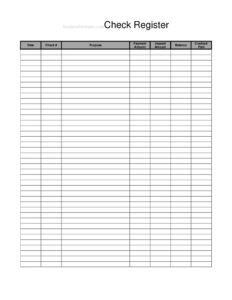
Full Page Check Register
Track every check, deposit, and balance with this free Full Page Check Register template, available as a free download in PDF and DOCX.
PDF
DOCX
8 downloads
0
likes
Download Files
- DOCX
A Full Page Check Register is a printable ledger for recording every transaction in your checking account — checks written, deposits made, and your running balance — on a single, generously sized page. People use it most often to keep an accurate, by-hand record of account activity that they can reconcile against monthly bank statements. It’s free to download here in both PDF and DOCX formats, with no signup required.
What Is a Full Page Check Register?
A Full Page Check Register is a structured table where you log each banking transaction line by line. Unlike the tiny register tucked into a checkbook, a full-page version gives you wide columns and plenty of rows to track activity over a longer period. Each entry captures the date, a check number (if applicable), the purpose of the transaction, the amount paid out or deposited, and the resulting balance. Individuals, families, small business owners, treasurers of clubs and nonprofits, and bookkeepers all use it to maintain a clear, chronological picture of money flowing into and out of an account — and to catch errors or unauthorized charges before they snowball.
When Do You Need a Full Page Check Register?
A check register is useful any time you want to know your true available balance rather than the figure the bank shows before everything clears. Common situations include:
- Tracking personal checking account activity so you never overdraw or bounce a payment.
- Recording rent, utility, and bill payments along with paycheck and other deposits in one place.
- Managing a small business or side hustle account where you write checks to vendors and deposit customer payments.
- Keeping the books for a club, HOA, PTA, or nonprofit where a treasurer must report on every dollar.
- Reconciling your records against the monthly bank statement to spot fees, errors, or fraud.
- Teaching a teenager or student how to balance an account and budget responsibly.
What a Full Page Check Register Should Have
A complete register makes it easy to see what happened and what’s left. The essential elements are a date for each entry, a check number column for written checks, a clear purpose or description of the transaction, separate payment and deposit amount columns, a balance column showing the running total after each line, and a credited/paid marker to confirm the transaction has cleared the bank. Together these let you reconcile against your statement with confidence and trace any discrepancy back to a single line.
How to Fill Out a Full Page Check Register
- Start with your opening balance. Write your current account balance at the top of the balance column before recording any new transactions.
- Enter the date. In the date field, record the day the check was written, the deposit was made, or the charge occurred.
- Record the check number. In the check # column, write the number printed on the check. For debit card payments, transfers, or deposits, leave it blank or note the type (e.g., “DC” or “DEP”).
- Describe the purpose. Use the purpose field to note who you paid or where the money came from — for example, “Electric bill,” “Groceries,” or “Paycheck.”
- Log the payment amount. If money left the account, enter the figure in the payment amount column.
- Log the deposit amount. If money came in, enter the figure in the deposit amount column instead.
- Update the balance. Subtract payments from or add deposits to the previous balance, and write the new figure in the balance column.
- Mark credited/paid. When the transaction appears on your statement as cleared, check it off in the credited/paid column.
How to Reconcile Your Register With Your Bank Statement
Reconciling means matching your register to your bank’s records so the two agree. When your statement arrives, go line by line: find each register entry on the statement and tick the credited/paid column. Any transactions that haven’t yet appeared on the statement are “outstanding” — common with checks the recipient hasn’t cashed. To reconcile, start with the statement’s ending balance, add any deposits not yet shown, and subtract any outstanding checks; the result should match your register balance. If it doesn’t, recheck your math, look for transposed digits, and confirm you recorded every bank fee, interest payment, and automatic withdrawal. Reconciling monthly is the single best habit for catching mistakes early.
Tips for Keeping an Accurate Register
Consistency is what makes a register trustworthy. Record transactions as soon as they happen rather than relying on memory at the end of the month. Write legibly in ink, and keep a single source of truth instead of scattering notes across receipts and apps. Don’t forget recurring items that are easy to overlook — monthly subscriptions, ATM fees, overdraft charges, and automatic transfers all belong in the register. If you share an account, agree on who logs what so two people don’t double-enter or skip a transaction. Finally, keep completed pages in a folder so you have a historical record for budgeting and tax season.
Paper Register vs. Banking App
Mobile banking shows recent activity, but it reflects what has cleared, not your true available balance after outstanding checks. A handwritten Full Page Check Register fills that gap by capturing every transaction the moment you make it, including checks that may take days to be cashed. Many people use both: the app for quick balance checks and the paper register as the authoritative running total they reconcile against. A register also works when you have no internet access and gives you a tangible backup if a digital record is ever lost or disputed.
Common Mistakes to Avoid
- Forgetting to subtract bank fees, ATM charges, or overdraft penalties from the balance.
- Mixing up the payment and deposit columns, which throws off every balance below it.
- Skipping the running balance update so you never know your true available funds.
- Leaving the purpose field blank, making it impossible to identify a transaction later.
- Relying only on the cleared balance in your banking app and ignoring outstanding checks.
- Putting off entries until later and then forgetting transactions entirely.
Frequently Asked Questions
What is a Full Page Check Register used for? It is used to manually record every transaction in a checking account — checks, deposits, withdrawals, and fees — along with a running balance. This helps you know your true available funds, budget accurately, and reconcile against your bank statement to catch errors or fraud.
Is the Full Page Check Register free to download? Yes. You can download this template for free in both PDF and DOCX formats, with no signup or payment required. Print as many copies as you need to keep tracking your account over time.
How do I calculate the running balance? Start with your current balance, then subtract each payment amount or add each deposit amount as you record it. Write the new figure in the balance column after every line so the bottom-most entry always reflects your most recent balance.
What does the credited/paid column mean? That column is a checkbox to confirm a transaction has cleared the bank and appears on your statement. Marking it during reconciliation lets you quickly separate cleared items from outstanding checks that haven’t been cashed yet.
Do I need to keep my old register pages? It’s a good idea to keep completed pages for your records. They are helpful for tracking spending trends, preparing budgets, resolving disputes with your bank, and supporting documentation at tax time.
Can I use this register for a business or club account? Absolutely. The same fields work for personal, small business, or organizational accounts. Treasurers and bookkeepers often use a full-page register because the wide columns make it easy to log vendor checks, member deposits, and a clear running balance for reporting.
This template is provided as a general example for informational purposes only and does not constitute financial, accounting, or tax advice. Banking practices and recordkeeping requirements vary, so consult a qualified financial professional or accountant for guidance specific to your situation.
Official resource: for the rules that apply to your situation, see the Consumer Financial Protection Bureau.
Related Forms
- Request Credit Card Chargeback
- Monthly Bank Reconciliation
- Overdue Account History
- Credit Memo
- Dependent Care Claim Form
- Sinking Funds Tracker
Browse more in Money.