
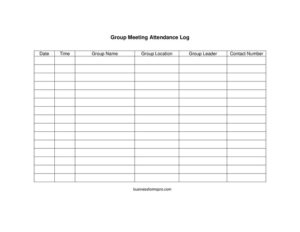
Group Meeting Attendance Log
Track who attends your meetings with this free Group Meeting Attendance Log template, available as a free download in PDF and DOCX formats.
PDF
DOCX
3 downloads
0
likes
Download Files
- DOCX
A Group Meeting Attendance Log is a simple sign-in sheet used to record who attended a meeting, when it took place, and who led it. People most often use it to keep an accurate, dated record of participation for recurring groups, support sessions, committees, and required-attendance programs. You can download this template for free in both PDF and DOCX formats, with no signup required.
What Is a Group Meeting Attendance Log?
A Group Meeting Attendance Log is a structured document that captures the essential details of a single gathering and the people present at it. It is typically prepared or maintained by a group leader, facilitator, secretary, or administrator who needs proof that a meeting occurred and that specific individuals took part. The log documents core meeting information — the date, time, group name, location, and the leader’s name and contact number — alongside a list where attendees sign in. It is used to track participation over time, verify attendance for compliance or reporting, and create a consistent paper trail that anyone can reference later without relying on memory or scattered notes.
When Do You Need a Group Meeting Attendance Log?
This form is useful any time you need to prove who showed up and document the basic facts of a session. Common situations include:
- Recurring support groups — recovery, grief, parenting, or peer-support meetings that track ongoing participation week to week.
- Court-ordered or program-mandated attendance — where participants must show proof they attended a required number of sessions.
- Community and nonprofit meetings — neighborhood associations, volunteer teams, and club gatherings that maintain membership records.
- Workplace training and safety sessions — documenting which employees completed a briefing or workshop.
- School, religious, or youth programs — tracking attendance for classes, study groups, or congregational events.
- Board or committee meetings — establishing whether enough members were present to meet a quorum.
What a Group Meeting Attendance Log Should Have
A complete attendance log balances meeting-level details with a clear attendee list. At minimum, an effective version of this form should include the meeting date and time so each record is unambiguous, the group name to identify which program the log belongs to, and the group location to confirm where the session was held. It should also name the group leader or facilitator responsible for the session and provide a contact number so questions can be directed to the right person. Below those header fields, a roster area lets each participant record their name — and, depending on your needs, a signature, arrival time, or notes column. Together these elements turn a blank page into a reliable, self-contained record.
How to Fill Out a Group Meeting Attendance Log
Complete the header before the meeting begins, then circulate the sheet as people arrive:
- Date: Enter the calendar date of the meeting. Use a consistent format (for example, MM/DD/YYYY) across all your logs so records sort correctly.
- Time: Record the scheduled start time, or note both start and end times if your program tracks session length.
- Group name: Write the official name of the group, class, or program so the log can be filed and found easily later.
- Group location: Note where the meeting is held — a room number, building, address, or a virtual platform name if the session is online.
- Group leader: Enter the full name of the facilitator, chairperson, or instructor responsible for running the meeting.
- Contact number: Provide a phone number for the leader or organizer so attendees or administrators can follow up.
- Attendee list: As each person arrives, have them sign or print their name in the roster section. Add arrival times or initials if your program requires them.
Paper, Digital, and Filing Tips
For in-person meetings, the PDF version is easy to print and pass around on a clipboard. For virtual or hybrid sessions, the editable DOCX lets a host type attendee names directly or paste them from a video call participant list. Whichever format you choose, store completed logs in a single, dated folder — physical or digital — so they remain in order. If your group meets weekly or monthly, consider scanning paper sheets after each session to create a backup. Keeping a consistent file-naming system, such as the group name followed by the date, makes it far easier to retrieve a specific session months later when someone requests proof of attendance.
How This Differs From a Sign-Up Sheet
An attendance log and a sign-up sheet serve related but distinct purposes. A sign-up sheet is forward-looking: people add their names in advance to reserve a spot, volunteer for a task, or indicate intent to attend. An attendance log is a record of fact: it confirms who was actually present at a meeting that has taken place. Because of this difference, an attendance log emphasizes verified, time-stamped sign-ins and identifies the responsible leader, while a sign-up sheet emphasizes available slots or roles. Many groups use both — a sign-up sheet to plan a session and an attendance log to document the result.
Common Mistakes to Avoid
- Leaving the header blank: A roster of names is far less useful without the date, group name, and location to anchor it.
- Inconsistent date formats: Mixing formats across logs makes records hard to sort and can cause confusion during audits.
- Illegible sign-ins: Ask attendees to print clearly, especially if signatures will be used to verify participation.
- No responsible contact: Omitting the leader’s name or contact number leaves no one to follow up with questions.
- Losing the originals: Failing to file or back up completed sheets defeats the purpose of keeping a record.
- Reusing one sheet for multiple sessions: Start a fresh log for each meeting so every date stands on its own.
Frequently Asked Questions
What is a Group Meeting Attendance Log used for? It is used to document who attended a specific meeting, along with the date, time, location, and leader of that session. Groups rely on it to track participation, verify attendance for programs or compliance, and keep an organized historical record.
How do I fill out the attendance log? Complete the header fields — date, time, group name, location, group leader, and contact number — before the meeting starts. Then circulate the sheet so each attendee signs or prints their name as they arrive.
Is a Group Meeting Attendance Log legally binding? An attendance log is generally a record-keeping document rather than a binding contract. However, it can serve as supporting evidence of participation when required by a program, employer, or court, so accuracy and consistency matter.
Do attendees need to sign it, or just print their names? That depends on your needs. A printed name is enough for casual tracking, but a signature provides stronger verification when proof of attendance is important.
Can I use this log for virtual meetings? Yes. Use the location field to note the platform, and have the host record attendee names from the participant list. The editable DOCX format makes typing names quick and easy.
How much does this template cost? It is completely free to download here in both PDF and DOCX formats, with no signup or payment required. You can use it as-is or customize it to fit your group’s needs.
This template is a general example provided for informational purposes only and is not legal, financial, or compliance advice. Record-keeping and attendance requirements vary by organization and jurisdiction, so consult a qualified professional to confirm what your specific situation requires.
Related Forms
- Bowling Sponsorship Form
- Sign In Sheet
- Weekly Conference Room Reservation
- Potluck Sign Up Sheet
- Sign Up Sheet Name and Date
- Baseball Sponsorship Form
Browse more in Sign In / Sign Up Sheets.