
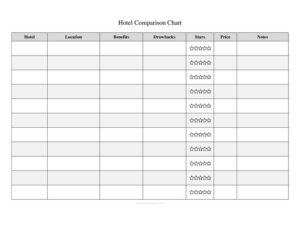
Hotel Comparison Chart
Compare hotels side by side with this free Hotel Comparison Chart template, weighing price, location and amenities before you book — free download.
PDF
DOC
30 downloads
0
likes
Download Files
- DOC
A Hotel Comparison Chart is a simple side-by-side worksheet that lets you evaluate several hotels against the same criteria so you can confidently pick the best place to stay. The most common reason people use it is to cut through endless browser tabs and conflicting reviews when planning a trip. It’s free to download here in both PDF and DOCX formats, with no signup required.
What Is a Hotel Comparison Chart?
A Hotel Comparison Chart is a structured table that lists candidate hotels in rows or columns and lines up the factors that matter most to you — nightly rate, location, amenities, ratings, and cancellation policy. It’s used by leisure travelers, business travelers, event planners, travel agents, and anyone booking accommodation for a group. Rather than relying on memory or scattered notes, the chart documents each property’s strengths and weaknesses in one view. By forcing every hotel to be measured against identical criteria, it removes guesswork and emotional impulse from the decision and makes trade-offs obvious. The result is a fast, defensible booking choice you can share with travel companions or approvers.
When Do You Need a Hotel Comparison Chart?
This chart is useful any time more than one hotel is on the table and the decision involves cost, convenience, or other people’s preferences. Common scenarios include:
- Planning a family vacation where pool access, free breakfast, and parking weigh as heavily as price.
- Booking business travel and needing to justify the choice to a manager or stay within a per-night budget.
- Organizing a group trip or wedding block where you must compare room rates and distance to the venue across several properties.
- Comparing destinations, where the hotel in each city affects which location offers better overall value.
- Choosing between loyalty-program properties to maximize points, perks, or elite-status benefits.
- Reviewing conference or event hotels, balancing meeting-room availability, shuttle service, and proximity to the airport.
What a Hotel Comparison Chart Should Have
A complete chart captures every factor that could change your decision and keeps each one comparable across all the hotels listed. At minimum it should include the hotel name and location, the nightly or total price, the star or guest rating, the key amenities you care about, the distance to your main destination, and the cancellation or refund policy. Many travelers also add columns for taxes and resort fees, breakfast inclusion, parking cost, Wi-Fi, check-in and check-out times, and personal notes. A final column or row for a score or ranking helps you turn all the details into a clear winner. The strength of the chart comes from consistency — fill in the same fields for every property.
How to Fill Out a Hotel Comparison Chart
- List your hotels. Enter the name of each candidate hotel in its own row, limiting the list to a manageable shortlist of three to five.
- Record the location. Note the neighborhood, address, or city for each so you can judge convenience and safety.
- Enter the price. Write the nightly rate, then the total for your full stay, including taxes and fees so comparisons are apples-to-apples.
- Add the rating. Capture the star class and the average guest review score, noting the number of reviews if it matters.
- Fill in amenities. Mark whether each hotel offers free breakfast, Wi-Fi, parking, a pool, a gym, or other features you value.
- Note the distance. Record how far each property is from the airport, venue, or attractions you’ll visit most.
- Log the cancellation policy. Indicate whether the booking is refundable and the deadline to cancel without penalty.
- Add notes and score. Use a free-text column for impressions, then assign each hotel a ranking to identify your top choice.
Tips for an Effective Comparison
To get the most from your chart, decide which two or three factors are non-negotiable before you start filling it in — for many travelers that’s total price, location, and cancellation flexibility. Always compare the total cost rather than the advertised headline rate, since resort fees, parking, and taxes can add a surprising amount per night. Pull rates and availability for the same dates and room type across all hotels, and screenshot or date-stamp prices because they fluctuate. If you’re traveling with others, share the chart and let everyone weight the criteria, which often resolves disagreements quickly. Finally, leave a notes column for the intangibles a number can’t capture, such as a recent renovation, a noisy street, or a generous loyalty perk.
Hotel Comparison Chart vs. a Travel Itinerary
It’s easy to confuse a comparison chart with a travel itinerary, but they serve different stages of planning. The comparison chart is a decision tool used before booking — it weighs options against one another. A travel itinerary is a scheduling tool used after booking, laying out confirmed dates, times, and activities. Use the chart first to choose your hotel, then transfer the winning property’s details into your itinerary so everything is in one place for the trip.
Common Mistakes to Avoid
- Comparing different dates or room types, which makes the prices meaningless and skews the whole chart.
- Ignoring hidden fees like resort charges, parking, and city taxes that can quietly inflate the real cost.
- Overloading the chart with too many hotels or columns, which makes the comparison harder rather than clearer.
- Trusting the star rating alone instead of reading recent guest reviews for current conditions.
- Forgetting the cancellation policy, then losing money when plans change on a non-refundable booking.
- Letting prices go stale — rates shift daily, so confirm before you commit.
Frequently Asked Questions
What is a Hotel Comparison Chart used for? It’s used to evaluate multiple hotels side by side against the same criteria — price, location, amenities, ratings, and cancellation terms — so you can choose the best option quickly. It replaces scattered notes and open browser tabs with one clear view. The chart is especially helpful for group trips, business travel, or any decision that involves a budget or multiple opinions.
How do I fill out a Hotel Comparison Chart? List each candidate hotel, then fill in the same fields for every one: location, total price, rating, amenities, distance, and cancellation policy. Add a notes column and a final score or ranking. Keeping the data consistent across all rows is what makes the comparison reliable.
How many hotels should I compare at once? A shortlist of three to five hotels usually works best. Fewer than that and you may miss a better deal; more than that and the chart becomes cluttered and the decision harder. Narrow a long list down to your strongest contenders before filling in every detail.
Should I compare the nightly rate or the total cost? Always compare the total cost for your full stay, including taxes, resort fees, and parking. A low nightly rate can end up more expensive once add-on fees are included. Recording the true total in your chart prevents costly surprises at checkout.
Is this Hotel Comparison Chart free to download? Yes. You can download this template for free in both PDF and DOCX formats with no signup required. Use the editable DOCX to customize the columns to your trip, or print the PDF to fill in by hand.
Can I customize the columns for my trip? Absolutely. The DOCX version lets you add, remove, or rename columns to match what matters most to you — for example, pet-friendliness, accessibility features, shuttle service, or loyalty points. Tailor the chart so every factor on it actually influences your decision.
This Hotel Comparison Chart template is a general example provided for informational purposes only and is not travel, financial, or professional advice. Hotel rates, policies, fees, and availability vary by property and change frequently — always confirm details directly with the hotel or a qualified travel professional before booking.
Related Forms
- Basic Entry Form White
- Job Rejection Letter
- Raffle Ticket
- Accident Claim Worksheet
- Table Wait List
- Security Shift Activity
Browse more in Miscellaneous.