
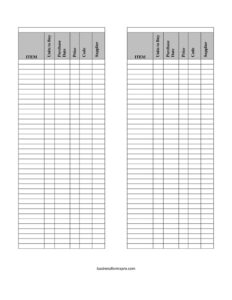
Inventory Cards Spreadsheet — Black And White
Track stock items, suppliers, and reorder needs with this free Inventory Cards Spreadsheet template — clean black and white design, free download in PDF and DOCX.
PDF
DOCX
1 downloads
0
likes
Download Files
- DOCX
An Inventory Cards Spreadsheet is a simple tracking sheet used to record each item you stock, how many units you need to buy, what it costs, and where it comes from. People most often use it to keep reordering organized and to maintain a clear paper trail of stock levels and supplier purchases. This clean black-and-white version is free to download in PDF and DOCX with no signup required.
What Is an Inventory Cards Spreadsheet?
An Inventory Cards Spreadsheet is a record-keeping document that consolidates the details of every product or material your business holds. Traditionally, businesses kept a separate physical “card” for each item; this spreadsheet brings that concept into a single, scannable grid. It is used by shop owners, warehouse staff, office managers, classroom teachers, and home-based sellers to know exactly what they have, what they need to reorder, and which supplier to contact. Each row captures one item along with its purchase details, code, and source. The black-and-white layout is intentional — it prints cleanly, photocopies well, and keeps the focus on the data rather than decoration. It serves as both a working reorder list and a historical purchasing reference.
When Do You Need an Inventory Cards Spreadsheet?
This form earns its place anywhere stock has to be counted, reordered, or accounted for. Common situations include:
- Running a retail shop or stall where you need to know which products are low and how many units to reorder.
- Managing a stockroom or warehouse and tracking purchase dates so older inventory is used or sold first.
- Comparing suppliers by recording the price and supplier name for each item over time.
- Preparing a purchase order using the “Units to Buy” column as a ready-made shopping list.
- Doing a periodic stocktake and reconciling what is on the shelf against what the spreadsheet records.
- Tracking supplies for an office, clinic, school, or workshop where consumables run out regularly and need restocking.
What an Inventory Cards Spreadsheet Should Have
A useful inventory card balances completeness with simplicity. At minimum it should identify each item clearly, note how many units to buy, record the price and purchase date, assign a code for quick lookup, and name the supplier. This template covers exactly those essentials. A strong inventory sheet also stays consistent: every row should be filled the same way so totals and reorder decisions can be made at a glance. Avoid cluttering it with one-off notes that belong elsewhere; keep the columns disciplined so the document remains easy to read and easy to update during a busy stock count.
How to Fill Out an Inventory Cards Spreadsheet
- Item: Write the name or description of the product or material. Be specific — “A4 copy paper, white, 80gsm” beats just “paper” when several similar items exist.
- Units to Buy: Enter the quantity you need to purchase to bring stock back to its target level. Leave it blank or zero when the item is fully stocked.
- Purchase Date: Record the date the item was last bought or the date you plan to reorder. Use a consistent format such as MM/DD/YYYY throughout.
- Price: Note the unit price or the price you last paid. Keeping this current helps you spot increases and compare suppliers.
- Code: Add the SKU, barcode number, or your own internal reference so the item can be matched quickly during ordering and counting.
- Supplier: Write the name of the vendor you buy this item from, so reordering takes one glance rather than a hunt through invoices.
Work through the sheet row by row, one item per line, and update it whenever stock is received or sold.
Tips for Keeping the Spreadsheet Accurate
An inventory record is only as good as its upkeep. Set a fixed routine — daily, weekly, or after each delivery — so the document never drifts far from reality. When you receive a shipment, update the purchase date and price immediately while the invoice is in front of you; details are easy to forget hours later. Use the Code column consistently so the same item is never entered twice under different names. If you maintain the DOCX version digitally, sorting by Supplier groups your orders so you can place one combined order per vendor and often qualify for better terms. Print a fresh copy before a full stocktake and mark counts by hand.
Choosing PDF or DOCX
The PDF version is ideal when you want a fixed, print-ready card to clip to a clipboard, post on a stockroom wall, or hand to staff for manual counting. The DOCX version is better when you want to type entries, copy rows, resize columns, or adjust headings to match your own item categories. Many users keep both: a master DOCX they edit on a computer and printed PDF snapshots for the shelf. Because the design is plain black and white, both formats reproduce cleanly on any printer or copier.
Common Mistakes to Avoid
- Inconsistent item names — listing the same product two different ways splits your records and breaks your counts.
- Skipping the Code column — without a SKU or reference, matching items during ordering becomes slow and error-prone.
- Letting prices go stale — outdated prices lead to wrong budgets and missed supplier increases.
- Forgetting to update Units to Buy after ordering — leaving old numbers in causes accidental double-ordering.
- Mixing date formats — switching between DD/MM and MM/DD makes purchase history confusing.
- Not backing up the file — keep a saved copy of the DOCX so a lost or damaged sheet doesn’t erase your records.
Frequently Asked Questions
What is an Inventory Cards Spreadsheet used for? It is used to track each item you stock along with how many units to buy, the price, the purchase date, an item code, and the supplier. It works as both a reorder list and a historical purchasing record, helping you avoid running out of stock or over-ordering.
Is this Inventory Cards Spreadsheet template really free? Yes. You can download it free in both PDF and DOCX formats with no signup, subscription, or payment required. Use it for personal or business inventory tracking as many times as you like.
What does the “Units to Buy” column mean? It represents the quantity you need to purchase to return an item to its desired stock level. When an item is fully stocked you can leave it blank or enter zero, and the filled-in rows become an instant shopping list for your next order.
Can I edit the columns to fit my business? Yes. The DOCX version lets you rename headings, add columns such as “Quantity on Hand” or “Reorder Point,” and adjust the layout. The PDF is best for printing and manual use if you prefer a fixed format.
How often should I update the spreadsheet? Update it whenever stock comes in or goes out, and do a full review on a regular schedule — weekly or after each delivery works well for most users. Frequent updates keep your reorder decisions and supplier records accurate.
What should I put in the Code field? Use whatever reference lets you identify the item fastest — a manufacturer SKU, a barcode number, or your own internal code. Consistent codes prevent duplicate entries and speed up both reordering and stocktaking.
This Inventory Cards Spreadsheet template is a general example provided for informational purposes only and is not financial, accounting, or business advice. Inventory and record-keeping requirements vary by business and jurisdiction — consult a qualified professional for guidance specific to your situation.
Related Forms
- Zombie Survival Checklist
- Submission Tracker Received
- First Aid Inventory
- Outgoing Mail Log
- Inventory Cards Spreadsheet
- Large-Print Packing List
Browse more in Log and Inventory.