
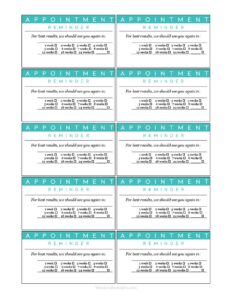
Recurring Appointment Reminder Card
Keep clients on schedule with a free Recurring Appointment Reminder Card template, easy to fill out and print, available as a free download in PDF and DOCX.
PDF
DOC
4 downloads
0
likes
Download Files
- DOC
A Recurring Appointment Reminder Card is a small printed card that confirms a client’s series of upcoming appointments and the date and time of each visit. People most often use it to reduce no-shows and keep regular clients—patients, students, or service customers—on a consistent schedule. You can download this template free in both PDF and DOCX formats, with no signup required.
What Is a Recurring Appointment Reminder Card?
A Recurring Appointment Reminder Card is a compact handout, usually wallet- or index-card sized, that a front desk or scheduler gives to a client at the end of a visit. It lists the business name and contact details, the client’s name, and a sequence of future appointment dates and times. Unlike a single confirmation slip, it documents multiple recurring visits at once—weekly therapy sessions, monthly hygiene checks, or standing tutoring slots. The card serves as a tangible memory aid the client can tuck into a wallet, stick to a fridge, or photograph for their phone. It benefits both sides: clients have a clear record of when to return, and businesses smooth out their calendar and protect booked revenue.
When Do You Need a Recurring Appointment Reminder Card?
This card fits any setting where clients return on a predictable schedule. Common scenarios include:
- Dental and orthodontic offices scheduling six-month cleanings or a series of adjustment visits over several months.
- Physical therapy or chiropractic clinics booking a course of two or three sessions per week for a set number of weeks.
- Salons, barbershops, and spas setting standing appointments for regular color, cut, or treatment clients.
- Tutors and music teachers confirming a recurring weekly lesson time for the term.
- Counseling and wellness practitioners who maintain a consistent weekly or biweekly session slot.
- Veterinary clinics and grooming services reminding owners of follow-up vaccinations or routine grooming visits.
Anytime a client commits to more than one future visit, handing them a written card beats relying on memory alone.
What a Recurring Appointment Reminder Card Should Have
A useful reminder card stays simple but complete. At minimum it should include the business or provider name and a contact phone number or address, a space for the client’s name, and a clearly laid-out list of upcoming appointment dates and times. Many cards add the day of the week beside each date, a line for the provider or service type, and a short cancellation or rescheduling note (for example, “Please give 24 hours’ notice”). Leaving room for several rows lets you record a full sequence of recurring visits on one card. Good cards are easy to read at a glance, with enough white space that handwritten entries stay legible.
How to Fill Out a Recurring Appointment Reminder Card
- Add your business details. Write or pre-print the practice or company name, address, and phone number at the top so the client can call to confirm or reschedule.
- Enter the client’s name. Write the client or patient name clearly on the designated line so the card is personalized.
- List the first appointment. In the first row, record the date, day of the week, and time of the next visit.
- Continue the recurring series. Use each additional row to enter the following appointments in chronological order—keep the spacing consistent so the sequence is easy to scan.
- Note the provider or service. If the card includes a field for it, add the provider’s name or the type of service for each visit.
- Add the cancellation policy. Fill in or confirm any pre-printed reminder about advance notice for changes.
- Hand it to the client. Give the completed card to the client before they leave, and confirm verbally that the dates work for them.
Tips for Reducing No-Shows
The card itself is only one layer of an effective reminder system. Pair it with a follow-up call, text, or email a day or two before each appointment, and the combination is far more reliable than either method alone. Write times clearly and avoid ambiguous abbreviations—”2:30 PM” beats “2:30” with no marker. If you offer online booking, add the website or a short code so clients can adjust their own appointments. Encourage clients to photograph the card with their phone as a backup, and keep a matching record in your own scheduling system so the front desk and client always agree on the dates.
Printing and Customizing the Template
Because the template comes in both PDF and DOCX, you can use it two ways. Print the PDF as-is for quick handwritten cards at the front desk, or open the DOCX in your word processor to add your logo, brand colors, and pre-printed business details before printing a batch. Many offices print several cards per sheet and cut them to size, or print onto perforated business-card stock. If your visits follow a fixed cadence, you can even pre-fill the recurring dates in the DOCX for an entire course of treatment, then just write in the client’s name on the day.
Common Mistakes to Avoid
- Leaving off AM/PM or the day of the week, which leads clients to show up at the wrong hour.
- Illegible handwriting—rushed entries are a top cause of missed appointments.
- Not updating both records when an appointment changes, so the card and your system disagree.
- Skipping the cancellation policy, leaving clients unsure how much notice they must give.
- Forgetting your phone number, which makes rescheduling harder and increases no-shows.
- Listing dates out of order, which confuses clients trying to track a long series of visits.
Frequently Asked Questions
What is a Recurring Appointment Reminder Card used for? It is used to confirm a series of future appointments for a returning client in one printed handout. Businesses give it out to reduce no-shows and help clients keep track of standing or repeating visits. It works well for clinics, salons, tutors, and any service with regular bookings.
How do I fill out the card? Add your business name and phone number, write the client’s name, and list each upcoming appointment with its date, day, and time in the rows provided. Include any cancellation note, then hand the completed card to the client before they leave. Confirm the dates verbally so everyone agrees.
Is this card legally binding? No, a reminder card is simply a courtesy notice and scheduling aid, not a contract. It documents agreed appointment times but does not create a legal obligation on its own. Any cancellation fees or commitments would come from a separate agreement or your posted policy.
How much does the template cost? The Recurring Appointment Reminder Card template is completely free to download here in PDF and DOCX formats. There is no signup, subscription, or hidden charge. You can print and reuse it as many times as you need.
Can I add my logo and brand it? Yes. Open the DOCX version in your word processor to insert your logo, adjust the colors, and pre-print your business details. You can then print a batch on card stock for daily use at your front desk.
Should I still send text or email reminders too? Yes, a printed card works best as part of a layered system. Combining the card with a text, call, or email a day or two before each visit significantly improves attendance compared to relying on the card alone. Encourage clients to save the dates in their phone as well.
This template is provided as a general example for informational purposes only and does not constitute legal, medical, or business advice. Scheduling and client-communication requirements may vary by industry and location—consult a qualified professional to confirm what applies to your practice.
Official resource: for the rules that apply to your situation, see the U.S. Small Business Administration.
Related Forms
- Workplace Safety Checklist
- Room Reservation Form
- Annual Appointment Reminder Card
- 2026 Postal Holidays
- Meeting Agenda Portrait
- Hotel Reservation Form
Browse more in Office.