
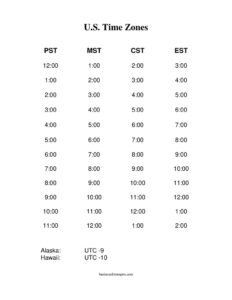
US Time Zones Chart
Download a free US Time Zones Chart template to compare Eastern, Central, Mountain, and Pacific times at a glance in PDF or DOCX for easy scheduling.
PDF
DOCX
5 downloads
0
likes
Download Files
- DOCX
A US Time Zones Chart is a simple reference that lays out the main time zones across the United States so you can convert and compare times at a glance. People most often use it to schedule calls, meetings, and deliveries across multiple regions without making costly mistakes. It is free to download here in both PDF and DOCX formats, with no signup required.
What Is a US Time Zones Chart?
A US Time Zones Chart is a visual table or grid that shows how the time differs across the country’s primary zones at any given moment. It typically lists the time zones side by side—Eastern, Central, Mountain, and Pacific—along with the hour-by-hour offset between them. Businesses, remote teams, schedulers, customer-service departments, and travelers use it to coordinate activities that span different regions. Rather than calculating offsets in your head, you read across a row to see that 9:00 a.m. Eastern is 6:00 a.m. Pacific. The chart documents the standard relationships between zones in one clear, printable layout that anyone on a team can reference quickly.
When Do You Need a US Time Zones Chart?
A US Time Zones Chart is useful any time your work or travel crosses regional boundaries. Common scenarios include:
- Scheduling cross-country meetings so no one is invited to a 6:00 a.m. call by accident.
- Running a remote or distributed team with employees in different states who need shared core hours.
- Managing customer support that promises callbacks or service windows in the caller’s local time.
- Coordinating shipping and delivery when cut-off times and warehouse hours vary by region.
- Planning business travel so you can adjust connections, check-ins, and appointments to the destination zone.
- Broadcasting or publishing webinars, sales, and announcements at a time that lands well nationwide.
Understanding the US Time Zones
The contiguous United States spans four main time zones, and a complete chart often notes additional ones for full coverage:
- Eastern Time (ET) — the easternmost zone, covering states such as New York, Florida, and Georgia.
- Central Time (CT) — one hour behind Eastern, covering Texas, Illinois, and much of the Midwest.
- Mountain Time (MT) — two hours behind Eastern, covering Colorado, Arizona, and surrounding states.
- Pacific Time (PT) — three hours behind Eastern, covering California, Oregon, and Washington.
- Alaska and Hawaii-Aleutian Time — further west, useful for nationwide coverage beyond the lower 48.
Note that most zones shift by one hour during Daylight Saving Time, while Arizona and Hawaii generally do not observe it. A good chart accounts for these distinctions.
What a US Time Zones Chart Should Have
A clear and complete chart includes the following elements:
- A labeled column or row for each zone, ideally with its abbreviation (ET, CT, MT, PT).
- An hour-by-hour comparison so any starting time maps cleanly across zones.
- Both standard time and a note about Daylight Saving adjustments.
- Representative cities or states under each zone for quick orientation.
- A title and a space to note the date or context, since DST changes affect offsets.
- A clean, readable layout suitable for printing or pinning near a workspace.
How to Fill Out a US Time Zones Chart
Because this is a reference template, “filling it out” means customizing it for your needs. Follow these steps:
- Add a title and date context at the top, noting whether the chart reflects standard time or Daylight Saving Time.
- Label each zone column with its name and abbreviation: Eastern, Central, Mountain, and Pacific.
- List representative cities beneath each zone so teammates recognize the region instantly.
- Choose a base zone—often Eastern—and enter a starting hour in the first row.
- Fill the offsets across each row: subtract one hour for Central, two for Mountain, three for Pacific.
- Highlight your core business hours or shared meeting windows so they stand out.
- Add any zones you regularly work with, such as Alaska or Hawaii, in extra columns.
- Save and print, then distribute the chart to your team or post it where scheduling happens.
Tips for Accurate Scheduling Across Zones
When you set up the chart, always state times with their zone abbreviation in writing—”2:00 p.m. ET”—rather than relying on context. Be mindful that Daylight Saving Time begins and ends on different dates than some other countries, so a chart accurate in January may be off by an hour in July for international comparisons. If your team includes Arizona, remember it stays on Mountain Standard Time year-round, which means its effective offset to other zones changes when DST starts. Re-confirm a fresh copy of the chart twice a year, right after the spring and fall time changes, to keep everyone aligned.
Common Mistakes to Avoid
- Ignoring Daylight Saving Time, which can throw off every offset by an hour during part of the year.
- Forgetting Arizona and Hawaii do not observe DST, creating exceptions to the standard pattern.
- Listing times without zone labels, leading to confusion in emails and invitations.
- Assuming a state sits entirely in one zone, since some states are split across two.
- Using an outdated chart after a time change instead of refreshing it.
- Scheduling at the edges of business hours, where one region’s morning is another’s late afternoon.
Frequently Asked Questions
How many time zones are in the United States? The contiguous lower 48 states span four primary time zones: Eastern, Central, Mountain, and Pacific. Counting Alaska and Hawaii-Aleutian time brings the total to six across the states, with additional zones in US territories. A complete chart usually focuses on the four main zones plus optional columns for Alaska and Hawaii.
How do I use a US Time Zones Chart to convert times? Find your starting time in the base zone column, then read straight across the same row to see the equivalent time in every other zone. For example, if Eastern shows 10:00 a.m., the row will display 9:00 a.m. Central, 8:00 a.m. Mountain, and 7:00 a.m. Pacific. Always note whether the chart reflects standard or Daylight Saving Time.
Does this chart account for Daylight Saving Time? The standard offsets between most zones stay the same during DST because nearly all zones shift together. The exceptions are Arizona and Hawaii, which do not observe DST, so their offsets to the rest of the country change in spring and fall. We recommend refreshing your chart after each time change.
Is this US Time Zones Chart free to download? Yes. You can download it completely free in both PDF and DOCX formats with no signup or account required. The DOCX version lets you customize zones, cities, and core hours for your own team or project.
Can I edit the chart for my own team or business? Absolutely. Download the DOCX version to add your company’s working hours, specific cities, additional zones, or color highlights for shared meeting windows. The PDF version is best when you simply want a clean, ready-to-print reference.
Why do some states fall into two time zones? A handful of states are geographically split, with parts observing one zone and other parts another, due to historical and practical boundary decisions. If you regularly work with a split state, label the specific city rather than the whole state on your chart to avoid confusion. Checking the exact city’s zone is always safest for scheduling.
This US Time Zones Chart template is a general example provided for informational purposes only and is not legal, financial, or scheduling advice. Time zone boundaries and Daylight Saving Time rules can change and vary by location, so verify the current zone and observance for any specific city or state before relying on it.
Related Forms
- Class Reunion Registration
- Babysitting Instructions
- Blank Memo
- Large-Print Guest List
- Todays Focus Sign
- Membership Cancellation Form
Browse more in Miscellaneous.