
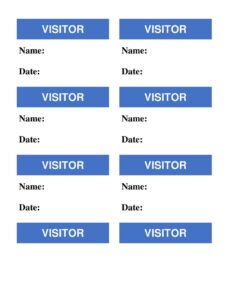
Visitor Badges
Create professional visitor badges with this free template, perfect for tracking guests and improving security — free download in PDF and DOCX.
PDF
DOC
7 downloads
0
likes
Download Files
- DOC
A visitor badge is a printable identification card that guests wear while on your premises, showing who they are, who they’re visiting, and when their visit took place. The most common reason people use one is to manage building security and keep a clear, professional record of everyone who enters and leaves. You can download this visitor badge template free in PDF and DOCX, with no signup required.
What Is a Visitor Badge?
A visitor badge is a temporary credential issued to non-employees — clients, contractors, delivery personnel, interview candidates, vendors, and family members — when they arrive at a workplace, school, clinic, or secured facility. It is typically printed, slipped into a clip or lanyard holder, and worn visibly for the duration of the visit. The badge documents the visitor’s name, the company or person they represent, who they are there to see, and the date or time of entry. Beyond simple identification, a visitor badge helps front-desk staff, security teams, and employees instantly recognize who belongs in a given area, supports emergency headcounts, and creates an audit trail of who was on site at any given moment.
When Do You Need a Visitor Badge?
Visitor badges are useful anywhere a property distinguishes between staff and guests. Common situations include:
- Corporate offices: issuing a badge to clients, job applicants, or partners attending a meeting so reception and staff can identify them.
- Manufacturing and warehouse sites: tracking contractors, inspectors, and delivery drivers who enter restricted or hazardous zones.
- Schools and childcare centers: giving parents, volunteers, and outside service providers a visible badge for student-safety compliance.
- Healthcare facilities: identifying patient visitors, medical reps, and maintenance vendors moving through clinical areas.
- Events and conferences: distinguishing registered attendees, exhibitors, and press with clearly labeled passes.
- Government and high-security buildings: documenting every guest for access control and emergency evacuation records.
Types of Visitor Badges
Not every visit calls for the same badge. A general visitor badge covers most one-time guests. A contractor or vendor badge signals someone doing work on site and may indicate which areas they’re authorized to enter. An escort-required badge tells staff the holder must be accompanied at all times, while a VIP or guest badge is often used for clients and dignitaries. Choosing the right label and color helps everyone interpret a badge at a glance, even from a distance.
What a Visitor Badge Should Have
A complete, useful visitor badge balances clarity with the small amount of space available. The essential elements are:
- The word “VISITOR” printed prominently so the badge is unmistakable.
- The visitor’s full name, large enough to read across a lobby.
- The company or organization the visitor represents.
- The host name — the employee or department being visited.
- The date of the visit, and time in and out where needed.
- A space for a badge number or signature to tie the badge to a sign-in log.
- Your organization’s name or logo for a professional, consistent look.
How to Fill Out a Visitor Badge
Filling out a visitor badge takes only a moment at the front desk:
- Add your organization name or logo at the top so the badge clearly belongs to your site.
- Confirm the “VISITOR” label (or change it to Contractor, Vendor, or Guest) so staff know the holder’s category.
- Write the visitor’s full name in the largest field, printing clearly in capital letters.
- Enter the company or organization the guest is representing, or “N/A” for personal visits.
- Record the host — the employee, team, or department the visitor is there to see.
- Fill in the date, and add time-in and time-out fields if you track duration.
- Assign a badge number that matches the entry in your visitor log for cross-referencing.
- Insert the badge into a clip or lanyard holder and confirm the visitor returns it on departure.
Tips for Managing Visitor Badges Effectively
A badge is only as good as the process behind it. Pair every issued badge with a sign-in sheet or visitor log so each name, host, and time can be reconciled at the end of the day. Use distinct colors or bold labels for different visitor types — for example, red for escort-required and blue for routine guests — so staff can interpret access levels instantly. Print badges on a contrasting background so the “VISITOR” text stays legible, and collect badges at exit to prevent reuse. If you print in advance for a known group, double-check spelling of names and company affiliations beforehand to avoid front-desk delays.
Visitor Badges vs. Employee ID Cards
It’s worth understanding how a visitor badge differs from a permanent employee ID. An employee ID is durable, often encoded for door access, and tied to a single person indefinitely. A visitor badge, by contrast, is temporary, usually disposable or reusable, and intentionally easy to spot as belonging to a non-employee. The visitor badge’s whole purpose is to make a guest stand out, not blend in — which is why the bold “VISITOR” label and a clear expiration or single-day date are central to its design.
Common Mistakes to Avoid
- Leaving fields blank: a badge with no host or date defeats the security purpose and weakens your records.
- Using fonts too small to read: names and labels should be visible from several feet away.
- Forgetting to collect badges: uncollected badges can be reused by unauthorized people.
- Not matching the badge to a log: without a corresponding sign-in entry, you can’t verify who was on site.
- Reusing dated badges: an old date on a badge makes it useless for daily tracking and audits.
- Omitting visitor type: failing to mark contractors or escort-required guests can let people into the wrong areas.
Frequently Asked Questions
What is a visitor badge used for? A visitor badge identifies a non-employee guest while they are on your premises and documents who they are, who they’re visiting, and when. It improves security, helps staff recognize authorized guests, and creates a record for emergency headcounts and audits.
How do I fill out a visitor badge? Add your organization name, write the visitor’s full name, list the company they represent, name the host they’re visiting, and enter the date and any badge number. Insert the badge into a holder and have the guest wear it visibly until they leave.
Is a visitor badge legally required? In most general office settings it is a best practice rather than a legal mandate, but certain industries — such as healthcare, education, and high-security facilities — may face regulations or insurance requirements around visitor tracking. Check the rules that apply to your industry and location.
Can I customize this visitor badge template? Yes. The DOCX version is fully editable, so you can add your logo, change colors by visitor type, adjust field labels, and resize the badge to fit your holders or printer sheets before printing.
How much does this visitor badge template cost? It is completely free to download here in both PDF and DOCX formats, with no signup or account required. You can print as many copies as you need.
Do visitors need to return their badges? Collecting badges at exit is strongly recommended. It prevents reuse by unauthorized individuals, keeps your inventory of badges and holders intact, and lets you confirm that a guest has actually left the building.
This visitor badge template is provided as a general example for informational purposes only and does not constitute legal, security, or compliance advice. Visitor management requirements vary by industry and jurisdiction — consult a qualified professional to ensure your procedures meet applicable regulations.
Related Forms
- Travel Itinerary
- Dressing Room Numbers
- Do Not Adjust Thermostat Sign
- Funeral Planning Form
- Set List
- Change Of Address Form
Browse more in Miscellaneous.