
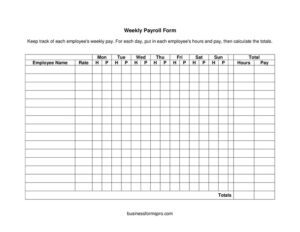
Weekly Payroll Form
Track employee hours and wages with our free Weekly Payroll Form template—record daily hours, calculate totals, and download free in PDF or DOCX.
PDF
DOCX
6 downloads
0
likes
Download Files
- DOCX
A Weekly Payroll Form is a simple worksheet used to record each employee’s hours and pay for a single workweek, day by day. Employers and bookkeepers reach for it to capture Monday-through-Sunday hours, calculate weekly totals, and prepare accurate paychecks. You can download this template free in PDF or DOCX with no signup required.
What Is a Weekly Payroll Form?
A Weekly Payroll Form is a structured record that documents how many hours each employee worked on each day of the week and how much they should be paid. It is typically used by small business owners, office managers, restaurant and retail managers, or bookkeepers who need an organized way to summarize labor before running payroll. The form lists employees by name, breaks the week into seven days (Monday through Sunday), and provides columns to enter daily hours and pay, then a total. Unlike a full payroll register, this is a lightweight worksheet—a starting point for calculating gross wages, spotting overtime, and keeping a tidy paper trail of who worked when.
When Do You Need a Weekly Payroll Form?
This form is useful any time you pay people on a weekly cycle or simply want to keep clean records of hours worked. Common situations include:
- Running a small business that pays hourly employees every week and needs to total hours before issuing checks.
- Managing a shop, café, or salon where shifts vary daily and you must track Monday-through-Sunday hours per worker.
- Overseeing a crew of seasonal or part-time staff whose schedules change from week to week.
- Reconciling timesheets so you can confirm reported hours match scheduled shifts before payday.
- Keeping a backup record for tax, audit, or labor-compliance purposes even if you also use payroll software.
- Tracking a household employee, such as a nanny or caregiver, who is paid weekly based on hours worked.
What a Weekly Payroll Form Should Have
A complete weekly payroll worksheet should make it easy to see, at a glance, who worked and how much they earned. Key elements include a clear space for each employee’s name, a column or row for every day of the week (Monday through Sunday), separate places to enter hours and pay, and a total column that sums the week. It helps to include the week’s start and end dates somewhere on the page so the record is unambiguous later. Room for the preparer’s initials or a signature line adds accountability. Finally, the layout should leave space to note overtime, unpaid breaks, or adjustments so nothing gets lost between the timesheet and the paycheck.
How to Fill Out a Weekly Payroll Form
- Employee name: Write the full name of the worker whose week you are recording. Use one row per employee so each person’s totals stay separate.
- Monday through Sunday: For each day, enter the number of hours that employee worked. If they had a day off, leave it blank or enter zero so the math stays accurate.
- Daily pay: Where the template provides space, record the pay earned each day—usually hours multiplied by the hourly rate. This is helpful when rates differ by shift or day.
- Hours: Add up the seven days to get the employee’s total hours for the week. Double-check that any partial hours are entered consistently (for example, 7.5 rather than 7:30).
- Pay: Calculate the gross pay for the week by combining the daily amounts or multiplying total hours by the rate.
- Total: Confirm the total column reflects the full week’s earnings. Repeat for each employee, then review the whole sheet before processing payroll.
Tips for Accurate Weekly Payroll Records
Small errors on a weekly payroll form compound quickly across a team, so a few habits go a long way. Decide upfront whether you record hours in decimals (7.25) or minutes, and stick with one method across every employee. If your jurisdiction requires overtime pay after a certain number of hours in a week, flag those hours clearly so they are paid at the correct rate. Note unpaid meal breaks rather than including them in worked hours, and record the actual clock-in and clock-out times on the underlying timesheet in case you need to verify a disputed entry. Save each completed week, dated and labeled, so you build a continuous record. Many employers keep these forms for several years to satisfy recordkeeping rules and to answer questions from employees or tax authorities later.
Weekly Payroll Form vs. a Pay Stub
It is worth understanding how this worksheet differs from documents that go to the employee. A Weekly Payroll Form is an internal calculation tool: it captures raw hours and gross pay so you can run payroll. A pay stub, by contrast, is given to the employee and itemizes gross pay, taxes, deductions, and net take-home pay for a pay period. The payroll form feeds the pay stub—you use the totals here to drive the figures that ultimately appear on the check and the stub. Keep both: the worksheet for your records, the stub for the worker.
Common Mistakes to Avoid
- Mixing time formats: Entering 7:45 in one cell and 7.75 in another leads to bad totals. Pick one format and use it everywhere.
- Forgetting the week’s dates: Without start and end dates, an old form can be confused with the current week.
- Including unpaid breaks in worked hours: This inflates pay and can cause disputes; subtract breaks that aren’t paid.
- Skipping overtime: Failing to separate or flag overtime hours can result in underpaying employees and compliance problems.
- Not double-checking the totals: A single transposed digit in the daily column throws off the weekly total and the paycheck.
- Losing the records: Discarding completed sheets removes the proof you may need for audits, taxes, or wage questions.
Frequently Asked Questions
What is a Weekly Payroll Form used for? It is used to record each employee’s daily hours and pay for one workweek and to calculate weekly totals before running payroll. Employers use it as an organized summary that turns raw timesheet data into the gross-pay figures needed to issue paychecks.
How do I fill out the daily columns? Enter the number of hours the employee worked on each day from Monday through Sunday, then record the pay where space is provided. Add the days together to get total weekly hours and total pay, leaving days off blank or set to zero.
Is this Weekly Payroll Form legally binding? The form itself is an internal recordkeeping tool rather than a contract, so it is not a binding agreement on its own. However, accurate payroll records are often required by labor and tax laws, so keeping them complete and truthful is important.
How long should I keep completed payroll forms? Many jurisdictions require employers to retain payroll and time records for several years, though the exact period varies. As a general practice, keep dated copies of each week’s form for a number of years and check your local recordkeeping rules.
Can I use this for salaried employees? The template is designed around hours and daily pay, so it works best for hourly workers. You can still use it for salaried staff to track attendance or hours, but you would record their fixed pay in the total rather than calculating from hours.
How much does this template cost? It is completely free to download here in both PDF and DOCX formats, with no signup or payment required. You can use the PDF as a printable worksheet or edit the DOCX version to add your company name, rates, or extra columns.
This Weekly Payroll Form template is a general example provided for informational purposes only and is not legal, financial, or tax advice. Payroll, overtime, and recordkeeping requirements vary by jurisdiction and situation—consult a qualified accountant, payroll professional, or attorney to ensure your practices comply with applicable laws.
Official resource: for the rules that apply to your situation, see the Consumer Financial Protection Bureau.
Related Forms
- Account Reconciliation Form
- Petty Cash Out
- Theme Park Cash Envelope
- Daily Cash Sheet (3 shifts)
- Balance Sheet
- Sinking Funds Tracker
Browse more in Money.