
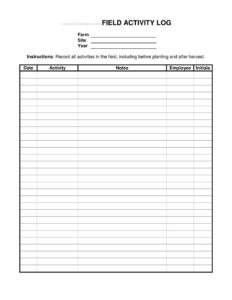
Field Activity Log
Track planting, spraying, and harvest tasks with this free Field Activity Log template, available as a free download in PDF and DOCX formats.
PDF
DOCX
9 downloads
0
likes
Download Files
- DOCX
A Field Activity Log is a record-keeping sheet used in farming to document every task performed on a field, from pre-planting preparation through post-harvest cleanup. Growers, farm managers, and crews rely on it most often to keep an accurate, dated history of what was done, where, and by whom. You can download this Field Activity Log free in both PDF and DOCX formats, with no signup required.
What Is a Field Activity Log?
A Field Activity Log is a simple agricultural record that captures the day-to-day work happening across a farm’s fields and sites. It is typically maintained by the person doing the work or a supervisor who reviews crew activity, and it documents each operation along with the date, the employee responsible, and the specific field or site involved. The log builds a continuous timeline of cultivation, input applications, scouting, irrigation, and harvest events for a given growing year. Because it ties an action to a place, a person, and a date, the log becomes a reliable reference for planning, troubleshooting crop issues, demonstrating compliance, and settling questions about what happened on the ground.
When Do You Need a Field Activity Log?
This log earns its keep any time multiple tasks, fields, or workers need to be tracked across a season. Common situations include:
- Tracking field prep: recording tillage, soil amendments, and bed preparation before planting begins.
- Documenting planting: noting seeding or transplanting dates, varieties, and which site each crop went into.
- Logging input applications: capturing fertilizer, herbicide, or pesticide events for recordkeeping and re-entry interval awareness.
- Supporting audits and certifications: providing organized history for food-safety, organic, or buyer audits.
- Managing crews: confirming who completed which task and on what day across a busy harvest window.
- Reviewing the season: looking back after harvest to evaluate timing, yields, and what to change next year.
What a Field Activity Log Should Have
A complete Field Activity Log connects every entry to a place, a time, and an accountable person. At minimum it should include the farm name and the site or field identifier, the growing year, the activity performed, the date it occurred, the employee who did the work, and a space for that worker’s initials to confirm the entry. A notes column rounds out the record by allowing details that do not fit a single label — weather, equipment used, product names and rates, or observations worth flagging. The clearer and more consistent each column is, the more useful the log becomes when someone needs to reconstruct events months later. Headers should stay uniform so entries can be sorted, scanned, and compared across fields and seasons.
How to Fill Out a Field Activity Log
Work through the columns in order and complete one row per task. Use the fields exactly as the template lays them out:
- Year: Enter the growing season this log covers so entries are grouped correctly across multiple-year records.
- Farm: Write the farm or operation name, especially useful if you manage records for more than one property.
- Site: Identify the specific site, block, or field where the work took place — use the same naming you use on maps or plans.
- Activity: Describe the task plainly, such as “disced field,” “transplanted lettuce,” “sprayed fungicide,” or “harvested first pass.”
- Date: Record the calendar date the activity was performed, not the date you filled in the log.
- Employee: Name the worker or crew lead who carried out the task.
- Initials: Have that employee initial the row to confirm the entry is accurate and complete.
- Notes: Add specifics — product names and rates, equipment, acreage covered, weather, or anything to revisit later.
Fill the log the same day the work happens; details fade fast once the next task starts.
Organizing Logs by Site and Season
Because the form pairs a Site field with a Year field, you can structure your records in whatever way matches your operation. Many growers keep a separate log per field or block so each crop’s full history lives in one place, while others keep one master log per farm and sort by site when they need to review a single area. Either approach works as long as the site names stay consistent from row to row and year to year. Keeping the year clearly marked also lets you archive completed logs and compare, for example, this season’s planting dates against last year’s. Over time these stacked records reveal patterns — which fields drain slowly, which sites need earlier weed control, or where harvest consistently runs late.
Tips for Reliable Field Records
The best logs are filled out in the field, not from memory at the end of the week. Keep a printed copy on a clipboard in the truck or use the DOCX version on a tablet so entries happen in real time. Standardize how you describe activities so “spray,” “sprayed,” and “application” do not split one operation into three different-looking entries. Encourage every worker to initial their own rows; that small step builds accountability and makes follow-up questions easy to direct. Finally, store completed logs somewhere safe and backed up — these records can matter long after the season ends.
Common Mistakes to Avoid
- Leaving the Site or Farm blank: an undated, unlocated entry tells you almost nothing months later.
- Logging from memory: waiting days to record activities introduces errors in dates and details.
- Vague activity descriptions: “worked the field” is far less useful than “cultivated rows 1–8.”
- Skipping initials: without them you lose the accountability the log is meant to provide.
- Ignoring the Notes column: product rates, equipment, and weather often matter more than the activity label itself.
- Inconsistent site names: calling the same block “North 40” and “NF” makes records impossible to sort.
Frequently Asked Questions
What is a Field Activity Log used for? It is used to record every task performed on a farm’s fields throughout a growing season, including activities before planting and after harvest. The log ties each task to a date, a specific site, and the employee who did it, creating a continuous, searchable history of field operations.
Who should fill out the log? Typically the worker or crew lead who performed the task completes the row and adds their initials, while a farm manager may review and store the records. The key is that whoever did the work records it promptly and accurately so the entry reflects what actually happened.
How often should I record entries? Record an entry each time a distinct activity is completed, ideally the same day. Same-day logging keeps dates accurate and ensures details like product rates, acreage, and weather are captured while they are fresh.
Can I use this log for audit or certification recordkeeping? A well-maintained Field Activity Log can support food-safety, organic, or buyer audits by showing an organized history of operations. That said, specific programs have their own required fields and formats, so confirm your certifier’s exact requirements and adapt the log as needed.
Is this Field Activity Log template free? Yes. You can download it completely free in PDF and DOCX formats with no signup required. Use the editable DOCX to add columns for your own needs, or print the PDF for clipboard use in the field.
What is the difference between the Activity and Notes fields? The Activity field names the task in short, standardized terms — such as “sprayed herbicide” or “harvested” — so entries stay easy to sort and scan. The Notes field is for the supporting details that do not fit a label, like product names, application rates, equipment used, or conditions observed.
This Field Activity Log template is a general example provided for informational purposes only and is not legal, regulatory, or agronomic advice. Recordkeeping requirements for pesticide use, certifications, and farm compliance vary by jurisdiction and program — consult your certifier, extension office, or a qualified professional to confirm what your operation must document.
Related Forms
- Animal Healthcare Record
- Spray Record
- Dairy Animal ID List
- Farmers Market Sales Record
- Detailed Egg Production Record
- Farm Store Order Form
Browse more in Agriculture.