
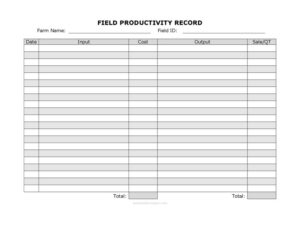
Field Productivity Record
Track inputs, outputs, costs, and yearly yields with this free Field Productivity Record template — download in PDF or DOCX, no signup required.
PDF
DOC
2 downloads
0
likes
Download Files
- DOC
A Field Productivity Record is a farm management document used to track the inputs, outputs, costs, and revenue tied to a specific field across a growing season or full year. Farmers and farm managers rely on it to see which fields actually turn a profit and which are draining resources. You can download this Field Productivity Record template for free in PDF or DOCX, with no signup required.
What Is a Field Productivity Record?
A Field Productivity Record is a structured log that ties farming activity to a single, identifiable field. Rather than lumping all costs and harvests together for an entire operation, it isolates the performance of one plot so you can measure its real productivity. The record captures what went into the field — seed, fertilizer, labor, water, and other inputs — alongside what came out of it in terms of yield and sales. It is typically maintained by a farm owner, field manager, or agronomist throughout the season. Over time, these entries build into a yearly productivity picture that supports better crop rotation, budgeting, and land-use decisions.
When Do You Need a Field Productivity Record?
This record becomes valuable any time you need to understand the true performance of a piece of land. Common situations include:
- Comparing fields: You farm several plots and want to know which Field ID consistently delivers the best output relative to its cost.
- Planning crop rotation: You need historical input and output data to decide what to plant next season in each field.
- Budgeting for the year: You want to forecast input costs and expected sale revenue based on past records.
- Applying for loans or grants: Lenders and agricultural programs often want documented evidence of yields and productivity.
- Identifying underperforming land: A field that costs more in inputs than it returns in sales may need soil testing, drainage work, or a different crop.
- Tax and accounting support: Detailed cost and sale records help when reconciling farm income and expenses.
What a Field Productivity Record Should Have
A complete record connects every entry back to a specific field and date so the data stays meaningful. It should clearly identify the farm and field, list each input with its associated cost, capture the output produced, and document the sale price or value. A running total and a yearly productivity summary tie the individual entries together. Without these elements, the record becomes a loose pile of numbers that cannot be compared field to field or season to season.
How to Fill Out a Field Productivity Record
- Farm Name: Enter the name of your farm or operation at the top so the record is clearly attributed, especially if you manage multiple properties.
- Field ID: Record the unique identifier for the field — a number, name, or map reference — so every entry is tied to the correct plot.
- Date: Log the date of each activity, whether it is an input application, a harvest, or a sale. Consistent dating lets you build a season timeline.
- Input: Describe what was added to the field, such as seed, fertilizer, pesticide, irrigation, or labor hours.
- Cost: Enter the expense associated with that input so you can track spending per field.
- Output: Record the yield produced, using consistent units such as bushels, tons, bales, or crates.
- Sale/QT: Note the sale price or the quantity sold so revenue can be matched against output.
- Total: Calculate the running total of costs and revenue for the field.
- Yearly Productivity: Summarize the field’s net performance for the year to compare it against other fields and prior seasons.
How to Use the Data You Collect
The real value of a Field Productivity Record appears once you start analyzing it. Subtract total input cost from total sale revenue to find net return per field, then divide by acreage to compare plots of different sizes fairly. Watch for trends across multiple seasons: a field whose output is declining while input costs climb may have a soil-fertility, pest, or compaction problem worth investigating. You can also use the Sale/QT column to spot timing patterns — selling the same crop at different points in the season can produce very different returns. Reviewing the yearly productivity figure each off-season helps you decide where to invest, where to rotate crops, and which fields might be better leased, rested, or replanted.
Tips for Keeping Accurate Records
Record entries the same day work is done rather than reconstructing them later from memory. Keep your units consistent within each column so totals add up correctly, and round costs the same way every time. If several people work the farm, agree on one naming system for Field IDs and inputs so the data stays clean. Storing the DOCX version on a shared drive lets the whole team update a living record, while the PDF version works well for printing and keeping a field-side paper copy.
Common Mistakes to Avoid
- Mixing fields: Logging costs or output without a clear Field ID makes it impossible to compare plots.
- Inconsistent units: Switching between tons and bushels in the Output column distorts your totals.
- Forgetting indirect inputs: Leaving out labor, fuel, or irrigation understates true cost and overstates profit.
- Skipping dates: Undated entries break the seasonal timeline and weaken your analysis.
- Not recording sales promptly: Delaying Sale/QT entries leads to guesswork and lost revenue detail.
- Ignoring the yearly summary: Without rolling entries into a yearly productivity figure, the record never answers the key question of which field paid off.
Frequently Asked Questions
What is a Field Productivity Record used for? It is used to track the inputs, costs, outputs, and sales tied to a specific field so you can measure its profitability and productivity. Farmers use it to compare fields, plan crop rotation, and support budgeting decisions. Over a season it builds into a clear performance picture for each plot.
How do I fill out the Field ID field? Use whatever unique identifier you already use for that plot — a number, a name, or a map reference. The key is to stay consistent so every input, output, and sale is tied to the same field. This consistency is what makes field-to-field comparison possible.
Is this form legally binding? No, a Field Productivity Record is an internal management and recordkeeping tool, not a contract. It documents your farming activity for your own analysis and may support tax or loan applications, but it does not create legal obligations on its own.
How much does this template cost? It is completely free to download from Business Forms Pro in both PDF and DOCX formats. There is no signup, subscription, or payment required, and you can edit and reuse it for as many fields and seasons as you need.
Can I track multiple fields with one template? Yes. Use a separate Field ID for each plot, or maintain a copy of the record per field. The Farm Name and Field ID fields keep entries organized so you can analyze each plot individually and then compare them.
What units should I use for Output? Use the standard unit for your crop — bushels, tons, bales, crates, or pounds — and apply it consistently throughout the record. Mixing units in the same column makes totals and yearly comparisons unreliable.
This Field Productivity Record template is a general example provided for informational purposes only and is not legal, financial, or tax advice. Agricultural recordkeeping, reporting, and program requirements vary by jurisdiction and operation — consult a qualified accountant, agronomist, or advisor for guidance specific to your farm.
Related Forms
- Animal Profile Record
- Field Planning Worksheet
- Dairy Animal ID List
- Three Year History Form
- Field Activity Log
- Farm Inventory Record
Browse more in Agriculture.