
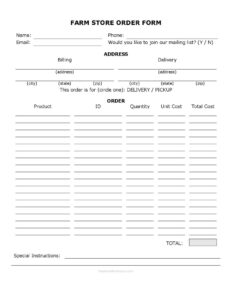
Farm Store Order Form
Download a free Farm Store Order Form template to record customer orders, products, quantities, and totals for delivery or pickup — free download in PDF and DOCX.
PDF
DOC
9 downloads
0
likes
Download Files
- DOC
A Farm Store Order Form is a simple document that lets customers place orders for farm products and lets your store record exactly what was requested, how much it costs, and whether it’s for delivery or pickup. It’s the everyday tool farm stands, CSAs, and small agricultural retailers use to keep orders organized and avoid mix-ups. You can download it free in both PDF and DOCX formats, with no signup required.
What Is a Farm Store Order Form?
A Farm Store Order Form is a written record created when a customer wants to buy products from a farm store, market stand, or direct-to-consumer farm operation. It is typically filled out by the customer or by staff taking the order, and it captures who the buyer is, what they want, the quantities, and the total cost. The form documents the agreed transaction so the farm can pick, pack, and fulfill it accurately. It also serves as a paper trail for billing and delivery, helping both sides confirm the order was understood correctly. For small farms that sell eggs, produce, dairy, meat, honey, or value-added goods, it brings order to a busy, seasonal sales rhythm.
When Do You Need a Farm Store Order Form?
This form is useful any time you accept an order that won’t be rung up instantly at a checkout counter. Common situations include:
- CSA and weekly share orders — recording recurring produce boxes for delivery or pickup.
- Pre-orders for seasonal items — pumpkins, holiday turkeys, jams, or bulk vegetables ordered ahead of harvest.
- Bulk and wholesale requests — restaurants or neighbors ordering large quantities of eggs, meat, or produce.
- Phone and email orders — capturing customer details and product lists when the buyer isn’t physically present.
- Farm stand delivery routes — organizing what goes on each delivery run and to which address.
- Farmers market reservations — letting regulars reserve items for pickup at the next market day.
What a Farm Store Order Form Should Have
A complete order form leaves no room for confusion about who ordered what. At minimum it should identify the customer with name and full contact details, list each product with its quantity, unit cost, and line total, and show an overall order total. It should specify whether the order is for delivery or pickup, capture a billing address and delivery address where they differ, and provide space for special instructions such as allergies, packaging preferences, or gate codes. An optional mailing list opt-in helps you stay in touch with regulars. Clear, legible fields and a running total reduce errors at fulfillment.
How to Fill Out a Farm Store Order Form
- Enter the customer’s Name and assign an Id or order number if you track orders by reference.
- Record contact details: Phone and Email so you can confirm or follow up on the order.
- Fill in the Address, City, State, and Zip for the customer’s location.
- Note the Billing address and Delivery address if they are different from one another.
- Under This Order Is For — Circle One: Delivery / Pickup, mark how the customer will receive the order.
- For each item, write the Product name, the Quantity, and the Unit Cost, then calculate the line Total Cost.
- Add up all line items to fill in the overall Total.
- Use Special Instructions for notes like “leave at side door,” “no plastic bags,” or substitution preferences.
- Ask Would You Like To Join Our Mailing List? and mark the customer’s choice.
- Review the form with the customer to confirm everything is correct before fulfilling.
Delivery vs. Pickup: Getting the Logistics Right
The delivery/pickup choice drives how you fulfill the order, so treat it as more than a checkbox. For delivery, confirm the delivery address matches the route and note any access details — gates, buzzers, or a safe drop spot — in the special instructions. For pickup, agree on a window and location, especially during busy market hours or farm-store opening times. Clarifying this up front prevents perishable items from sitting out and reduces no-shows. If you run regular delivery days, group orders by zip code or neighborhood to plan an efficient route, and use the order Id to keep everything traceable from order to handoff.
Pricing, Totals, and Record-Keeping Tips
Because farm products are often priced by weight, bunch, dozen, or case, the unit cost and quantity fields do a lot of work. Be specific about the unit — “per dozen,” “per pound,” “per pint” — so the total cost calculation is unambiguous. When an item is priced by weight and the final weight isn’t known until packing, note an estimate and adjust the total at fulfillment. Keep completed forms in date order so you can reconcile sales, track popular products across the season, and follow up with customers who opted into your mailing list. A tidy stack of order forms also makes seasonal planning and inventory decisions far easier.
Common Mistakes to Avoid
- Skipping the delivery/pickup choice — leaving it blank causes fulfillment confusion and missed handoffs.
- Vague product descriptions — “tomatoes” instead of “2 lbs heirloom tomatoes” leads to wrong picks.
- Math errors in totals — always double-check unit cost times quantity and the grand total.
- Missing contact info — without a phone or email you can’t confirm changes or substitutions.
- Confusing billing and delivery addresses — note clearly when they differ to avoid misdirected orders.
- Forgetting special instructions — allergy notes and access details belong on the form, not in someone’s memory.
Frequently Asked Questions
What is a Farm Store Order Form used for? It is used to record a customer’s order for farm products, including the items, quantities, prices, and whether the order is for delivery or pickup. It gives both the farm and the customer a clear record of what was agreed so the order can be fulfilled accurately.
How do I fill out a Farm Store Order Form? Start with the customer’s name and contact details, then add their address and any separate billing or delivery address. List each product with its quantity, unit cost, and total, mark delivery or pickup, add special instructions, and total the order before confirming it.
Is this form legally binding? An order form documents an agreed sale and can serve as evidence of the transaction, but it is not a formal contract on its own. For larger wholesale arrangements you may want a separate written agreement; for everyday farm-store sales, a clear, signed-off order form is generally sufficient.
Can I use the same form for delivery and pickup orders? Yes. The form includes a “Circle One: Delivery / Pickup” field so you can use one template for both, simply marking the customer’s choice and filling in the relevant address details for delivery orders.
How much does this Farm Store Order Form cost? Nothing — it is completely free to download from Business Forms Pro in both PDF and DOCX formats, with no signup or account required. You can print it as-is or edit the DOCX to add your farm’s name, logo, and product list.
Can I customize the form for my farm? Absolutely. Open the DOCX version to add your branding, list your specific products and units, adjust the pricing columns, or change the mailing-list wording to match how you communicate with customers.
This template is a general example provided for informational purposes only and is not legal, financial, or tax advice. Business requirements and sales regulations vary by jurisdiction — consult a qualified professional to ensure your forms and practices comply with the rules that apply to your farm operation.
Related Forms
- Field History Sheet
- Field Planning Worksheet
- Spray Record
- Farmers Market Sales Record
- Detailed Egg Production Record
- Animal Healthcare Record
Browse more in Agriculture.