
Deal Recap
Download a free Deal Recap form template for auto sales to summarize selling price, trade, financing, F&I reserves, and commissions — free download in PDF and DOCX.
PDF
DOC
3 downloads
0
likes
Download Files
- DOC
A Deal Recap is the internal worksheet a dealership uses to summarize every financial detail of a vehicle sale on a single page — from selling price and trade allowance to financing terms, F&I reserves, and commissions. Sales managers and F&I staff rely on it to confirm a deal is profitable and complete before it’s finalized. You can download this Deal Recap template free in both PDF and DOCX formats, with no signup required.
What Is a Deal Recap?
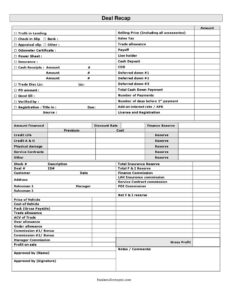
A Deal Recap is an internal summary document created by a car dealership’s sales and finance office to capture the full financial structure of a single vehicle transaction. It pulls together the customer-facing numbers (selling price, sales tax, down payment, amount financed) and the back-office numbers (vehicle cost, pack, trade ACV, finance reserve, and commissions). Unlike the buyer’s contract, the Deal Recap is built for the dealership: it lets a manager verify gross profit, approve the structure, and assign commissions before the paperwork is sent to funding. It serves as the single reference point that ties the desking, F&I, and accounting steps of a deal together.
When Do You Need a Deal Recap?
The Deal Recap is used at the point a sale is being structured and approved, and again when accounting reconciles the deal. Common scenarios include:
- A salesperson and desk manager are working a deal and need to confirm front-end and back-end gross before signing.
- The F&I office needs to total finance reserve, credit life, A&H, service contracts, and physical damage premiums into one place.
- A manager must approve the deal structure and assign salesman, manager, and F&I commissions.
- Accounting needs a clean summary to post the deal, match the bank funding, and verify the trade payoff and ACV.
- A trade-in is involved and you need to document trade allowance, over/under allowance, and actual cash value.
- The deal is being audited or reviewed and you need a one-page record showing how profit on sale was calculated.
What a Deal Recap Should Have
A complete Deal Recap separates the transaction into clear blocks: the sale terms, the financing, the insurance and F&I reserves, the trade, and the profit and commission breakdown. It should show the selling price including accessories, sales tax, license and registration, total cash down payment, amount financed, and the financing terms such as APR, add-on interest rate, number of payments, and days before the first payment. It must also document the vehicle cost, pack, trade allowance versus ACV, each reserve line, and a final gross profit figure. Approval fields — an approved-by name and signature plus a verified-by line — make the recap official.
How to Fill Out a Deal Recap
- Enter the selling price (including all accessories), then add sales tax, license and registration, and any PO amount to build the gross sale figure.
- Record the trade allowance, ACV of trade, and calculate over allowance or under allowance, plus the payoff and lien holder.
- Log the down payment detail: cash deposit, cash receipts, COD, deferred down, and the total cash down payment.
- Complete the financing block: amount financed, add-on interest rate/APR, discount rate, number of payments, number of days before 1st payment, and the good till date.
- Total the insurance and reserves: credit life, credit A&H, physical damage, service contracts, finance reserve, and total F&I reserve.
- Fill the profit section: price of vehicle, cost of vehicle, pack, profit on sale, and gross profit.
- Assign commission #1/bonus, commission #2/bonus, manager commission, and the salesman name.
- Add notes/comments, complete verified by, and have the manager sign the approved by name and signature lines.
Understanding the F&I and Reserve Lines
The finance and insurance section is where many Deal Recaps get complicated, so it helps to understand each line. Finance reserve is the dealership’s share of the rate spread on the loan, while credit life and credit A&H reflect optional insurance products with their own premium, cost, and reserve. Physical damage and service contracts add further reserve lines, and the form rolls these into a total insurance reserve and total F&I reserve. The commission columns — finance commission, LAH insurance commission, service contract commission, and PDI commission — translate those reserves into pay. Filling these accurately matters because back-end gross often makes up a large portion of total deal profit.
Verifying the Deal Before Approval
Before a manager signs the approved by line, double-check the supporting documents referenced on the recap. The check in slip, appraisal slip, and odometer certificate confirm the trade was received and inspected; the truth in lending disclosure and power sheet support the financing terms; and the bank, insurance, and registration entries should match the funding package. A few minutes spent reconciling the recap against these slips prevents funding delays and chargebacks later. The verified by field exists precisely so a second set of eyes confirms the numbers before they reach accounting.
Common Mistakes to Avoid
- Listing the trade allowance as profit without subtracting the ACV of trade, which overstates gross.
- Forgetting to include accessories, pack, or PDI in the cost side, making the deal look more profitable than it is.
- Mismatching the amount financed on the recap with the Truth in Lending figures, which can hold up bank funding.
- Leaving the payoff or lien holder blank on a trade, causing title and accounting problems.
- Skipping the verified by or approved by signature, so the deal has no documented sign-off.
- Double-counting reserve on the F&I lines, which inflates commissions and triggers later corrections.
Frequently Asked Questions
What is a Deal Recap used for? A Deal Recap is an internal dealership worksheet that summarizes the entire financial structure of a vehicle sale on one page. It shows selling price, trade, financing, F&I reserves, and commissions so a manager can verify profit and approve the deal before it’s finalized. It is not given to the customer.
How is a Deal Recap different from the buyer’s purchase agreement? The purchase agreement is the legally binding contract between the dealership and the buyer, while the Deal Recap is an internal summary used only by dealership staff. The recap includes confidential figures like vehicle cost, pack, ACV, reserve, and commissions that never appear on customer paperwork.
Who fills out the Deal Recap? Typically the salesperson or desk manager starts it during desking, the F&I manager completes the financing and reserve lines, and a sales manager reviews and signs the approved-by line. The verified-by field is often completed by accounting or a second manager.
How do I calculate gross profit on the recap? Gross profit generally combines the front-end profit (price of vehicle minus cost of vehicle, adjusted for pack and any over or under trade allowance) with the back-end F&I reserve. The form’s profit-on-sale and gross-profit lines bring these together, but your dealership’s accounting method determines the exact formula.
Is a Deal Recap a legally binding document? No. The Deal Recap is an internal management and accounting tool, not a contract with the customer. The legally binding terms live in the retail installment contract, the Truth in Lending disclosure, and the buyer’s order.
Is this Deal Recap template really free? Yes. You can download this Deal Recap template free in both PDF and DOCX formats with no signup or payment required. Edit the fields to match your dealership’s process, store fields, and commission structure.
This Deal Recap template is a general example provided for informational purposes only and is not legal, financial, tax, or accounting advice. Dealership accounting practices, commission structures, and lending disclosure requirements vary by state and by lender — consult a qualified professional or your compliance department before relying on this form.
Official resource: for the rules that apply to your situation, see your state DMV.
Related Forms
- Vehicle Loan Payment Calculator
- Fuel Tracker
- Car Bill of Sale
- Auto Bill Of Sale
- Used Car Mechanic Checklist
- Truck Bill of Sale
Browse more in Auto Sales.