
Vehicle Loan Payment Calculator
Estimate your monthly car payment with this free Vehicle Loan Payment Calculator template — track price, fees, and interest in a free download.
PDF
DOCX
2 downloads
0
likes
Download Files
- DOCX
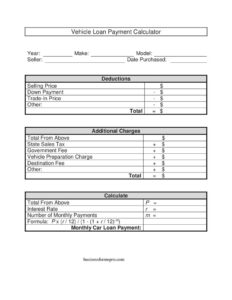
A Vehicle Loan Payment Calculator is a worksheet that helps you estimate the monthly payment on a car loan by combining the vehicle’s selling price, deductions like a down payment and trade-in, additional charges such as taxes and fees, and the loan terms. People most commonly use it before signing a purchase agreement to confirm a payment fits their budget. It’s free to download in PDF and DOCX with no signup required.
What Is a Vehicle Loan Payment Calculator?
A Vehicle Loan Payment Calculator is a structured worksheet used by car buyers, private sellers, and dealership staff to work out the true amount financed and the resulting monthly payment. Rather than guessing, it walks you through every number that affects the loan: the agreed selling price, any amounts that reduce it, the taxes and government fees that add to it, and finally the principal, interest rate, and term. Using the standard amortization formula, it produces a realistic monthly figure. It documents the math behind a deal so both buyer and seller can see exactly how the final payment was derived before anything is signed.
When Do You Need a Vehicle Loan Payment Calculator?
This calculator is useful any time financing a vehicle is on the table. Common situations include:
- Shopping for a car and wanting to know whether a monthly payment fits your household budget before you visit a lot.
- Comparing two vehicles with different prices, fees, or interest rates to see which is genuinely more affordable.
- Negotiating a deal where a larger down payment or a higher trade-in value could lower your monthly cost.
- Selling a vehicle privately and helping a buyer understand what their financed payment might look like.
- Checking a dealer’s quote to make sure the advertised payment lines up with the price, taxes, and fees you were shown.
- Adjusting loan length, such as testing a 48-month versus 60-month term to balance the payment against total interest paid.
What a Vehicle Loan Payment Calculator Should Have
A complete calculator captures three groups of information plus the loan math. First, it identifies the vehicle and the deal: year, make, model, seller, and date purchased. Second, it lists deductions — the selling price reduced by a down payment, a trade-in, and any other credits — to find the net amount. Third, it adds additional charges like state sales tax, government registration fees, vehicle preparation, and destination charges. The result is the principal that will actually be financed. Finally, it includes the loan terms — interest rate and number of monthly payments — and applies the amortization formula to output a single, clear monthly payment.
How to Fill Out a Vehicle Loan Payment Calculator
- Enter the vehicle Year, Make, and Model, the Seller name, and the Date Purchased at the top so the worksheet ties to a specific deal.
- In the Deductions section, write the Selling Price, then subtract the Down Payment, the Trade-In Price, and any Other credit. Add these reductions and record the Total net amount.
- In Additional Charges, carry the Total From Above, then add State Sales Tax, the Government Fee, the Vehicle Preparation Charge, the Destination Fee, and any Other charge. Sum them for the Total amount financed.
- Set P (principal) equal to that financed total.
- Enter your annual Interest Rate as r (for example, 0.06 for 6%), and the Number of Monthly Payments as m.
- Apply the formula P × (r / 12) / (1 − (1 + r / 12)⁻ᵐ) and write the result in Monthly Car Loan Payment.
Understanding the Loan Formula
The formula at the bottom of the worksheet is the standard fixed-rate amortization equation. It takes your principal (P), divides the annual rate (r) by 12 to get the monthly rate, and spreads repayment evenly across the number of payments (m). The result is a level payment that covers both interest and principal for the life of the loan. A key tip: convert your interest rate to a decimal before dividing — 7.5% becomes 0.075, not 7.5. Small input errors here cause large swings in the answer, so double-check that r is a decimal and m is a count of months, not years.
Tips for Lowering Your Monthly Payment
The worksheet makes it easy to see which levers matter most. Increasing your down payment or maximizing your trade-in value reduces the principal directly. Negotiating the selling price and questioning soft add-ons like a vehicle preparation charge can trim the amount financed. A lower interest rate — often available with stronger credit or a shorter term — reduces the monthly cost too. Extending the term lowers the payment but increases total interest paid, so weigh both numbers. Re-running the calculator with a few scenarios before committing helps you find the combination that fits your budget without overpaying over time.
Common Mistakes to Avoid
- Forgetting taxes and fees: financing only the selling price understates your real payment — always carry the full charges total into P.
- Entering the rate as a whole number: using 6 instead of 0.06 produces a wildly wrong result.
- Mixing up years and months: m must be the total number of monthly payments (a 5-year loan is 60, not 5).
- Double-counting a trade-in: apply it once as a deduction, not also as a down payment.
- Ignoring rolled-in negative equity: if you owe more on a trade than it’s worth, that balance increases what you finance.
- Treating the estimate as a lender quote: actual offers may include different fees, add-on products, or rate adjustments.
Frequently Asked Questions
What is a Vehicle Loan Payment Calculator used for? It is used to estimate the monthly payment on a car loan by combining the selling price, deductions like a down payment and trade-in, added taxes and fees, and the loan’s rate and term. Buyers use it to budget before purchasing, and sellers use it to explain financing math. It produces a clear monthly figure from the standard amortization formula.
How do I calculate my monthly car payment? First find the amount financed by subtracting your down payment and trade-in from the selling price, then adding taxes and fees. Use that as the principal P, set r to your annual rate as a decimal, and m to the number of months. Plug them into P × (r / 12) / (1 − (1 + r / 12)⁻ᵐ).
Does the calculator include sales tax and fees? Yes. The Additional Charges section has lines for state sales tax, government fees, a vehicle preparation charge, and a destination fee, plus an Other line. Adding these to your net price gives the true amount you finance, which makes the payment estimate far more accurate.
Is the monthly payment from this worksheet exact? It is a close estimate based on the inputs you provide. Actual lender quotes can differ because of added products, dealer fees, rate adjustments based on credit, or different compounding. Use it to plan and compare, then confirm the final figure with your lender.
How much does this calculator cost? Nothing. The Vehicle Loan Payment Calculator is free to download in PDF and DOCX with no signup required. You can fill it out by hand, on screen, or print copies for several vehicles you are comparing.
Can I use it for a private-party purchase, not just a dealership? Absolutely. The worksheet works for any financed vehicle. For a private sale you may have fewer added charges — perhaps just sales tax and registration — but the deductions, principal, and formula sections work exactly the same way.
This template is a general example provided for informational purposes only and is not legal, financial, or tax advice. Loan terms, taxes, and fees vary by lender and jurisdiction, and calculated figures are estimates only — consult a qualified financial professional or your lender before relying on these numbers.
Official resource: for the rules that apply to your situation, see your state DMV.
Related Forms
- Deal Recap
- Motor Vehicle Bill of Sale
- Odometer Statement
- Vehicle Invoice
- Salesperson Commission Voucher
- Used Car Mechanic Checklist
Browse more in Auto Sales.