
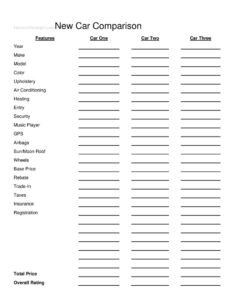
New Car Comparison
Use this free New Car Comparison template to weigh features, prices, and ratings across three vehicles side by side — free PDF and DOCX download.
PDF
DOCX
7 downloads
0
likes
Download Files
- DOCX
A New Car Comparison form is a simple side-by-side worksheet that lets you evaluate up to three vehicles across features, options, and total cost so you can choose the right car with confidence. People most often use it when they are torn between a few finalists at the dealership and want an objective way to compare apples to apples. You can download this template free in both PDF and DOCX formats — no signup required.
What Is a New Car Comparison?
A New Car Comparison is a structured document used by car shoppers to record and contrast the key attributes of multiple vehicles in one place. Instead of relying on memory after visiting several lots, you log each car’s year, make, model, equipment, and pricing breakdown into columns labeled Car One, Car Two, and Car Three. The form documents both the practical features — air conditioning, airbags, GPS, wheels — and the financial picture, from base price through taxes, rebates, and trade-in value. The result is a clear, organized snapshot that turns a confusing decision into a measurable one, helping buyers, families, and even fleet managers justify a purchase.
When Do You Need a New Car Comparison?
This worksheet earns its place any time you are weighing more than one vehicle and want to avoid an impulse decision. Common situations include:
- You have narrowed your search to two or three models and need to see which offers the most value for the money.
- You are visiting multiple dealerships and want a consistent way to record quotes, options, and out-the-door pricing.
- A salesperson presents several trims, and you want to compare the base price against the rebate and trade-in offers in writing.
- You are buying for a household and need to balance comfort features — heating, upholstery, sun/moon roof — against safety items like airbags and security systems.
- You manage a small business or fleet and must document why one vehicle was chosen over the alternatives.
- You are shopping online and want to copy listing details into one place before scheduling test drives.
What a New Car Comparison Should Have
A useful comparison form captures both objective specs and subjective impressions. The essentials include clear identifying details for each car (year, make, model, and color), a complete feature checklist so nothing is overlooked, and a full cost breakdown that goes beyond the sticker. Just as important is a place to record your overall rating, which forces you to summarize how each vehicle stacks up after the details are filled in. The best version keeps every category in the same row across all three columns so differences jump out at a glance.
How to Fill Out a New Car Comparison
- Label the three vehicle columns as Car One, Car Two, and Car Three, then enter the Year, Make, Model, and Color for each.
- Record interior details under Upholstery, Air Conditioning, and Heating, noting cloth versus leather and any climate options.
- Mark the comfort and tech features — Entry (keyless or standard), Security, Music Player, GPS, and Sun/Moon Roof.
- Note safety and exterior items such as Airbags (count and type) and Wheels (size and material).
- Move to the cost section: enter the Base Price, then subtract any Rebate and Trade-In value.
- Add the variable costs: Taxes, Insurance, and Registration for each vehicle.
- Calculate and write the Total Price so you can compare true out-the-door figures.
- Finally, assign an Overall Rating to each car, weighing both the features and the total cost.
Comparing Features Versus Cost
The real power of this form is forcing a balance between what a car offers and what it costs. A vehicle with a higher base price may still win once a generous rebate and a strong trade-in offer lower its total. Conversely, a cheaper sticker can creep upward after taxes, insurance, and registration are added. Use the feature rows to flag must-haves versus nice-to-haves — for example, airbags and a security system might be non-negotiable, while a sun/moon roof or premium upholstery is a bonus. When two cars are close, the feature checklist often becomes the tiebreaker.
Tips for an Accurate Comparison
Fill out the form during or immediately after each visit while details are fresh, and ask the salesperson to confirm pricing figures in writing. Compare similar trim levels so the columns are fair, and always include the trade-in and rebate figures specific to each dealer, since these can vary widely. Keep the completed sheet handy when you return to negotiate — having the numbers organized signals that you have done your homework and can strengthen your bargaining position.
Common Mistakes to Avoid
- Comparing only base prices and ignoring taxes, insurance, and registration, which can change the ranking entirely.
- Mixing different trim levels in the same comparison, making the feature columns misleading.
- Leaving the overall rating blank — without it, the worksheet lists facts but never reaches a conclusion.
- Forgetting to record the trade-in value separately for each dealer, since offers often differ.
- Relying on memory for features instead of writing them down at the lot.
- Overweighting a single flashy feature, like GPS, while overlooking total cost or safety equipment.
Frequently Asked Questions
What is a New Car Comparison used for? It is a worksheet that lets you evaluate up to three vehicles side by side across features, options, and total cost. Shoppers use it to make an informed, objective decision instead of relying on memory or a salesperson’s pitch. It is especially helpful when several cars seem similar at first glance.
How do I fill out the cost section correctly? Start with the base price, then subtract any rebate and trade-in value, and add taxes, insurance, and registration to reach the total price. Doing this for each vehicle reveals the true out-the-door cost rather than just the sticker. Always use figures confirmed by the dealer for accuracy.
Can I compare fewer than three cars? Yes. The template includes columns for Car One, Car Two, and Car Three, but you can leave any unused column blank. It works just as well for comparing two finalists or for adding a third option later in your search.
Is this New Car Comparison form legally binding? No. It is a personal planning and decision-making tool, not a contract. The actual sale is governed by the dealership’s purchase agreement, so any figures you record here should be confirmed on official paperwork before you buy.
How much does the template cost? It is completely free to download here in both PDF and DOCX formats, with no signup required. You can print the PDF to use at the dealership or edit the DOCX version on your computer to customize the feature rows.
Should I bring the completed form when I negotiate? Yes, it can be very useful. Having organized pricing and feature details shows you have compared options carefully, which can support your negotiating position and help you spot when one offer is stronger than another.
This template is a general example provided for informational purposes only and is not legal, financial, or tax advice. Vehicle pricing, fees, taxes, and registration requirements vary by location and dealer. Consult a qualified professional or review your official purchase documents before making a buying decision.
Official resource: for the rules that apply to your situation, see your state DMV.
Related Forms
- Motorcycle Bill of Sale
- Used Car Mechanic Checklist
- Salesperson Commission Voucher
- We Owe Form
- Vehicle Loan Payment Calculator
- Bill Of Sale
Browse more in Auto Sales.