
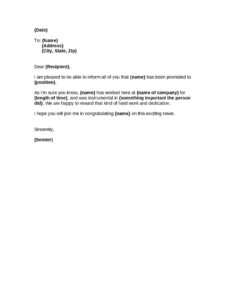
Internal Promotion Announcement
Announce a staff promotion with our free Internal Promotion Announcement template, an easy-to-edit letter you can customize and free download in PDF or DOCX.
DOCX
2 downloads
0
likes
Download Files
- DOCX
An Internal Promotion Announcement is a short business letter used to inform a team, department, or entire company that a colleague has been promoted to a new role. The most common reason people use it is to recognize an employee publicly while keeping coworkers informed of changes in responsibility and reporting lines. This template is free to download in both PDF and DOCX, with no signup required.
What Is an Internal Promotion Announcement?
An Internal Promotion Announcement is a written communication, typically sent by a manager, supervisor, or HR representative, that publicly confirms an employee’s move into a higher or different position. It documents who was promoted, what their new title is, and often a brief mention of their tenure and key contributions. The letter serves both a practical purpose — clarifying organizational changes — and a cultural one, celebrating achievement and signaling that hard work is rewarded. Unlike a private offer letter or an internal HR record, this announcement is meant to be shared with a wider audience so that colleagues understand the new reporting structure and can offer their congratulations to the promoted individual.
When Do You Need an Internal Promotion Announcement?
This letter is useful any time a promotion affects how a team works together or how people interact with the promoted employee. Common scenarios include:
- A staff member is moving from an individual contributor role into a management or supervisory position.
- An employee has been elevated to a leadership title that changes who reports to whom.
- You want to formally recognize a long-tenured worker’s loyalty and contributions in front of peers.
- A department is being reorganized and a new lead needs to be introduced to the wider company.
- You are sending a morale-boosting message to reinforce that the organization values dedication and growth.
- HR wants a consistent, professional template to use for every promotion announcement across the company.
What an Internal Promotion Announcement Should Have
A complete announcement is brief but informative. It should clearly state the employee’s name, their new position, and ideally how their role differs from before. It should reference the person’s history with the company and at least one meaningful accomplishment that earned the promotion. A warm, congratulatory tone is essential — this is a celebratory document, not a dry memo. Finally, it should be properly addressed and signed by a credible sender, such as a manager or executive, so recipients know the news is official and endorsed by leadership.
How to Fill Out an Internal Promotion Announcement
- Enter the Date at the top so the announcement is properly dated and timely.
- In the To line, add the recipient’s Name, then their Address and City, State, Zip if you are sending a formal mailed or individually addressed copy.
- Open with the greeting, replacing Dear {Recipient} with the audience’s name — this could be an individual, a team, or a general salutation like “Dear Team.”
- State the news by inserting the promoted employee’s {name} and their new {position} in the opening sentence.
- Add context by entering the {name of company} and the employee’s {length of time} with the organization to highlight their tenure.
- Describe {something important the person did} — a specific project, achievement, or contribution that justifies the promotion.
- Keep the congratulatory closing line that invites colleagues to celebrate the news.
- Sign off with Sincerely and add the {Sender} name and title to authorize the announcement.
Tips for Writing a Strong Promotion Announcement
The most memorable announcements feel personal rather than templated. When you fill in the accomplishment field, choose something concrete — “led the migration to a new inventory system” lands better than “was a great employee.” Mentioning the length of time with the company adds weight, especially for long-serving staff. Keep the overall message positive and forward-looking; avoid comparing the promoted person to others or detailing salary information, which should remain confidential. If the promotion changes reporting lines, you may add a sentence clarifying who the employee will now lead or report to so the rest of the team isn’t left guessing.
How It Differs From Related Documents
An Internal Promotion Announcement is not the same as a promotion offer letter, which is a private document extended to the employee outlining the new title, compensation, and start date. It also differs from a press release or external announcement, which is aimed at customers, partners, or the public. This letter sits in between — it is internal-facing, celebratory, and concise. It assumes the employee has already accepted the promotion and focuses on informing colleagues rather than negotiating terms. Because it travels widely within the organization, keep the content appropriate for any internal reader to see.
Common Mistakes to Avoid
- Forgetting to confirm the new title is finalized and accepted before announcing it broadly.
- Including confidential details such as salary, bonus figures, or the reasons behind any prior issues.
- Being so generic that the accomplishment section sounds like it could describe anyone.
- Misspelling the promoted employee’s name or stating the wrong new position — always proofread.
- Sending the announcement before the employee’s own manager and immediate team have been told.
- Leaving placeholder text like {name} or {position} in the final version because it wasn’t fully edited.
Frequently Asked Questions
What is an Internal Promotion Announcement? It is a short business letter that informs colleagues a team member has been promoted to a new role. It typically names the employee, states their new position, references their tenure and a key contribution, and invites coworkers to congratulate them. The purpose is both to share organizational news and to recognize the employee publicly.
How do I fill out the template? Replace each bracketed placeholder with your details: the date, recipient, the promoted employee’s name and new position, the company name, length of service, and a specific accomplishment, then sign as the sender. Read through the finished letter to confirm no placeholders remain and that the tone fits your workplace.
Who should send a promotion announcement? Usually a manager, supervisor, department head, or HR representative sends it, because the announcement carries more weight when it comes from someone in a position of authority. The sender’s name and title in the signature line tell readers the news is official and endorsed by leadership.
Is an Internal Promotion Announcement legally binding? No, this letter is a communication tool, not a contract. The legally significant document is the promotion offer or acceptance the employee signs, which sets out the title, compensation, and terms. The announcement simply shares the news internally and does not, by itself, create any legal obligation.
Should I include salary or compensation details? Generally no. Compensation is considered confidential and belongs in the private offer letter rather than a company-wide announcement. Keeping pay out of the public message protects the employee’s privacy and avoids comparisons or tension among coworkers.
How much does this template cost? It is completely free to download here in both PDF and DOCX formats, with no signup or payment required. You can edit it as many times as you like to match different promotions, departments, or company branding.
This template is provided as a general example for informational purposes only and does not constitute legal, HR, or professional advice. Workplace policies and employment requirements vary by jurisdiction and organization, so consult a qualified professional or your HR department before relying on this document.
Related Forms
- Complaint Disavowal
- Cease and Desist Harassment
- Stop Delivery
- Landlord Unauthorized Subletting Warning
- Late Reply to a Customer
- Sales Order Confirmation
Browse more in Business Letters.