
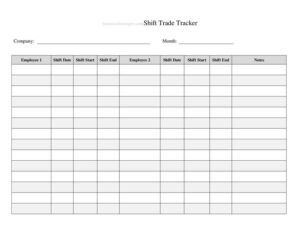
Shift Trade Tracker
Download a free Shift Trade Tracker template in PDF and DOCX to log, approve, and manage employee shift swaps clearly and avoid scheduling confusion.
PDF
DOCX
2 downloads
0
likes
Download Files
- DOCX
A Shift Trade Tracker is a simple workplace form used to record when one employee swaps a scheduled shift with a coworker, capturing who gave up the shift, who picked it up, and whether a manager approved the change. The most common reason people use it is to keep an accurate paper trail of shift swaps so payroll, attendance, and coverage stay correct. It’s free to download here in both PDF and DOCX formats, with no signup required.
What Is a Shift Trade Tracker?
A Shift Trade Tracker is a logging document that managers, schedulers, and team leads use to document approved shift exchanges between employees. Instead of relying on verbal agreements or scattered text messages, it records each trade in one consistent place: the original employee, the covering employee, the date and time of the shift, and the supervisor sign-off. It is typically used in retail, hospitality, healthcare, manufacturing, call centers, and any environment with rotating or fixed shifts. The tracker protects everyone involved by confirming who is responsible for working a given shift, preventing no-shows caused by miscommunication, and giving payroll a clear reference when calculating hours, overtime, or shift differentials.
When Do You Need a Shift Trade Tracker?
Any team that schedules workers across multiple shifts will eventually face swap requests. A tracker keeps those changes organized and auditable. Common scenarios include:
- An employee has a doctor’s appointment or family obligation and needs a coworker to cover their shift.
- Two staff members mutually agree to swap days so one can attend a personal event without using paid time off.
- A manager needs to verify who was actually scheduled to work after a no-show or coverage gap.
- Payroll needs documentation to confirm hours worked when shifts were exchanged mid-pay-period.
- HR wants a record of trade frequency to spot scheduling problems or recurring availability conflicts.
- A union or company policy requires written, approved documentation before any shift change takes effect.
What a Shift Trade Tracker Should Have
A complete and useful Shift Trade Tracker includes a few core elements that make each entry clear and verifiable. At minimum, it should capture the names of both employees involved (the one releasing the shift and the one accepting it), the original shift date and time, the position or department, and the reason for the trade. It should also include a space for the date the request was submitted, an approval or denial status, and the signature or initials of the supervisor authorizing the change. Many trackers add a notes column for special circumstances and a running log format so multiple trades can be recorded on one sheet for easy review at the end of a pay period.
How to Fill Out a Shift Trade Tracker
Because this is a flexible log, fill in each entry consistently so the record stays useful. Follow these steps:
- Enter the date the trade was requested so you can track turnaround time and keep entries in order.
- Write the name of the employee giving up the shift, including their role or department if your team is large.
- Record the name of the employee accepting the shift who has agreed to cover it.
- Note the original shift date, start time, and end time being traded so coverage is unambiguous.
- Add the position or station involved if duties differ by role.
- Briefly state the reason for the trade, such as appointment, personal day, or mutual swap.
- Mark the approval status — approved, pending, or denied — and the date it was decided.
- Have the supervisor or manager sign or initial to authorize the change.
- Use the notes field for anything unusual, like overtime impact or a partial-shift swap.
Tips for Managing Shift Trades Fairly
A tracker works best when paired with a clear policy. Decide in advance how far ahead trades must be requested, whether employees can swap directly or must route requests through a manager, and how trades that create overtime or differential pay will be handled. Keeping completed trackers for each pay period makes it easy to reconcile against the master schedule and timekeeping system. If you use a shared digital copy, restrict editing to scheduling staff so entries cannot be altered after approval. Reviewing the log periodically also reveals patterns — for example, an employee who repeatedly trades the same shift may need a permanent schedule adjustment, while frequent last-minute swaps might signal a coverage or staffing issue worth addressing.
How It Differs From a Time-Off Request
People sometimes confuse a shift trade with a time-off request, but they serve different purposes. A time-off request removes an employee from the schedule entirely, often drawing down paid leave, and leaves a coverage gap the manager must fill. A shift trade, by contrast, keeps the position covered because another employee has already agreed to step in — no leave balance is used and total staffing stays the same. The tracker documents that the responsibility has transferred from one worker to another. Using the correct form keeps your records accurate and prevents an approved swap from being mistakenly logged as an absence.
Common Mistakes to Avoid
- Leaving the approval field blank, which makes it unclear whether the trade was actually authorized.
- Recording only one employee’s name so it’s impossible to tell who is now responsible for the shift.
- Forgetting the exact shift date and times, leading to confusion when two shifts look similar.
- Allowing trades verbally and logging them after the fact, which creates gaps and disputes.
- Ignoring the overtime or pay impact when a swap pushes one employee over their normal hours.
- Failing to keep completed trackers, so payroll has nothing to reference when hours are questioned.
Frequently Asked Questions
What is a Shift Trade Tracker used for? It is used to document approved shift swaps between employees in one organized place. The tracker records who released the shift, who picked it up, the shift details, and the supervisor’s approval. This prevents miscommunication, missed coverage, and payroll errors.
How do I fill out a Shift Trade Tracker? Enter the request date, the names of both employees involved, the original shift date and times, the reason for the trade, and the approval status. Then have a supervisor sign or initial to authorize the change. Use the notes field for any special circumstances such as overtime impact.
Does a shift trade need manager approval? In most workplaces, yes — a supervisor or scheduler should approve trades to confirm coverage, qualifications, and pay impact. The tracker includes an approval field and signature line for exactly this reason. Always follow your own company or union policy, which may set additional rules.
Is a Shift Trade Tracker a legal document? It is primarily an internal scheduling and record-keeping tool rather than a binding legal contract. That said, it can serve as useful evidence of who agreed to work a shift if a dispute over attendance or pay arises. Keeping consistent, dated entries makes the record far more reliable.
How long should I keep completed trackers? Retain them at least through the relevant pay period and any payroll reconciliation, and longer if your company or local recordkeeping rules require it. Many employers keep scheduling and timekeeping records for several years. Check your jurisdiction and internal policy for specific retention periods.
Is this Shift Trade Tracker template free to download? Yes. You can download it free in both PDF and DOCX formats with no signup required. The DOCX version is fully editable so you can add columns, your company logo, or policy notes to match your team’s workflow.
This Shift Trade Tracker template is a general example provided for informational purposes only and does not constitute legal, HR, or payroll advice. Employment and recordkeeping requirements vary by jurisdiction and employer policy. Consult a qualified professional to ensure your scheduling practices comply with applicable laws and agreements.
Official resource: for the rules that apply to your situation, see the U.S. Department of Labor.
Related Forms
- Job Description Template
- Personnel Emergency Contact Record
- Employee Warning Letter
- Bi-Weekly Time Card With Approval
- Employment Verification Letter
- Authorization To Travel
Browse more in Employment.