
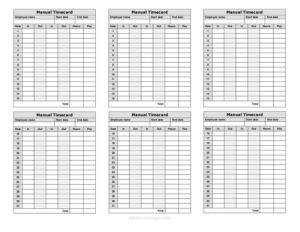
Manual Timecard Semi-Monthly Mini
Download a free Manual Timecard Semi-Monthly Mini template in PDF or DOCX to track employee hours across two pay periods each month, no signup.
PDF
DOC
2 downloads
0
likes
Download Files
- DOC
A Manual Timecard Semi-Monthly Mini is a compact paper-or-print form used to record an employee’s hours worked across a semi-monthly pay period — typically the 1st through the 15th and the 16th through the end of the month. People most often use it to log daily start, stop, and break times by hand so payroll can be calculated accurately at each cutoff. It’s free to download here in both PDF and DOCX, with no signup required.
What Is a Manual Timecard Semi-Monthly Mini?
A Manual Timecard Semi-Monthly Mini is a small, streamlined time-tracking sheet designed for businesses that pay employees twice a month. Unlike a weekly or biweekly card, it organizes hours around two fixed pay periods per calendar month. Employees or supervisors write in the date worked, time in, time out, lunch or break deductions, and the resulting daily and total hours. The “mini” format keeps the layout tight so it fits a single page or half-sheet, making it practical for small teams, manual recordkeeping, and businesses that don’t use digital punch systems. It serves as the source document payroll uses to verify hours and prepare each semi-monthly paycheck.
When Do You Need a Manual Timecard Semi-Monthly Mini?
- Your business runs payroll twice a month (for example, on the 15th and the last day) and you need hours grouped to match those cutoffs.
- You manage a small team without an electronic time clock and prefer a simple, printable sheet employees can fill in by hand.
- A new hire starts mid-period and you need a clean card to capture partial-period hours from the start date forward.
- You track hourly, part-time, or contract staff whose schedules vary day to day and require manual entry.
- You need a paper backup when a digital timekeeping system is down or unavailable on a job site.
- You want a signed, dated record on file to support payroll accuracy, dispute resolution, and basic wage-and-hour recordkeeping.
What a Manual Timecard Should Have
A complete semi-monthly timecard ties each entry to a clear date, the employee, and the specific pay period. Essential elements include the employee’s name and identifier, the pay period start and end dates, a dated row for every workday, columns for time in and time out, a field for unpaid breaks or lunch, daily totals, and a grand total of regular and any overtime hours. Signature lines for both the employee and the supervisor confirm the hours are accurate and approved. Including the employee’s department or position and the date submitted makes filing and payroll matching easier.
How to Fill Out a Manual Timecard Semi-Monthly Mini
- Enter the employee name and, if used, an employee ID or position at the top of the card.
- Write the pay period dates — the start and end of the semi-monthly cycle (such as the 1st–15th or 16th–31st).
- For each day worked, fill in the date in the leftmost column.
- Record the time in and time out for that day, using a consistent format (AM/PM or 24-hour).
- Note any unpaid lunch or break time to be deducted from the day’s total.
- Calculate the daily hours by subtracting breaks from elapsed time and write the figure in the totals column.
- At the bottom, add up the total hours for the period, separating regular and overtime hours if applicable.
- The employee signs and dates the card to certify accuracy, then the supervisor signs to approve it before it goes to payroll.
Semi-Monthly vs. Biweekly Timekeeping
It’s easy to confuse semi-monthly with biweekly, but they’re different. Semi-monthly means two pay periods every month — usually 24 paychecks a year — with fixed dates like the 15th and the last day. Biweekly means every two weeks, which produces 26 paychecks a year and pay periods that drift across calendar months. This timecard is built specifically for the semi-monthly model, so the period boundaries align with month-based payroll cutoffs. If your organization actually pays biweekly, you’d want a card that spans a rolling 14-day window instead. Choosing the format that matches your payroll schedule keeps totals clean and avoids hours being counted in the wrong period.
Tips for Accurate Manual Time Tracking
Manual cards work well when entries are made in real time rather than reconstructed from memory at the end of the period. Encourage employees to write times immediately at clock-in, after lunch, and at clock-out. Use a single, agreed time format across all cards so payroll never has to guess whether “1:00” means morning or afternoon. Keep completed cards together by pay period and store them in a consistent place. For overtime, confirm how your business defines and rounds it before totaling, and flag any unusual entries — missed punches, partial days, or paid leave — with a brief note so the approver understands them at a glance.
Common Mistakes to Avoid
- Leaving the pay period dates blank, which makes it impossible to know which cycle the hours belong to.
- Mixing AM and PM inconsistently, leading to negative or wildly inflated daily totals.
- Forgetting to deduct unpaid lunch breaks, which overstates paid hours.
- Adding daily figures incorrectly — always re-add the grand total before submitting.
- Submitting the card without the employee or supervisor signature, so payroll can’t verify or approve it.
- Writing times for days not actually worked or skipping rows, which leaves gaps the approver must chase down.
Frequently Asked Questions
What is a Manual Timecard Semi-Monthly Mini used for? It’s used to record an employee’s daily hours worked across a semi-monthly pay period so payroll can calculate pay accurately twice a month. The compact format suits small teams and manual recordkeeping. It also creates a signed, dated record you can keep on file.
How do I fill out the timecard correctly? Enter the employee name and pay period dates, then log the date, time in, time out, and any unpaid breaks for each day worked. Calculate daily hours and add them into a period total, separating overtime if applicable. Finally, have the employee and supervisor sign and date the card before submitting it to payroll.
What does semi-monthly mean for pay periods? Semi-monthly means employees are paid twice each month, usually on set dates such as the 15th and the last day of the month, producing 24 paychecks a year. This is different from biweekly pay, which occurs every two weeks. This card is designed to match the semi-monthly schedule.
Does a timecard need to be signed? While signature rules vary by employer, it’s standard practice to have both the employee and the supervisor sign to certify and approve the recorded hours. Signatures help confirm accuracy and provide documentation in case of a payroll question or dispute. The template includes lines for both.
How long should I keep completed timecards? Recordkeeping retention periods vary by jurisdiction and by employer policy, so check the rules that apply to your business. Many organizations keep payroll and time records for several years as a matter of practice. Store completed cards organized by pay period for easy reference.
Is this timecard template free to download? Yes. You can download the Manual Timecard Semi-Monthly Mini for free in both PDF and DOCX formats with no signup required. Use the PDF to print and fill in by hand, or edit the DOCX to customize fields for your business.
This template is a general example provided for informational purposes only and is not legal, financial, or tax advice. Wage, overtime, and recordkeeping requirements vary by jurisdiction and by employer policy — consult a qualified professional or your applicable labor authority to ensure your timekeeping practices comply with the rules that apply to you.
Official resource: for the rules that apply to your situation, see the U.S. Department of Labor.
Related Forms
- Employee Exit Interview
- Employee Self Evaluation
- Employee Complaint Form
- Comp Time Request Form
- Leave Of Absence Form
- Personnel Emergency Contact Record
Browse more in Employment.