
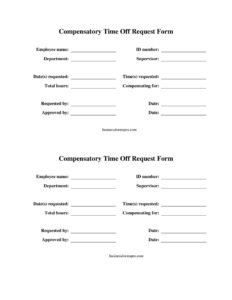
Comp Time Request Form
Download a free Comp Time Request Form template in PDF and DOCX to log compensatory time off requests, track hours, and get manager approval quickly.
PDF
DOCX
7 downloads
0
likes
Download Files
- DOCX
A Comp Time Request Form is a short workplace document an employee uses to formally request compensatory time off in exchange for extra hours already worked. People most often use it to convert overtime or banked hours into paid time away while keeping a clear, approvable record. It’s free to download here in both PDF and DOCX, with no signup required.
What Is a Comp Time Request Form?
A Comp Time Request Form is a written request submitted by an employee to a supervisor or HR asking to use accrued compensatory time commonly called “comp time” as paid leave. Comp time is time off granted instead of, or in addition to, overtime pay for hours worked beyond the standard schedule. The form documents how many comp hours the employee has earned, how many they want to use, and the dates they intend to be away. It creates a paper trail that protects both the employee and the employer by recording the request, the balance, and the manager’s decision in one place.
When Do You Need a Comp Time Request Form?
This form is useful any time an employee wants to draw down banked hours rather than let them go unused. Common situations include:
- An employee worked several late nights finishing a project and now wants a day off to recover.
- A staff member covered a weekend event or on-call shift and earned comp hours to use later.
- A worker wants to extend a holiday weekend using comp time instead of vacation days.
- An hourly or salaried non-exempt employee in an organization that offers comp time in lieu of overtime pay.
- A manager needs documentation to keep team scheduling and coverage balanced.
- HR or payroll requires a signed record before adjusting an employee’s accrued time bank.
Comp Time vs. Overtime Pay and PTO
It helps to understand how comp time differs from related concepts. Overtime pay is cash compensation for extra hours, while comp time is paid time off for those same hours. Paid time off (PTO) and vacation are separate accruals that usually accumulate based on tenure, not extra hours worked. Comp time policies and eligibility vary widely between public-sector and private-sector employers, and the rules differ for exempt versus non-exempt employees. Because of this, a Comp Time Request Form should always be used alongside your organization’s written comp time policy, which defines who qualifies, how hours accrue, and any limits on banking or using them.
What a Comp Time Request Form Should Have
A complete form keeps the request unambiguous and easy to approve. It should capture the employee’s identifying details, the comp hours already earned and available, the specific dates and hours being requested off, a short reason or note, and clear spaces for both the employee’s and the supervisor’s signatures. A running balance line showing hours before and after the request makes the document especially useful for payroll. Finally, an approval/denial section with the date and any comments closes the loop so everyone knows the outcome.
How to Fill Out a Comp Time Request Form
- Employee name and ID: Enter your full name, employee or payroll ID, and department so HR can match the request to your record.
- Supervisor or manager: Write the name of the person who will review and approve the request.
- Date of request: Record the date you are submitting the form.
- Comp hours available: List your current balance of accrued comp time. Check with payroll or your timekeeping system if you are unsure.
- Date(s) requested off: Specify the exact day or days you want to take, including start and end dates for multi-day requests.
- Hours requested: Enter the number of comp hours you wish to use, whether a partial day or full days.
- Reason (optional): Add a brief note if your workplace requires or appreciates context.
- Balance after use: Calculate and record your remaining comp hours after the request.
- Employee signature and date: Sign to confirm the request is accurate.
- Supervisor approval: Leave the approval, signature, and comment fields for your manager to complete.
Tips for a Smooth Approval
Submit your request as far in advance as possible, especially during busy periods, so your manager can arrange coverage. Double-check your available balance against the official timekeeping system rather than guessing, since an inflated number can lead to a denial or a payroll correction later. If your request spans multiple days, note whether any of those fall on days you would normally be scheduled, and confirm whether holidays affect the count. Keeping a copy of the approved form for your own records is wise in case there is ever a discrepancy about your remaining balance.
After the Form Is Approved
Once your supervisor signs off, the approved form usually goes to HR or payroll so they can deduct the used hours from your comp time bank and update the schedule. Confirm that your timecard or leave system reflects the change after the dates pass. If the request is denied, the comments section should explain why, and you can typically resubmit for alternate dates. Treat the signed copy as your evidence that the time off was authorized.
Common Mistakes to Avoid
- Requesting more hours than you have actually accrued.
- Leaving the date fields vague always list specific calendar dates.
- Submitting at the last minute when coverage is hard to arrange.
- Forgetting to sign and date the form before sending it.
- Not keeping a copy of the approved version for your own records.
- Confusing comp time with vacation or PTO, which draw from different balances.
Frequently Asked Questions
What is a Comp Time Request Form used for? It is used by an employee to formally ask a manager to take paid time off using compensatory hours earned from working beyond their normal schedule. The form records the request, the available balance, the dates wanted, and the approval decision in one place. This protects both the employee and the employer by creating a clear written record.
How do I fill out a Comp Time Request Form? Start by entering your name, ID, department, and the supervisor who will review it, then add your current comp time balance. Specify the exact dates and number of hours you want off, calculate your remaining balance, and sign and date the form. Leave the approval section blank for your manager to complete.
Does a Comp Time Request Form need to be notarized? No. This is an internal workplace document, so it does not require notarization or witnesses. It simply needs the employee’s signature and the supervisor’s approval signature to be valid within your organization.
Is comp time the same as overtime? Not quite. Overtime is typically extra cash pay for hours worked beyond the standard threshold, while comp time is paid time off granted in place of, or in addition to, that pay. Whether comp time is offered at all depends on your employer’s policy and applicable employment rules, which differ for public and private employers.
How much does this form cost? Nothing the Comp Time Request Form template is completely free to download here in PDF and DOCX formats, with no signup required. You can use it as-is or edit the DOCX version to match your company’s specific policy and branding.
Can my employer deny a comp time request? Yes. Approval usually depends on staffing needs, your available balance, and your organization’s comp time policy. If a request is denied, the form’s comments section should explain the reason, and you can typically request alternate dates.
This Comp Time Request Form template is provided as a general example for informational purposes only and is not legal, financial, or tax advice. Comp time eligibility and employment rules vary by jurisdiction and by employer, and rules differ for exempt and non-exempt workers. Consult your HR department or a qualified professional to confirm requirements that apply to your situation.
Official resource: for the rules that apply to your situation, see the U.S. Department of Labor.
Related Forms
- Overtime Authorization Form
- Job Acceptance Letter
- Employee Pay Rate and Title History Change
- Direct Deposit Authorization
- Employee Name Change Notification
- Promotion Request Letter
Browse more in Employment.