
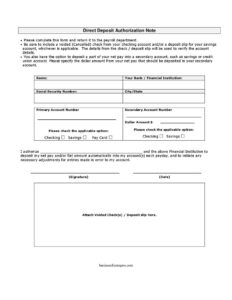
Direct Deposit Authorization
Set up automatic payroll deposits with our free Direct Deposit Authorization Form template — easy to fill out and free download in PDF and DOCX.
PDF
DOCX
4 downloads
0
likes
Download Files
- DOCX
A Direct Deposit Authorization Form is the document an employee gives to their employer’s payroll department to have their net pay deposited automatically into one or more bank accounts each payday. People most commonly use it when starting a new job or switching banks so they can stop receiving paper checks. You can download this form free in PDF and DOCX formats, with no signup required.
What Is a Direct Deposit Authorization Form?
A Direct Deposit Authorization Form is a short payroll document that authorizes your employer and your financial institution to electronically deposit your wages into your account. It is typically completed by the employee and submitted to the payroll or HR department, where the account details are verified against a voided check or deposit slip. The form documents your consent to receive pay electronically, identifies the receiving bank and account, and permits the employer to correct any deposit made in error. It replaces the need for printed paychecks and ensures funds arrive in your account on payday without a trip to the bank.
When Do You Need a Direct Deposit Authorization Form?
This form comes up any time payroll needs accurate, authorized banking details. Common situations include:
- Starting a new job — most employers ask for it during onboarding so your first paycheck deposits correctly.
- Changing banks — when you close an old account or open a new one and need to redirect your pay.
- Splitting your pay — when you want part of your net pay sent to a savings or credit union account each payday.
- Switching from paper checks — when an employer moves to electronic-only payroll and asks existing staff to enroll.
- Updating an existing setup — after a bank merger, a new account number, or a routing change.
- Adding a pay card — when you prefer to receive wages on a reloadable payroll card instead of a traditional account.
What a Direct Deposit Authorization Form Should Have
A complete form gives payroll everything they need to process and verify your deposit. The essentials are your full legal name, the name of your bank or financial institution, and your account information. The form should let you choose the account type — checking, savings, or pay card — and indicate the primary account that receives your pay. If you split your pay, it should capture a secondary account number and the exact dollar amount to deposit there. Verifying documentation, such as a voided check or a savings deposit slip, should be attached so payroll can confirm the routing and account numbers. Finally, an authorization statement and your signature and date make the consent official.
How to Fill Out a Direct Deposit Authorization Form
- Name: Print your full legal name exactly as it appears on your employment and bank records.
- Your bank/financial institution: Write the name of the bank or credit union that will receive your deposit.
- Social Security number: Enter your SSN so payroll can match the form to your employee record.
- City/State: Provide your location or the bank’s location as requested on the form.
- Account type: Check the box for checking, savings, or pay card to identify your primary account.
- Primary account number: Enter the full account number for the account where your net pay will go.
- Secondary account number: If you want to split your pay, list the second account here.
- Dollar amount: Specify the exact amount of your net pay to deposit into the secondary account.
- Authorization line: Write your employer’s name in the authorization statement that permits deposits and error corrections.
- Signature and date: Sign and date the form, then attach a voided check or deposit slip and return it to payroll.
Verifying Your Account With a Voided Check or Deposit Slip
Payroll departments require proof of your account details so deposits are not misdirected. For a checking account, attach a check marked VOID across the front — never sign it. The check displays both the bank routing number and your account number printed along the bottom. For a savings account, attach a deposit slip or a letter from your bank confirming the routing and account numbers, since savings accounts do not always come with checks. If you are enrolling a pay card, follow your employer’s instructions for the card’s routing and account information. Accurate verification prevents the most common cause of delayed pay: a single transposed digit.
Splitting Pay Between Two Accounts
This form lets you direct part of your net pay into a secondary account, which is a simple way to automate savings. Decide on a fixed dollar amount — for example, a set sum into a savings or credit union account each payday — and enter it in the dollar amount field. The remaining balance of your net pay is deposited into your primary account. Keep in mind the secondary deposit is a flat amount, not a percentage, so you may want to revisit the figure if your hours or pay change. If your secondary deposit ever exceeds your net pay, payroll will typically deposit everything into the primary account instead.
Common Mistakes to Avoid
- Transposing account or routing numbers — double-check every digit against your voided check or deposit slip.
- Forgetting to attach verification — most payroll teams will not process the form without a voided check or deposit slip.
- Signing the voided check — write VOID across it but never add your signature.
- Leaving the account type unchecked — failing to mark checking, savings, or pay card can stall processing.
- Setting a secondary amount higher than your pay — confirm the flat dollar amount fits within your net pay.
- Missing the signature or date — an unsigned form is not a valid authorization and will be returned.
Frequently Asked Questions
What is a Direct Deposit Authorization Form? It is a payroll document that authorizes your employer and bank to deposit your net pay electronically into your account each payday. It captures your account details, your chosen account type, and your signed consent. Employers use it to set up or update electronic payroll for an employee.
How do I fill out a Direct Deposit Authorization Form? Enter your name, bank name, Social Security number, and city/state, then provide your primary account number and check whether it is checking, savings, or a pay card. If you want to split your pay, add a secondary account and a flat dollar amount, sign and date the form, and attach a voided check or deposit slip before returning it to payroll.
Does this form need to be notarized or witnessed? No. A Direct Deposit Authorization Form generally does not require notarization or witnesses. Your signature and the attached account verification are what make it valid, though your employer may have its own internal review steps.
Why do I need to attach a voided check? The voided check or deposit slip lets payroll verify your routing and account numbers against an official bank document. This reduces the chance of a typo that could send your pay to the wrong account. For savings accounts without checks, a deposit slip or bank letter serves the same purpose.
Can I deposit my pay into two different accounts? Yes. This form includes a secondary account field and a dollar amount field so you can send a fixed portion of your net pay to a second account, such as savings, with the remainder going to your primary account. The secondary amount is a flat dollar figure, not a percentage.
Is this Direct Deposit Authorization Form free to download? Yes. You can download this template free in both PDF and DOCX formats with no signup required. Edit it to match your employer’s payroll process, print it, and attach your verification documents.
This Direct Deposit Authorization Form template is a general example provided for informational purposes only and is not legal, financial, or tax advice. Payroll and banking requirements vary by employer and jurisdiction. Consult your payroll department or a qualified professional for guidance specific to your situation.
Official resource: for the rules that apply to your situation, see the U.S. Department of Labor.
Related Forms
- Employee Of The Month Nomination Form
- Employee Fired For Cause
- Overtime Authorization Form
- Request To Attend Training
- Harassment Report Form
- Employee Incident Report Form
Browse more in Employment.