
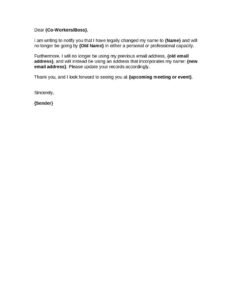
Employee Name Change Notification
Use our free Employee Name Change Notification form template to officially update payroll, HR, and benefits records — free download in PDF and DOCX.
DOCX
4 downloads
0
likes
Download Files
- DOCX
An Employee Name Change Notification is a simple HR document an employee submits to formally request that their legal or preferred name be updated across company records. The most common reason people use it is to update payroll, tax, and benefits files after a marriage, divorce, or court-ordered name change. You can download this template free in PDF and DOCX formats — no signup required.
What Is an Employee Name Change Notification?
An Employee Name Change Notification is a standardized form that documents an employee’s request to change the name on file with their employer. It is typically completed by the employee and submitted to the human resources or payroll department, which then updates internal systems such as payroll software, benefits enrollment, the company directory, email accounts, and identification badges. The form creates a written, dated record of the change so HR has a clear audit trail. While the request itself is straightforward, it usually requires supporting documentation — such as an updated Social Security card or marriage certificate — to ensure tax records and government filings stay accurate and consistent with the employee’s legal name.
When Do You Need an Employee Name Change Notification?
Employees and HR teams reach for this form whenever a name on record no longer matches reality. Common situations include:
- Marriage or civil union — an employee adopts a spouse’s surname or hyphenates their last name.
- Divorce or annulment — an employee returns to a former or maiden name.
- Court-ordered name change — a legal petition that changes a first, middle, or last name.
- Gender transition — an employee updates their legal and preferred name to match their identity.
- Correcting a clerical error — fixing a misspelling that occurred during onboarding.
- Adoption or other family-law events — a name change tied to a legal status change.
In each case, the notification ensures payroll, tax forms like the W-2, benefits providers, and company communications all reflect the correct name before the next reporting cycle.
What an Employee Name Change Notification Should Have
A complete and useful name change form captures enough detail for HR to act without follow-up questions. Key elements include the employee’s identifying information (such as an employee ID), both the previous and new legal names, the effective date of the change, the reason for the request, a list of records to update, the employee’s signature and date, and a space for HR or payroll acknowledgment. Including a checklist of systems to update — payroll, benefits, email, badge, directory — helps prevent records from falling through the cracks. A line referencing required supporting documents reminds the employee to attach proof so the change can be processed promptly and accurately.
How to Fill Out an Employee Name Change Notification
- Enter the date you are submitting the request at the top of the form.
- Provide your identifying details — full current legal name, employee ID number, department, and job title — so HR can locate your file.
- Write your previous (current) legal name exactly as it appears in existing company records.
- Write your new legal name exactly as it appears on your updated government documents, including correct spelling and any hyphenation.
- State the reason for the change (marriage, divorce, court order, correction, etc.).
- Indicate the effective date the new name should take effect for payroll and benefits purposes.
- Check or list the records to update — payroll, tax withholding, benefits, email, badge, and directory.
- Note attached documentation, such as a new Social Security card or marriage certificate.
- Sign and date the form to authorize the request, then submit it to HR. The HR or payroll representative completes the acknowledgment section confirming when the change was processed.
Supporting Documents and Tax Considerations
For payroll and tax purposes, the name on your employer’s records should match the name on file with your country’s tax authority. In the United States, that means your name should align with your Social Security Administration record before your employer updates payroll, because a mismatch can cause issues when W-2s are filed. For this reason, many employers ask employees to first update their Social Security card and then submit a copy with this notification. Other helpful documents include a marriage certificate, divorce decree, or court order. Attaching the right proof up front speeds processing and reduces back-and-forth. If your name change also affects direct deposit or beneficiary designations, mention that so HR can route the update appropriately.
What Happens After You Submit the Form
Once HR receives the signed notification and supporting documents, they typically update the payroll system, notify benefits and insurance providers, and coordinate with IT to change your email address and login. You may receive a new ID badge and see your name updated in the company directory. Ask HR to confirm in writing when each system has been updated, and review your next pay stub to verify the change appears correctly. Keep a copy of the completed form for your own records in case any discrepancy arises later.
Common Mistakes to Avoid
- Spelling the new name inconsistently — match it letter-for-letter to your legal documents.
- Forgetting to attach proof — missing documentation is the top cause of processing delays.
- Leaving out the effective date, which makes it unclear when payroll should switch.
- Skipping the signature — an unsigned request usually cannot be processed.
- Overlooking secondary records like beneficiary forms, direct deposit, or email aliases.
- Not confirming the update on a later pay stub or in the benefits portal.
Frequently Asked Questions
What is an Employee Name Change Notification used for? It is used to formally tell your employer that your legal or preferred name has changed so they can update payroll, tax forms, benefits, email, and other records. It creates a dated, signed record of your request. This helps keep your W-2 and other filings accurate.
How do I fill out the form? Enter the date, your employee details, your previous name, and your new legal name exactly as it appears on your updated documents. Add the reason and effective date, note any attached proof, then sign and submit it to HR. The HR representative completes the acknowledgment section once processed.
Do I need to provide documentation? Most employers require supporting proof such as an updated Social Security card, marriage certificate, divorce decree, or court order. Providing the correct document up front prevents delays and helps ensure your tax records match. Check with your HR department for the exact documents they accept.
Is this form legally binding? The form is an internal request and acknowledgment, not a legal name-change order. Your actual legal name changes only through marriage, court order, or another legal process. This notification simply documents and authorizes the update within your employer’s systems.
Does it need to be notarized or witnessed? Notarization is generally not required for an internal HR form like this. Your signature and the HR acknowledgment are usually sufficient. If your company has its own policy requiring additional verification, follow those internal guidelines.
How much does this template cost? This Employee Name Change Notification template is completely free to download from Business Forms Pro in both PDF and DOCX formats, with no signup required. You can edit the DOCX version to add your company logo and fields. Use it as many times as you need.
This template is a general example provided for informational purposes only and is not legal, tax, or HR advice. Requirements and recordkeeping rules vary by jurisdiction and employer. Consult a qualified professional or your HR department for guidance specific to your situation.
Official resource: for the rules that apply to your situation, see the U.S. Department of Labor.
Related Forms
- Payroll Statement
- Company Policy Explanation
- Bi-Weekly Time Card With Approval
- Organizational Chart
- Hazard Assessment
- Employee Benefits Sheet
Browse more in Employment.