
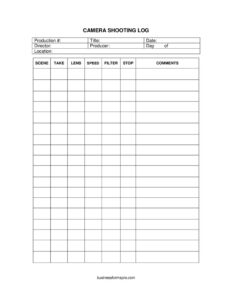
Camera Shooting Log
Track every scene, take, and camera setting on set with our free Camera Shooting Log template, available as a free download in PDF and DOCX.
PDF
DOCX
12 downloads
0
likes
Download Files
- DOCX
A Camera Shooting Log is the on-set document the camera department uses to record exactly what was captured on each take — the scene, the take number, the lens, the f-stop, and any notes. It’s the single most common reason crews avoid post-production headaches, and you can download it here for free in PDF and DOCX with no signup required.
What Is a Camera Shooting Log?
A Camera Shooting Log is a record kept by the camera assistant, second AC, or DIT during principal photography. For every take rolled, it logs the technical and creative details needed to identify, match, and recover that footage later. It documents the production number, title, shooting date, director, producer, day count, location, scene and take numbers, plus the lens, frame rate (speed), filter, and aperture (stop) used. Comments capture circle takes, focus issues, or anything notable. The log becomes a bridge between the set and the edit suite, ensuring editors, colorists, and the script supervisor can find and trust the material that was shot.
When Do You Need a Camera Shooting Log?
Any production that runs a camera benefits from a structured log. Common situations include:
- Narrative film and TV shoots where multiple takes of the same scene must be tracked and matched in editorial.
- Multi-camera setups that require knowing which lens and stop each unit used so footage can be intercut cleanly.
- Commercial and music video work where clients later request specific lens looks or frame-rate ramps recreated.
- Documentary or run-and-gun productions that capture footage across many locations and need an accurate paper trail.
- Reshoots and pickups where the team must replicate the original lens, filter, and exposure to match earlier scenes.
- Camera rentals and insurance claims where logged settings help verify gear use and troubleshoot technical failures.
What a Camera Shooting Log Should Have
A complete log ties creative identity to technical metadata. At minimum it should capture the production identity (production number and title), the shoot date and day-of count, key personnel (director and producer), and the location. The technical core covers scene, take, lens, speed, filter, and stop. Finally, a comments column lets the operator flag the circle take, a soft focus, a lens flare, a battery swap, or a reshoot request. Without a notes field, the log becomes a list of numbers with no context. The goal is that anyone reading it weeks later can reconstruct precisely what happened on each roll.
How to Fill Out a Camera Shooting Log
- Production #: Enter the assigned production or job number so this log can be filed with the rest of the project paperwork.
- Title: Write the project title — the film, episode, or spot name.
- Date: Record the calendar date of the shooting day.
- Director and Producer: Note the responsible director and producer for reference and approvals.
- Day of: Indicate the production day number (e.g., Day 4 of 18).
- Location: Enter the set or location name for the day’s work.
- Scene: Log the scene number as it appears in the shooting script.
- Take: Record each take number sequentially for that setup.
- Lens: Write the lens used (e.g., 35mm prime, 24-70mm zoom).
- Speed: Note the frame rate (e.g., 24fps, 48fps for slow motion).
- Filter: List any filters in front of the lens (ND, polarizer, diffusion).
- Stop: Record the aperture (f-stop) used for exposure.
- Comments: Mark the circle take, focus notes, or any issue worth flagging for post.
Reading the Log in Post-Production
The shooting log is one of the first documents the editorial and post teams consult. The script supervisor cross-references it against the lined script and continuity notes, while the assistant editor uses scene and take numbers to match clips to script pages. The comments column tells the editor which takes the director preferred (the circle takes) so they can be pulled first. Colorists and VFX artists often check the lens, speed, and filter columns to understand why a shot looks the way it does and how to match adjacent footage. A clean, legible log saves hours of guesswork and prevents the wrong take from making it into a cut.
Tips for Keeping an Accurate Log on Set
Fill the log in real time, not from memory at lunch. Confirm scene and take numbers with the slate and the script supervisor before rolling so everyone agrees. Write legibly — a smudged f-stop helps no one. When the director calls a circle take, mark it immediately and clearly. If you change a lens, filter, or frame rate mid-setup, start a new row rather than overwriting the old one. At wrap, photograph or scan the day’s pages so a digital backup exists alongside the physical sheet, and hand a copy to the DIT or data wrangler with the media.
Common Mistakes to Avoid
- Skipping the comments field so no one knows which take was preferred or why a take was no good.
- Letting scene and take numbers drift out of sync with the slate and script supervisor’s notes.
- Logging speed and stop inconsistently — abbreviate the same way every time so post can read it.
- Forgetting to update the day-of count or shoot date when paperwork carries over to a new day.
- Failing to note lens or filter changes within a setup, making it impossible to match shots later.
- Not backing up the sheet at wrap, risking total loss of the day’s metadata if the page is misplaced.
Frequently Asked Questions
What is a Camera Shooting Log used for? It records the technical and creative details of every take captured on a shooting day — scene, take, lens, speed, filter, stop, and comments. The camera team uses it so footage can be identified, matched, and trusted in editorial. It is a core piece of on-set paperwork on most productions.
Who fills out the Camera Shooting Log? Typically the second assistant camera (2nd AC) or a designated camera assistant maintains the log during the shoot. On smaller crews the DIT, data wrangler, or even the operator may keep it. Whoever holds the role should fill it in live, take by take, for accuracy.
What’s the difference between a shooting log and a camera report? The two overlap heavily and on many productions the terms are used interchangeably. A shooting log emphasizes the per-take creative and technical record tied to scene and take numbers, while a camera report often focuses on media, roll, and clip data handed to the DIT. Some productions use both side by side.
What does “speed” and “stop” mean on the log? “Speed” refers to the camera’s frame rate, such as 24fps for normal motion or higher rates for slow motion. “Stop” refers to the lens aperture, the f-stop used to set exposure. Recording both lets post understand how each shot was exposed and timed.
Is a Camera Shooting Log legally required? No law requires it, but it is standard professional practice and often expected by producers, post houses, and insurers. A complete log protects the production by documenting exactly what was shot and how. Many rental and insurance processes go more smoothly when accurate logs exist.
How much does this Camera Shooting Log template cost? It is completely free to download here in both PDF and DOCX formats, with no signup or account required. Use the PDF for printing on set or the DOCX to customize columns for your specific camera package and workflow. You can reuse it across as many productions as you like.
This Camera Shooting Log template is provided as a general example for informational purposes only and does not constitute legal, financial, or professional production advice. Workflows, terminology, and documentation requirements vary by production, studio, and region — consult your production company, DIT, or a qualified professional to confirm what your specific project requires.
Related Forms
- Script Supervisor Daily Report
- Video Production Rates
- Extras Release Form
- Video Production Contract
- Deal Memo
- Walkie Signout Sheet
Browse more in Film Production Forms.