
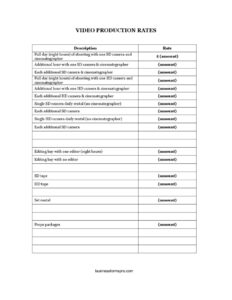
Video Production Rates
Download a free Video Production Rates template to clearly list camera, crew, editing, and equipment fees—free PDF and DOCX, no signup required.
PDF
DOCX
6 downloads
0
likes
Download Files
- DOCX
A Video Production Rates sheet is a single-page price list that spells out what a videographer, production house, or freelance crew charges for shooting days, additional cameras, editing time, and gear rentals. People most often use it to give clients a fast, transparent quote before a project begins. You can download it free in PDF and DOCX—no signup required—and edit the numbers to match your own pricing.
What Is a Video Production Rates Sheet?
A Video Production Rates sheet is a structured rate card used by video production companies, cinematographers, and editors to communicate standard pricing. Rather than negotiating every line from scratch, the document lists each service—full shooting days, additional hours, extra cameras, editing bays, tape stock, set rental, and props packages—next to a fixed or starting price. It serves as both a marketing tool and a reference attached to estimates and contracts. Clients use it to understand exactly what they are paying for and to compare options like SD versus HD cameras. For the production team, it sets expectations, reduces back-and-forth, and creates a consistent baseline that protects against underbidding your own work.
When Do You Need a Video Production Rates Sheet?
- A potential client emails asking “how much does a video shoot cost?” and you want to send a clear, professional answer instead of a vague figure.
- You are bidding on a corporate event, music video, or commercial and need to itemize a full day of shooting plus any additional cameras and crew.
- A documentary producer wants to rent cameras only—no cinematographer—and you need a daily rental rate ready to quote.
- An editor or production house is booking edit-bay time and wants to show whether an editor is included.
- You are comparing SD and HD packages for a budget-conscious client who needs to decide which format fits the project.
- You want a reusable price reference to attach to invoices, proposals, and contracts so every team member quotes the same numbers.
What a Video Production Rates Sheet Should Have
A complete rate card leaves no room for confusion. At minimum it should clearly separate shooting services from rental-only services, distinguish SD from HD pricing, and list editing and consumables separately. Each line item needs a precise description and a price, plus any unit it applies to—per day, per hour, or per additional camera. It helps to note what is included in a “full day” (for example, eight hours of shooting with one camera and cinematographer) so clients understand where overtime begins. Adding your business name, contact information, an effective date, and a short note about taxes, travel, or deposits turns a bare list into a usable, defensible quote document.
How to Fill Out a Video Production Rates Sheet
- Set your full day (eight hours) of shooting with one SD camera and cinematographer rate—this is your baseline shooting-day price.
- Enter the additional hour with one SD camera & cinematographer to cover overtime beyond the eight-hour day.
- Price each additional SD camera & cinematographer for multi-angle shoots.
- Repeat the same three lines for HD: full day with one HD camera and cinematographer, the additional HD hour, and each additional HD camera & cinematographer—HD typically commands higher rates.
- Fill in rental-only pricing: single SD camera daily rental (no cinematographer) and each additional SD camera, then the single HD camera daily rental and each additional HD camera.
- Set post-production rates for the editing bay with one editor (eight hours) and the editing bay with no editor (self-edit access).
- Add consumable and resource costs: SD tape, HD tape, set rental, and props packages.
- Review for consistency, add your business details, and save a master copy.
SD vs. HD and How to Price Tiers
The single biggest pricing decision on this sheet is the split between standard-definition (SD) and high-definition (HD) work. HD shooting generally requires more expensive bodies, larger storage, and longer post-production, so HD lines usually carry a premium over their SD equivalents. Keep that gap consistent across the full-day, additional-hour, and additional-camera lines so clients can see a logical ladder. The rental-only rows—cameras with no cinematographer—should sit well below the staffed rates, since you are not supplying labor. When you set the additional-camera prices, remember that each extra body often needs its own operator, media, and setup time, so they are rarely free add-ons. A clean tier structure makes upselling from a single-camera SD shoot to a multi-camera HD package feel natural rather than arbitrary.
Using the Rate Sheet in Quotes and Contracts
A rate card is a starting point, not a binding contract by itself. Treat it as the reference you draw from when building a formal estimate or a production agreement. For each booking, copy the relevant lines, multiply by quantity (cameras, hours, days), and total them, then add travel, deposits, or rush fees as separate lines. Note an effective date and a statement that prices are subject to change so an old sheet does not lock you into outdated numbers. When a client signs off, attach the finalized figures to your contract or invoice so everyone agrees on the scope before the camera rolls.
Common Mistakes to Avoid
- Listing a “full day” without defining it as eight hours, then disputing overtime later.
- Pricing HD identically to SD, which undervalues the extra gear and post time HD demands.
- Forgetting to set the additional-hour and additional-camera rates, leaving overtime and multi-cam shoots un-quoted.
- Blurring staffed shooting rates with rental-only rates so clients assume a cinematographer is always included.
- Omitting tape, set rental, and props packages, then absorbing those costs out of your margin.
- Leaving off an effective date or contact details, making the sheet hard to honor or follow up on.
Frequently Asked Questions
What is a Video Production Rates sheet? It is a price list that itemizes a production company’s or freelancer’s charges for shooting days, additional hours, extra cameras, editing, and equipment. It lets clients understand costs up front and gives the production team a consistent baseline for quotes. Think of it as a menu you draw from when building a custom estimate.
How do I fill out the Video Production Rates template? Enter your own prices next to each line—SD and HD full days, additional hours, additional cameras, rental-only rates, editing bay options, tape, set rental, and props packages. Define what a full day includes (eight hours) and add your business details and an effective date. Save a master copy you can reuse for every quote.
What is the difference between SD and HD rates here? SD (standard definition) lines cover lower-resolution gear and faster post-production, while HD (high definition) lines reflect more expensive cameras, larger media, and longer editing. HD rates are typically higher across the full-day, hourly, and additional-camera lines. The sheet keeps both so clients can pick the format that fits their budget.
Is a rate sheet a legally binding contract? On its own, no—it is a reference document and pricing menu. To create binding terms, transfer the agreed line items into a signed estimate or production contract that defines scope, deposits, and cancellation terms. Always confirm the final numbers with the client before the shoot.
Should I include taxes and travel on the sheet? It is wise to note that prices may exclude applicable taxes, travel, deposits, and rush fees, and to add those as separate line items on the final quote. Stating this up front prevents disputes when the invoice arrives. Keep the base rate sheet clean and itemize extras per project.
How much does this template cost? The Video Production Rates template is completely free to download from Business Forms Pro in both PDF and DOCX formats, with no signup required. You can edit the DOCX version to insert your own pricing and branding. Reuse it for as many quotes and projects as you like.
This Video Production Rates template is a general example provided for informational purposes only and does not constitute legal, financial, or tax advice. Pricing norms and contract requirements vary by region and project—consult a qualified professional before relying on it for binding agreements.
Related Forms
- Daily Film Production Report
- Location Use Release Form
- Deal Memo
- Appearance Release Form
- Shooting Notice
- Actor Release Form
Browse more in Film Production Forms.