
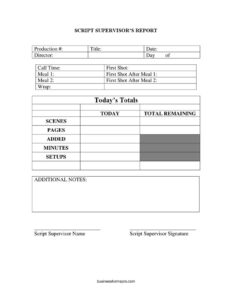
Script Supervisor Daily Report
Download a free Script Supervisor Daily Report template to log scenes, pages, setups, and timings on set, with free PDF and DOCX download.
PDF
DOCX
13 downloads
0
likes
Download Files
- DOCX
A Script Supervisor Daily Report is the end-of-day production document that records exactly what was shot on a film or TV set, including scenes, pages, setups, and key timing milestones. Production teams use it to track progress against the schedule and reconcile the day’s work against the remaining script. It’s free to download here in both PDF and DOCX formats, with no signup required.
What Is a Script Supervisor Daily Report?
A Script Supervisor Daily Report is a standardized form completed by the script supervisor (continuity supervisor) at the close of each shooting day. It documents how much of the screenplay was covered, how many camera setups were used, and the precise times for call, first shot, meal breaks, and wrap. The report becomes part of the official production paper trail, sitting alongside the daily progress report and call sheet. Producers, the assistant director, the production manager, and post-production editors all rely on it to gauge whether a production is ahead, on, or behind schedule and to plan the days that follow.
When Do You Need a Script Supervisor Daily Report?
The report is generated every single shooting day, but it becomes especially important in specific situations:
- At the end of each principal photography day, to summarize scenes and pages completed for the production office.
- When a production needs to compare actual progress against the shooting schedule to flag delays early.
- To document meal-break timing for payroll, union compliance, and meal-penalty tracking.
- When scenes are added, dropped, or rearranged on the day and the script must be reconciled.
- For post-production planning, so editors and the editorial team know what coverage exists.
- To create a historical record producers can review if questions about pacing or budget arise later in the schedule.
What a Script Supervisor Daily Report Should Have
A complete report ties identifying details to measurable progress. It should clearly state the production number, title, director, and shooting date so it can be filed correctly. It needs the timing block — call, first shot, meal periods, and wrap — to show how the day flowed. Most importantly, it must quantify the work: scenes and pages shot today, setups used, any added material, and the running totals for what’s done and what remains. A signature line confirms the script supervisor stands behind the numbers, and a notes field captures anything that doesn’t fit a column.
How to Fill Out a Script Supervisor Daily Report
- Enter the production # and title at the top so the report is matched to the correct project.
- Record the date and the director directing that day’s work.
- Note the day of field — which shooting day this is out of the total scheduled days.
- Log the timing milestones in order: call time, first shot, meal 1, the first shot after meal 1, meal 2, the first shot after meal 2, and finally wrap.
- Fill in today’s total and today to capture the day’s completed work, then enter total remaining for what is still outstanding.
- Quantify coverage by entering the number of scenes, pages, any added material, minutes of screen time, and setups completed.
- Use additional notes for retakes, continuity issues, weather delays, or schedule changes.
- Print the script supervisor name and add the script supervisor signature to certify the report.
Understanding the Timing and Page-Count Columns
The timing fields are not busywork — they build the spine of the daily progress story. Call time marks when the crew was due; first shot shows how long it took to roll the first take, a number producers watch closely because a slow start often signals a long day. The meal entries and the “first shot after” times bracket each break, which matters for tracking turnaround and any meal penalties owed under union rules. On the content side, pages are usually measured in eighths of a page, the traditional film unit, so “2 4/8 pages” means two-and-a-half pages. Comparing pages and scenes shot today against the total remaining gives an instant read on whether the production is keeping pace with its plan.
How It Relates to the Daily Production Report
The Script Supervisor Daily Report and the Daily Production Report (DPR) overlap but serve different masters. The script supervisor’s version focuses on continuity and script progress — scenes, pages, setups, and screen minutes — and is authored from the supervisor’s running log at the camera. The DPR, prepared by the production office, layers in budget, cast and crew hours, equipment, and other line items. Together they give producers a full picture: the script supervisor confirms what story content was captured, while the DPR confirms what it cost in time and resources. Keeping both consistent prevents confusion when the editorial and accounting teams reconcile the day.
Common Mistakes to Avoid
- Estimating page counts instead of measuring them precisely in eighths, which distorts the remaining-pages math.
- Forgetting to log the “first shot after meal” times, leaving gaps that complicate meal-penalty and turnaround tracking.
- Omitting added scenes or pickup shots, so the totals no longer reconcile with the script.
- Mixing up the day count (“day of”) with the calendar date, which misfiles the report.
- Leaving the setups field blank — setup counts are a key efficiency metric producers track over the schedule.
- Submitting an unsigned report, which weakens its value as an official record.
Frequently Asked Questions
What is a Script Supervisor Daily Report used for? It is a daily record of what was shot, summarizing scenes, pages, setups, screen minutes, and the day’s key timing milestones. Producers and the production office use it to measure progress against the schedule, while editorial uses it to understand what coverage exists. It is one of the core documents on the set’s daily paper trail.
Who fills out the report? The script supervisor (sometimes called the continuity supervisor) completes it at the end of each shooting day from the running log kept at the camera. They are responsible for the page counts, scene tallies, and timing entries, and they sign to certify the numbers are accurate.
How are pages counted on the report? Pages are traditionally measured in eighths of a page rather than whole numbers, since scenes rarely fill an exact page. For example, a scene that runs three-quarters of a page is logged as 6/8. This convention keeps the “pages today” and “total remaining” fields precise enough to support scheduling decisions.
Does this report need to be signed or notarized? It does not require notarization. A printed name and the script supervisor’s signature are enough to certify the report as an accurate daily record. The signature simply confirms that the person responsible for continuity stands behind the figures submitted.
Is the Script Supervisor Daily Report legally binding? It is an internal production document rather than a contract, so it is not “binding” in the contractual sense. However, it is an official record that can be referenced for payroll, union meal-penalty calculations, and dispute resolution, so accuracy matters. Treat it as a reliable business record.
How much does this template cost? Nothing — this Script Supervisor Daily Report template is completely free to download from Business Forms Pro in both PDF and DOCX formats. There is no signup or account required. You can edit the DOCX to match your production’s column preferences before printing.
This template is a general example provided for informational purposes only and is not legal, financial, or production-compliance advice. Union rules, meal-penalty requirements, and reporting practices vary by jurisdiction and by production. Consult a qualified professional or your production’s guild representative for guidance specific to your project.
Related Forms
- Production Assistant Breakdown
- Video Production Proposal
- Actor Pay Form
- Appearance Release Form
- Student Film Actor Release Form
- Location Release Form
Browse more in Film Production Forms.