
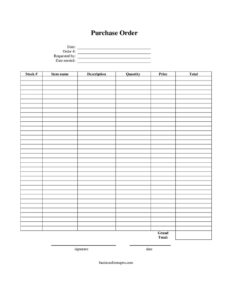
Purchase Order
Free purchase order template in PDF & DOCX. Learn what a purchase order is, the types, what a PO number is, and how to fill one out — download today.
PDF
DOCX
3 downloads
0
likes
Download Files
- DOCX
A purchase order (PO) is a buyer’s official document authorizing a purchase from a supplier — it lists the items, quantities, and agreed prices before any money changes hands. Download the free purchase order below in PDF or DOCX and start ordering. No signup or email required.
What Is a Purchase Order?
A purchase order is a document a buyer sends to a seller to confirm exactly what they want to buy, how much, and at what price. Once the supplier accepts it, the PO becomes a binding agreement and a clear paper trail for both sides. Each one carries a unique purchase order number so the order can be tracked from request to delivery to invoice. Purchase orders help businesses control spending, get internal approval before money is committed, avoid duplicate orders, and verify that what arrives matches what was ordered.
Why Businesses Use Purchase Orders
Beyond simply placing an order, POs create accountability. They give finance teams a record to budget against, let managers approve spending before it happens, and protect both buyer and seller if there’s a disagreement about quantities or prices later. For accounting, the PO is the first leg of “three-way matching” — comparing the purchase order, the delivery receipt, and the supplier’s invoice before any payment is released. That single control stops overbilling and accidental double payments.
Types of Purchase Orders
- Standard PO — a one-time order for specific items, quantities, and prices.
- Blanket PO — an agreement to buy from a supplier repeatedly over a period at set prices, with deliveries drawn down as needed.
- Planned PO — an order placed in advance with estimated delivery dates, scheduled later.
- Contract PO — tied to a broader supply contract that governs the terms.
For most small businesses, the standard PO above covers day-to-day ordering.
When Do You Need a Purchase Order?
- Ordering inventory, supplies, or materials from a vendor
- Setting a clear budget and approval trail before a purchase is made
- Tracking which orders are open, received, or still outstanding
- Matching a supplier’s invoice against the original agreed price
- Giving your accounting team a record for three-way matching
How to Fill Out a Purchase Order
- Enter the date and a unique order number so the PO can be tracked.
- Add “requested by” and the date needed for delivery.
- For each line item, list the stock number, item name, and a short description.
- Enter the quantity and unit price for each item.
- Multiply quantity by price to get each line total, then add them for the order total.
- Send it to your supplier for approval, and keep a copy to check against the delivery and invoice.
Purchase Order vs. Invoice
People often confuse the two, but they move in opposite directions. The buyer issues a purchase order to *request* goods or services. The seller issues an invoice to *request payment* once those goods or services are delivered. The PO comes first and sets the agreed terms; the invoice comes last and should match the PO. When they don’t match, that mismatch is exactly what your approval process is meant to catch before payment.
Common Mistakes to Avoid
- Reusing or skipping PO numbers, which breaks your tracking
- Leaving the “date needed” blank, so suppliers can’t prioritize
- Vague item descriptions that lead to the wrong product being shipped
- Math errors in line totals — double-check quantity × price
- Not keeping a copy to reconcile against the invoice later
How the Purchase Order Process Works
A purchase order moves through a predictable cycle, and filling the form out with the next steps in mind makes it far more useful:
- A team member identifies a need and raises a requisition or request.
- A manager reviews and approves the spending.
- The approved purchase order is created and sent to the supplier.
- The supplier confirms it can fulfill the order at the stated prices, turning the PO into a binding agreement.
- The goods are delivered with a packing slip, which is checked against the PO.
- The supplier sends an invoice, which is matched to the PO and the delivery before payment is released.
This cycle is why the small details on a purchase order matter so much — the order number, dates, and line items are what every later step is checked against. Even a one-person business benefits from the discipline: it forces a pause to confirm what’s being bought, from whom, and at what price before any money is committed.
Purchase Order Best Practices
Number your POs sequentially so none are lost or duplicated, send them in writing rather than agreeing to orders verbally, and keep a copy of every one. Set a simple approval threshold — for example, any order above a set dollar amount needs a second sign-off — to keep spending under control as you grow. And store your purchase orders where your accounting records can reach them, so month-end matching is quick instead of a scavenger hunt.
Frequently Asked Questions
What is a purchase order? It’s a buyer’s document that authorizes a purchase, listing the items, quantities, and prices agreed with a supplier before payment.
What is a purchase order number? A unique code assigned to each PO so the buyer and seller can track the order through delivery, invoicing, and payment.
What is a blanket purchase order? An agreement to buy from one supplier repeatedly over time at set prices, with individual deliveries pulled from it as needed — useful for recurring supplies.
How do I create a purchase order? Fill in the order date and number, who requested it, the items with quantities and prices, and the totals — then send it to your supplier. The template above includes every field.
What’s the difference between a purchase order and an invoice? A buyer sends a purchase order to request goods; the seller sends an invoice to request payment once the goods are delivered.
How much does a purchase order template cost? Nothing — this one is free to download in PDF and DOCX.
Related Forms
Invoice · Proforma Invoice · Order Form · Requisition Form · Quotation Record · Sales Order Confirmation
This template is provided for general informational purposes only and is not legal or financial advice. Adapt it to your own business and accounting requirements.
Need to work out sales tax? Use our free Sales Tax Calculator to add or remove sales tax from any amount in seconds.
Official resource: for the rules that apply to your situation, see the U.S. Small Business Administration.
Related Forms
- Restaurant Order Pad
- Letter to Confirm Verbal Order
- Packing Slips Multiple
- Avoid Verbal Orders AVO Form
- Packing List
- Work Invoice Labor
Browse more in Invoices and Order Forms.