
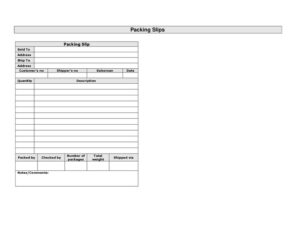
Packing Slips Multiple
Download a free multiple packing slips template in PDF and DOCX to document shipment contents, quantities, and delivery details with no signup required.
PDF
DOCX
2 downloads
0
likes
Download Files
- DOCX
A multiple packing slips form is a shipment document that itemizes the contents of one or more packages so the recipient can verify what was sent against what was ordered. Businesses most often use it to accompany goods leaving a warehouse, confirming quantities and descriptions without revealing pricing. This template is free to download in PDF and DOCX, with no signup required.
What Is a Multiple Packing Slips Form?
A multiple packing slips form is a list that travels with a shipment to detail every item inside the box or pallet. Unlike an invoice, it focuses on what is being shipped rather than how much it costs, making it safe to place inside packages handled by carriers and warehouse staff. It is typically issued by a seller, fulfillment center, or shipping department and read by the buyer’s receiving team. The “multiple” version is built to handle several line items or several packages on a single document, listing quantities, descriptions, weights, and who packed and checked the order so discrepancies can be caught immediately on delivery.
When Do You Need a Multiple Packing Slips Form?
This form is useful any time goods physically change hands and the contents need to be confirmed. Common situations include:
- Shipping a multi-item order where the buyer needs to check each product against the original purchase order.
- Splitting an order across several packages or pallets that ship together and must be reconciled as a group.
- Wholesale and B2B fulfillment, where a customer’s number and salesman name help route the delivery internally.
- Drop-shipping, when goods ship directly to an end customer and pricing must be kept off the document.
- Returns and exchanges, providing a clear record of what left your facility in case of a dispute.
- Inventory and audit trails, giving the warehouse a paper record of who packed and checked each shipment.
What a Multiple Packing Slips Form Should Have
A complete packing slip ties the shipment to the order and to the people who handled it. The essentials are: a clear sold to party and billing address, a separate ship to destination, reference numbers (the customer’s number and your shipper’s number), the responsible salesman, and the date. The body should list each item by quantity and description. Finally, accountability and logistics details matter: who packed and checked the order, the number of packages, the total weight, the carrier it was shipped via, and a space for notes or comments covering special handling or backorders.
How to Fill Out a Multiple Packing Slips Form
- Sold to and address: Enter the customer or company that placed the order, with their billing address.
- Ship to: Add the delivery destination if it differs from the sold-to party, such as a job site or branch location.
- Customer’s no.: Record the buyer’s reference or account number so they can match it internally.
- Shipper’s no.: Enter your own order, pick-ticket, or shipment tracking number.
- Salesman: Name the sales rep or account contact tied to the order.
- Date: Write the date the shipment leaves your facility.
- Quantity and description: List each item on its own line — the number of units and a clear description, including SKU or model where helpful.
- Packed by / checked by: Have the person who packed the order and the one who verified it sign or initial.
- Number of packages and total weight: Note how many boxes ship and the combined weight for carrier reconciliation.
- Shipped via: Record the carrier or method (e.g., a courier, freight line, or local delivery).
- Notes/comments: Add backorder notes, fragile warnings, or partial-shipment details.
Packing Slip vs. Invoice vs. Bill of Lading
These three documents often travel together but serve different roles. A packing slip confirms the contents of a shipment and deliberately omits prices, so it can be handled by warehouse and shipping staff without exposing financial terms. An invoice is the request for payment and includes unit prices, taxes, and totals — it goes to the accounts-payable team, not into the box. A bill of lading is a transport contract between the shipper and the carrier that governs the freight movement itself. On this form, the reference numbers and the “shipped via” field connect the packing slip to both the invoice and the carrier paperwork, creating a clean audit trail from order to delivery.
Tips for Accurate Shipments
Because the packing slip is the recipient’s first check against their order, accuracy here prevents downstream disputes. Always reconcile the quantity and description lines against the original purchase order before sealing the boxes. Use the packed by and checked by fields as a genuine two-person verification step rather than a formality — it dramatically reduces shipping errors. When an order ships in stages, use the notes/comments field to flag what is included now and what is backordered, and keep the number of packages field current so receiving can confirm nothing arrived missing. Keeping a copy of every completed slip alongside the matching invoice makes returns, claims, and inventory audits far simpler.
Common Mistakes to Avoid
- Including prices: A packing slip should never show dollar amounts — that belongs on the invoice.
- Confusing sold to and ship to: Billing and delivery addresses are often different; mixing them causes misdeliveries.
- Vague descriptions: “Box of parts” is not enough; list models, SKUs, or sizes so the buyer can verify each item.
- Mismatched package count: If you list three packages but ship four, the recipient may assume an error or theft.
- Skipping the checked-by step: Leaving verification fields blank removes accountability when discrepancies arise.
- Forgetting reference numbers: Without the customer’s and shipper’s numbers, neither side can match the shipment to its paperwork.
Frequently Asked Questions
What is a multiple packing slips form used for? It is used to document the contents of a shipment that contains multiple items or multiple packages, so the recipient can confirm everything ordered actually arrived. It lists quantities and descriptions but no pricing, making it safe to include inside the box.
How is a packing slip different from an invoice? A packing slip lists what is in the shipment and omits prices, while an invoice requests payment and includes costs, taxes, and totals. Many businesses send both — the packing slip inside the package and the invoice separately to accounts payable.
Do I need to include prices on a packing slip? No. Packing slips intentionally leave prices off so that warehouse staff, carriers, and recipients can handle the document without seeing financial terms. Use the customer’s and shipper’s reference numbers to link it to the priced invoice.
What goes in the packed by and checked by fields? The packed-by field records the staff member who physically assembled the shipment, and the checked-by field records a second person who verified the contents. Together they create a two-step accuracy check and an accountability trail if items are missing.
Is this packing slip template legally binding? A packing slip is generally a record of shipment contents rather than a binding contract; the binding agreements are typically the purchase order, invoice, and any bill of lading. It can still serve as useful evidence in delivery disputes and returns.
How much does this template cost? Nothing — it is completely free to download in both PDF and DOCX formats with no signup required. You can fill it out by hand after printing or edit the DOCX to match your branding and item lines.
This template is provided as a general example for informational purposes only and does not constitute legal, financial, or tax advice. Shipping, documentation, and recordkeeping requirements vary by jurisdiction and industry — consult a qualified professional to ensure your forms meet your specific needs.
Need to work out sales tax? Use our free Sales Tax Calculator to add or remove sales tax from any amount in seconds.
Official resource: for the rules that apply to your situation, see the U.S. Small Business Administration.
Related Forms
- Packing List
- Tax Invoice Statement Book
- Numbered Purchase Order
- Proforma Invoice
- Lost Orders Tracker
- Avoid Verbal Orders AVO Form
Browse more in Invoices and Order Forms.