
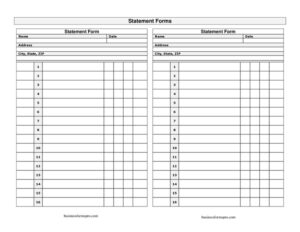
Statement Form
Send a clear account statement to customers with this free Statement Form template, summarizing invoices, payments, and balance due. Free download in PDF and DOCX.
PDF
DOCX
2 downloads
0
likes
Download Files
- DOCX
A statement form is a billing document that summarizes a customer’s account activity over a period of time — listing invoices, payments received, credits, and the total balance due. Businesses most often use it to remind customers of outstanding amounts and to give a clean snapshot of where the account stands. You can download this statement form free in both PDF and DOCX formats, with no signup required.
What Is a Statement Form?
A statement form is a periodic account summary that a seller, supplier, or service provider sends to a customer to show all financial activity on their account. Unlike a single invoice, which bills for one transaction, a statement rolls up multiple invoices, payments, and adjustments into one easy-to-read total. It typically covers a defined window — such as a calendar month — and shows the opening balance, charges added, payments applied, and the closing balance owed. Accounts receivable teams, freelancers, contractors, and small businesses use statements to keep customers informed, encourage timely payment, and reduce billing disputes. It is a communication and collection tool more than a legal demand, but it forms an important part of an organized bookkeeping system.
When Do You Need a Statement Form?
A statement form is useful any time a customer has ongoing or multiple charges that need to be reconciled in one place. Common situations include:
- Monthly billing cycles — sending regular customers a recap of all invoices and payments for the period.
- Overdue balances — reminding a client of unpaid invoices and showing exactly what remains due.
- Recurring service accounts — for clients on retainers, subscriptions, or maintenance contracts billed repeatedly.
- Year-end or quarter-end reconciliation — giving customers a full accounting to match against their own records.
- Wholesale and trade accounts — suppliers who extend credit terms and bill multiple shipments before payment.
- Disputed or partial payments — clarifying which invoices were paid, which were credited, and what still remains open.
Types of Statements
Statements come in a few common forms depending on how the balance is calculated. A balance forward statement simply carries over the prior period’s unpaid balance and adds new activity. An open item statement lists each unpaid invoice individually until it is settled, which makes it easier to match payments to specific charges. A activity statement shows every transaction during the period, paid or unpaid, for a complete picture. This template can be adapted to any of these styles depending on how your business tracks receivables.
What a Statement Form Should Have
A complete and useful statement form should clearly identify both parties and present the financial summary without ambiguity. Key elements include the business name and contact details, the customer’s name and account information, the statement date and the period covered, a unique statement number, a line-by-line list of invoices and transactions with dates and amounts, payments and credits applied, and a clearly highlighted total balance due. Many statements also include payment terms, a due date, accepted payment methods, and a note about late fees. The clearer the layout, the faster customers can verify the figures and pay.
How to Fill Out a Statement Form
- Add your business details. Enter your company name, address, phone, and email at the top so the customer knows exactly who issued the statement.
- Enter the customer information. Include the customer or company name, billing address, and account number if you assign one.
- Assign a statement number and date. Give the statement a unique reference number and the date it was prepared.
- Define the statement period. Note the start and end dates the statement covers, such as a single month.
- Record the opening balance. Carry forward any balance owed from the previous period.
- List each transaction. For every invoice, payment, or credit, enter the date, a short description, the invoice number, and the amount as a charge or credit.
- Apply payments and credits. Subtract any amounts the customer has paid so the running balance stays accurate.
- Calculate the total due. Show the closing balance and a clear amount the customer owes.
- State payment terms. Add the due date, accepted payment methods, and any late-fee or remittance instructions before sending.
Statement Form vs. Invoice
People often confuse statements and invoices, but they serve different purposes. An invoice is a request for payment for a specific sale or service, issued at the time of the transaction with its own line items and total. A statement is a summary of account activity that may reference several invoices at once. An invoice initiates a charge; a statement reports on charges that already exist. You should not treat a statement as a replacement for invoicing — customers still need the underlying invoices for their records, and a statement simply consolidates them into a single balance.
Tips for Sending Statements That Get Paid
Send statements on a consistent schedule so customers come to expect them, ideally the same day each month. Highlight the total due prominently and include a clear due date rather than vague terms. List the oldest unpaid invoices first so overdue items stand out. Offer multiple payment options to remove friction, and keep a copy of every statement you send for your own reconciliation. A short, polite note thanking the customer for their business often improves response rates more than a stern tone.
Common Mistakes to Avoid
- Mismatched balances — failing to carry forward the correct opening balance, which throws off the total due.
- Missing invoice references — listing amounts without invoice numbers makes it hard for customers to verify charges.
- Forgetting to apply payments — showing a balance the customer has already paid causes frustration and disputes.
- No clear period — omitting the statement dates leaves customers unsure of what activity is covered.
- Vague payment terms — leaving out the due date or how to pay slows down collection.
- Treating it as an invoice — never use a statement as the only billing record for a brand-new charge.
Frequently Asked Questions
What is the difference between a statement and an invoice? An invoice bills a customer for a single transaction at the time of sale or service. A statement summarizes account activity across a period, often referencing several invoices, payments, and the resulting balance. The invoice asks for payment; the statement reports the overall account status.
How do I fill out a statement form? Start with your business and customer details, assign a statement number and date, and define the period covered. Then list each invoice, payment, and credit with dates and amounts, apply payments to the balance, and show the total due along with payment terms.
Is a statement form legally binding? A statement is primarily a billing and communication tool, not a contract. The underlying invoices and your agreement with the customer establish the obligation to pay. A statement reflects what is owed but does not by itself create a new legal debt.
How often should I send statements? Most businesses send statements monthly, often at the end of each billing cycle. Some send them quarterly or only when a balance is overdue. Consistency matters most — pick a schedule and stick to it so customers know when to expect them.
Does a statement form need to be signed or notarized? No. A statement is an informational account summary and does not require a signature, witness, or notarization. You simply prepare it, keep a copy, and send it to the customer.
How much does this statement form cost? Nothing — this statement form template is completely free to download in PDF and DOCX formats with no signup required. You can edit the DOCX version in your word processor to add your logo, branding, and custom fields.
This statement form template is provided as a general example for informational purposes only and does not constitute legal, financial, or accounting advice. Billing practices and credit requirements vary by jurisdiction and industry — consult a qualified professional for guidance specific to your situation.
Need to work out sales tax? Use our free Sales Tax Calculator to add or remove sales tax from any amount in seconds.
Official resource: for the rules that apply to your situation, see the U.S. Small Business Administration.
Related Forms
- Avoid Verbal Orders AVO Form
- Job Invoice
- Construction Invoice
- Numbered Purchase Order
- Contractor Change Form
- Restaurant Order Pad
Browse more in Invoices and Order Forms.