
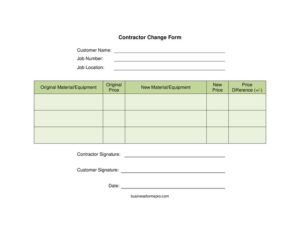
Contractor Change Form
Download a free Contractor Change Form template to document material swaps, price changes, and customer approvals on any job — free PDF and DOCX download.
PDF
DOCX
4 downloads
0
likes
Download Files
- DOCX
A Contractor Change Form is a short written record that documents an agreed change to materials, equipment, or pricing on an active construction or service job. The most common reason people use one is to get a customer’s written sign-off before swapping a specified item for a different one that costs more or less than originally quoted. It’s free to download here in both PDF and DOCX, with no signup required.
What Is a Contractor Change Form?
A Contractor Change Form is issued by a contractor and signed by both the contractor and the customer to confirm a modification to the original scope of a job. It records what was originally agreed, what is changing, and how that change affects the price. Unlike a full change order that may cover labor, scheduling, and complex scope shifts, this form focuses on a clean comparison: the original material or equipment and price versus the new material or equipment and price, plus the resulting price difference. It ties everything to a specific job number and location so the paperwork stays organized. The dual-signature design turns a verbal agreement into a documented one that both parties can reference later.
When Do You Need a Contractor Change Form?
This form is useful any time the work or materials drift away from the original estimate. Common situations include:
- A specified product is out of stock and you substitute a comparable item at a different price.
- The customer requests an upgrade — for example, a higher-grade fixture, appliance, or finish than originally quoted.
- A cheaper alternative becomes available and you want to document the credit back to the customer.
- Field conditions force a change in equipment, such as a different size unit or a stronger material.
- A supplier price increase affects an item already listed on the original quote.
- The customer wants to downgrade a selection to bring the job back within budget.
What a Contractor Change Form Should Have
A complete form leaves no room for confusion about what changed and who approved it. It should clearly identify the customer and the job through a name, job number, and location. It must state the original material or equipment alongside its original price, then describe the new material or equipment with its new price. The price difference should be calculated and shown plainly so both parties know the financial impact. Finally, it needs a contractor signature, a customer signature, and the date of agreement. Together these elements make the change traceable and mutually authorized.
How to Fill Out a Contractor Change Form
- Enter the customer name exactly as it appears on the original contract or estimate.
- Add the job number so the change links to the correct project file and invoicing record.
- Write the job location — the full site address where the work is being performed.
- In original material/equipment, describe the item that was originally quoted, including brand, model, or specification.
- Enter the original price for that item as listed in the prior agreement.
- Under new material/equipment, describe the replacement item with the same level of detail.
- Record the new price for the replacement.
- Calculate and enter the price difference — the new price minus the original, noting whether it is an additional charge or a credit.
- Have the work-side party sign the contractor signature line.
- Obtain the customer signature to confirm approval before ordering or installing.
- Fill in the date the change was agreed.
How It Affects Your Invoice
Because this form falls under invoices and order forms, the figure in the price difference field flows directly into your billing. If the new item costs more, the difference becomes an add-on line on the final invoice; if it costs less, it becomes a credit. Keep the signed form with the original estimate and the final invoice so your records reconcile cleanly. When a customer questions the bill, you can show exactly what they approved and when. Many contractors number each change form sequentially within a job so a project with several substitutions has a clear paper trail from first quote to final payment.
Tips for Getting Approval Smoothly
Capture the change in writing before money is spent. Ordering a substitute item or starting installation before the customer signs is the fastest way to create a payment dispute. Be specific in the material descriptions — “upgraded faucet” invites argument, while a brand and model number does not. Explain the price difference in person or by phone before presenting the form, so the signature confirms an understanding rather than introducing a surprise. If a job involves several changes, complete a separate form for each so each item stands on its own record. Take a photo or scan of the signed form and attach it to the job file immediately.
Common Mistakes to Avoid
- Leaving the job number or job location blank, which makes the form hard to match to the right project later.
- Writing vague item descriptions instead of specific brands, models, or specifications.
- Forgetting to calculate the price difference, leaving the customer unsure of the cost impact.
- Ordering or installing the new item before the customer signature is obtained.
- Omitting the date, which weakens the record if a dispute arises about timing.
- Failing to transfer the agreed difference onto the final invoice, causing billing errors.
Frequently Asked Questions
What is a Contractor Change Form used for? It documents an agreed change to materials, equipment, or pricing on an active job and captures both parties’ approval. It protects the contractor from unpaid changes and gives the customer a clear record of what was modified and why.
How do I fill out a Contractor Change Form? Identify the customer and job, describe the original item and its price, describe the new item and its price, calculate the difference, and have both parties sign and date it. Be as specific as possible in the material descriptions to avoid later disputes.
Does a Contractor Change Form need to be notarized? Notarization is generally not required for a simple material or price change. The dual signatures from the contractor and customer are usually sufficient to show mutual agreement, though requirements vary by project and jurisdiction.
Is a Contractor Change Form legally binding? When both parties sign it and it references a valid underlying contract, it generally functions as an enforceable amendment to that agreement. Keeping it attached to the original estimate strengthens its standing if questions arise.
How is the price difference calculated? Subtract the original price from the new price. A positive number is an additional charge added to the invoice, while a negative number is a credit returned to the customer.
How much does this form cost? Nothing — you can download the Contractor Change Form free from Business Forms Pro in PDF and DOCX formats with no signup. Edit the DOCX to add your business name or logo before sending it to a customer.
This template is a general example provided for informational purposes only and is not legal, financial, or tax advice. Contract and change-order requirements vary by jurisdiction and project type — consult a qualified professional before relying on this form.
Need to work out sales tax? Use our free Sales Tax Calculator to add or remove sales tax from any amount in seconds.
Official resource: for the rules that apply to your situation, see the U.S. Small Business Administration.
Related Forms
- Outstanding Invoices
- Statement of Work
- Avoid Verbal Orders AVO Form
- Trade Credit Discount Calculator
- Packing List
- Rain Check Long
Browse more in Invoices and Order Forms.