
Meeting Minutes
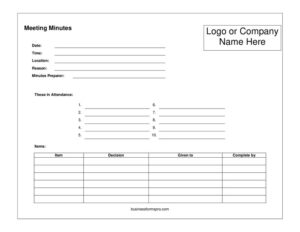
Record decisions, action items, and attendance with this free Meeting Minutes template, available as a free download in PDF and DOCX formats.
PDF
DOCX
6 downloads
0
likes
Download Files
- DOCX
Meeting minutes are the official written record of what happened during a meeting — the topics discussed, decisions made, and tasks assigned. People most often use a Meeting Minutes template to create a clear, consistent record they can share with attendees and reference later. This template is free to download in both PDF and DOCX formats, with no signup required.
What Is a Meeting Minutes Form?
A Meeting Minutes form is a structured document used to capture the key details of a meeting as it unfolds. It is typically prepared by a designated note-taker, secretary, or administrative assistant and then circulated to participants for review and approval. Rather than recording every word spoken, minutes summarize the agenda items covered, motions raised, votes taken, decisions reached, and action items assigned to specific people. Once approved, minutes become the official record of the meeting and are stored alongside an organization’s other documentation. They serve as an institutional memory, providing accountability and a reliable reference for anyone who needs to know what was decided and why.
When Do You Need a Meeting Minutes Form?
Almost any group that gathers to discuss and decide benefits from keeping minutes. Common situations include:
- Board of directors meetings — many organizations are legally or procedurally required to keep minutes of board decisions and votes.
- Nonprofit and committee meetings — to document grant decisions, policy changes, and volunteer assignments.
- Team or department meetings — to track project updates, deadlines, and who owns each task.
- Homeowners’ association (HOA) meetings — to record community votes, budget approvals, and resident concerns.
- Shareholder or annual general meetings — to formally capture resolutions passed by members.
- Client or vendor meetings — to confirm agreed scope, next steps, and responsibilities in writing.
Whenever a group needs an accurate, shareable record that everyone can rely on, minutes turn a conversation into a documented decision trail.
Types of Meeting Minutes
Not all minutes look the same. Action minutes focus mainly on decisions and assigned tasks, keeping discussion summaries brief. Discussion minutes include more context about the points raised before a decision was reached, which is useful when debate matters. Verbatim minutes record proceedings word for word and are reserved for formal settings such as hearings or disciplinary panels. For most organizations, a blend of action and discussion minutes offers the right balance of detail and readability.
What a Meeting Minutes Form Should Have
A complete set of minutes should include the meeting’s basic identifying details, a list of who attended and who was absent, the agenda items discussed, any motions and votes with their outcomes, decisions reached, and a clear list of action items with owners and due dates. It should also note the time the meeting started and ended, the name of the person recording the minutes, and the date the minutes are approved. These elements together make the record complete and easy to audit.
How to Fill Out a Meeting Minutes Form
- Meeting title and type: Enter the name of the group and whether it is a regular, special, or emergency meeting.
- Date, time, and location: Record the calendar date, the start time, and the physical or virtual location.
- Attendees: List everyone present, noting their role or title, then record absentees and any guests.
- Chairperson and recorder: Name the person leading the meeting and the person taking the minutes.
- Approval of previous minutes: Note whether the prior meeting’s minutes were reviewed and approved.
- Agenda items: For each item, summarize the discussion, capture any motions, and record the vote count or decision.
- Action items: Write each task, the person responsible, and the deadline.
- Next meeting: Add the date and time of the next scheduled meeting if known.
- Adjournment and signature: Note the time the meeting ended, then sign and date the minutes once approved.
Tips for Writing Clear, Useful Minutes
Good minutes are concise and objective. Write in the past tense and the third person, and summarize rather than transcribe. Record decisions and outcomes, not personal opinions or off-topic chatter. Use the agenda as your outline so the minutes follow the same order as the meeting, which makes them easy to follow afterward. Capture action items in a consistent format — task, owner, due date — so responsibilities are unmistakable. Whenever a vote takes place, note who proposed and seconded the motion and the final tally. Aim to circulate a draft within a day or two while details are fresh, and ask attendees to flag corrections before the minutes are formally approved at the next meeting.
Storing and Approving Minutes
Once minutes are drafted, they are usually distributed to attendees for review. At the following meeting, the group typically votes to approve the prior minutes, sometimes with corrections. Approved minutes should be stored in a consistent, retrievable place — a shared drive, a minute book, or a records management system — and organized by date. Many organizations retain minutes indefinitely because they may be needed for audits, legal review, or historical reference. Keeping a numbered or dated archive makes it easy to trace a decision back to the meeting where it was made.
Common Mistakes to Avoid
- Recording too much detail — verbatim notes are rarely needed and make minutes hard to scan.
- Omitting action items — without owners and deadlines, decisions stall and accountability disappears.
- Editorializing — minutes should stay neutral and factual, not reflect the writer’s opinions.
- Forgetting to note votes — for formal decisions, the motion, second, and tally should always appear.
- Delaying the write-up — waiting too long means important context is forgotten.
- Skipping approval — minutes that are never reviewed or approved carry less weight as an official record.
Frequently Asked Questions
What are meeting minutes? Meeting minutes are the official written summary of a meeting, capturing attendees, topics discussed, decisions made, and tasks assigned. They serve as a permanent record that participants and others can reference later. Minutes focus on outcomes rather than recording every spoken word.
Who is responsible for taking minutes? Usually a designated secretary, administrative assistant, or appointed note-taker records the minutes. In smaller or informal meetings, the role may rotate among members. The recorder’s name should appear on the document so it is clear who prepared it.
Do meeting minutes need to be signed or approved? Many organizations approve minutes at the following meeting, often with a motion and vote, and the chairperson or recorder may sign them. Approval confirms the record is accurate and complete. Whether signatures are required depends on your organization’s bylaws and rules.
Are meeting minutes legally binding? Minutes themselves are a record rather than a contract, but for corporations, nonprofits, and HOAs they can serve as legal evidence of decisions and may be required by law. Properly kept and approved minutes carry significant weight in audits and disputes. Always follow your governing documents and applicable rules.
How detailed should minutes be? Minutes should be concise but complete — enough to capture decisions, votes, and action items without transcribing the entire discussion. Summarize the key points of each agenda item and clearly note any conclusions. The goal is a record someone who missed the meeting could understand.
Is this Meeting Minutes template free? Yes. You can download this Meeting Minutes template completely free in PDF and DOCX formats, with no signup required. Edit it to match your organization’s meeting structure and reuse it for every session.
This Meeting Minutes template is a general example provided for informational purposes only and does not constitute legal, financial, or professional advice. Record-keeping and meeting requirements vary by organization and jurisdiction, so consult your bylaws and a qualified professional to ensure your minutes meet applicable standards.
Related Forms
- First Aid Inventory
- Inspection Tags
- Birthday Calendar One Page
- Website Password Tracker
- Donations Log
- Fire Emergency Checklist
Browse more in Log and Inventory.