
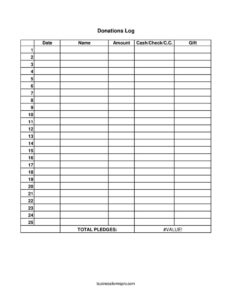
Donations Log
Track every gift with this free Donations Log template, recording date, donor name, amount, and payment type — download free in PDF or DOCX.
PDF
DOCX
XLSX
3 downloads
0
likes
Download Files
- DOCX
- XLSX
A Donations Log is a simple record-keeping sheet used to track every contribution a nonprofit, church, club, or charitable group receives, capturing the date, donor name, amount, and how the gift was given. The most common reason people use it is to keep an accurate, organized record of incoming donations for accounting, thank-you letters, and tax reporting. You can download it free in PDF or DOCX with no signup required.
What Is a Donations Log?
A Donations Log is a running list that documents each gift your organization receives over time. It is typically maintained by a treasurer, volunteer coordinator, office administrator, or fundraising team member. Each row represents one contribution and records who gave, when, how much, and the payment method — cash, check, credit card, or an in-kind gift. The log serves as the central source of truth that feeds into donor acknowledgment letters, bank deposit reconciliation, and year-end financial summaries. Unlike a formal receipt issued to a single donor, the Donations Log is an internal tracking document that aggregates many gifts in one place, making it easy to see totals, spot trends, and confirm that every dollar received has been recorded and accounted for.
When Do You Need a Donations Log?
A Donations Log is useful any time money or goods come in and someone needs to keep an organized trail. Common scenarios include:
- Church or place of worship collections: recording weekly offerings, tithes, and special-purpose gifts from the congregation.
- Nonprofit fundraising drives: tracking pledges and contributions during an annual campaign, gala, or capital appeal.
- School and PTA fundraisers: logging donations for a class trip, library fund, or athletic program.
- Community events and bake sales: capturing cash, checks, and card payments collected at a booth or table.
- In-kind and gift donations: noting donated supplies, auction items, food, or services that have value but aren’t cash.
- Small clubs and sports teams: keeping a transparent record of member contributions and outside sponsors.
What a Donations Log Should Have
A complete Donations Log makes it easy to find, total, and verify every entry. At minimum it should include a clear column for the date the gift was received, the donor’s name, the amount, and the payment method (cash, check, or credit card). A column to describe any gift — particularly in-kind or non-cash donations — rounds out the picture. Strong logs also leave room at the bottom for running totals or a summary, and they identify the organization and the time period the sheet covers. Consistency matters more than complexity: using the same format for every row means anyone can reconcile the log against bank deposits and pull accurate numbers when it’s time to send acknowledgments or prepare reports.
How to Fill Out a Donations Log
- Date: Enter the date the donation was received, not the date it was promised or deposited. Use a consistent format (for example, MM/DD/YYYY) throughout the sheet so entries sort correctly.
- Name: Record the donor’s full name as it should appear on a thank-you letter or receipt. For anonymous gifts, write “Anonymous”; for businesses, use the organization’s legal name.
- Amount: Write the dollar value of the contribution. For in-kind gifts, you may enter an estimated fair value or leave it blank and note the item in the gift column.
- Cash/Check/C.C.: Indicate how the gift was given — cash, check (note the check number if helpful), or credit card. This makes bank reconciliation far easier.
- Gift: Use this column to describe non-cash or in-kind donations, such as “auction basket” or “50 lbs canned food,” or to note a designated purpose for a cash gift.
Cash, Check, Card, and In-Kind Gifts
The payment-method column is more important than it looks. Cash donations should be counted by two people when possible and matched to the log before being deposited, since cash leaves no paper trail of its own. Checks are easy to verify against bank records, so noting the check number alongside the entry speeds up reconciliation. Credit card gifts often arrive through a processor that takes a small fee, so the amount you log may differ slightly from what actually lands in your account — decide in advance whether you record the gross gift or the net deposit, and stay consistent. In-kind gifts, recorded in the gift column, generally aren’t assigned a value by the organization itself; instead, you describe the item and let the donor determine its value for their own records.
Why Accurate Logging Matters
A well-kept Donations Log protects both your organization and your donors. It gives your treasurer a reliable basis for monthly and annual financial statements, helps demonstrate transparency to your board and members, and provides the documentation needed if your books are ever reviewed or audited. Donors often need a record of their giving for their own tax purposes, and your log is what allows you to generate accurate acknowledgment letters. Keeping the log current — rather than reconstructing it from memory at year-end — dramatically reduces errors and missed gifts.
Common Mistakes to Avoid
- Logging gifts late: recording donations days or weeks later invites missed entries and wrong dates — log them the same day.
- Leaving the payment method blank: without the cash/check/card column filled in, reconciling the log to deposits becomes guesswork.
- Assigning values to in-kind gifts you shouldn’t: describe donated items in the gift column rather than declaring their tax value for the donor.
- Inconsistent date formats: mixing styles makes the log hard to sort and total accurately.
- Forgetting to note designated gifts: if a donor specifies a fund or purpose, capture it so the money is used as intended.
- No periodic totals: failing to subtotal regularly makes it harder to catch discrepancies early.
Frequently Asked Questions
What is a Donations Log used for? A Donations Log is used to track every contribution your organization receives in one organized place, recording the date, donor name, amount, and payment method. It supports accounting, donor thank-you letters, and year-end reporting, and gives you a clear, verifiable record of all incoming gifts.
How do I fill out a Donations Log? For each gift, enter the date received, the donor’s name, the amount, and whether it came as cash, check, or credit card, then use the gift column to describe any in-kind item or note a designated purpose. Fill in one row per donation and keep the format consistent so the sheet is easy to total and reconcile.
Is a Donations Log a legal document? The log itself is an internal record-keeping tool rather than a binding legal contract. However, accurate records support your organization’s financial statements and any tax filings, so it should be maintained carefully and kept on file according to your record-retention practices.
Should I record in-kind donations in the log? Yes — use the gift column to describe non-cash contributions such as donated goods, services, or auction items. As a general practice the organization describes the item rather than assigning a tax value; the donor is typically responsible for determining the value for their own records.
How much does this Donations Log template cost? It is completely free to download from Business Forms Pro in both PDF and DOCX formats, with no signup or account required. You can print the PDF for in-person collections or edit the DOCX version to add columns or your organization’s name.
How often should I update the log? Update it as gifts come in, ideally the same day, so nothing is forgotten and dates stay accurate. Reconciling the log against your bank deposits on a regular schedule — weekly or monthly — helps you catch discrepancies early and keeps your records reliable.
This Donations Log template is a general example provided for informational purposes only and is not legal, financial, or tax advice. Record-keeping and tax-acknowledgment requirements vary by jurisdiction and organization type — consult a qualified accountant or professional for guidance specific to your situation.
Related Forms
- Log Sheet
- Outgoing Mail Detailed Log
- Housekeeping Inspection Checklist
- Yearly Cleaning Log
- IT Inventory
- Weekly Music Practice Log
Browse more in Log and Inventory.