
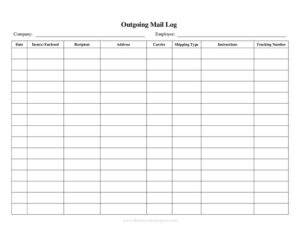
Outgoing Mail Detailed Log
Track every letter and package you send with this free Outgoing Mail Detailed Log template, available as a free download in PDF and DOCX.
PDF
DOCX
8 downloads
0
likes
Download Files
- DOCX
An Outgoing Mail Detailed Log is a simple record sheet used to track every piece of mail and every package leaving your office, mailroom, or home business. People most often use it to confirm exactly what was sent, when, to whom, and by which carrier — creating a paper trail that settles disputes and prevents lost items. It’s free to download here in both PDF and DOCX formats, with no signup required.
What Is an Outgoing Mail Detailed Log?
An Outgoing Mail Detailed Log is a structured document — usually a table — that captures the key details of each item your organization sends out. It is typically maintained by a mailroom clerk, office administrator, receptionist, or anyone responsible for dispatching correspondence. The log documents the date, recipient, sender or department, carrier or service used, tracking numbers, postage cost, and how the item was delivered. Its purpose is twofold: to provide an at-a-glance audit trail of outbound communications and to support accountability when a recipient claims a letter or parcel never arrived. Unlike a casual sticky note, a detailed log standardizes the information so anyone reviewing it later can reconstruct exactly what happened.
When Do You Need an Outgoing Mail Detailed Log?
Almost any setting that sends physical mail in volume benefits from a consistent record. Common situations include:
- Corporate mailrooms handling daily outbound correspondence for multiple departments and needing to allocate postage costs back to budgets.
- Legal and accounting firms that must prove time-sensitive documents (contracts, filings, notices) were mailed by a deadline.
- Small businesses and e-commerce sellers shipping products and wanting a quick reference of tracking numbers for customer inquiries.
- Medical and HR offices mailing confidential records, where proof of dispatch matters for compliance.
- Schools, nonprofits, and government offices sending bulk notices, invoices, or fundraising letters.
- Home-based businesses that need to separate personal and business postage for tax or reimbursement purposes.
Types of Outgoing Mail You Might Log
A detailed log can cover several categories of dispatch, and noting the type helps with sorting and reporting. Standard first-class letters make up the bulk of most logs, but you may also record certified or registered mail (which carries delivery proof), priority and express parcels, courier deliveries, interoffice mail, and bulk or marketing mailings. Distinguishing between these in your log makes it easy to filter for high-value or time-critical items when you need to verify them.
What an Outgoing Mail Detailed Log Should Have
A complete and useful log includes enough detail to identify any single item without ambiguity. At minimum it should capture:
- The date and time the item was sent.
- The recipient’s name and address or company.
- The sender or department responsible for the item.
- A brief description of the contents (e.g., invoice, contract, sample).
- The carrier or mail service used and the class of service.
- Any tracking or reference number.
- The postage or shipping cost.
- The initials of the person who processed it.
How to Fill Out an Outgoing Mail Detailed Log
Because this template is a flexible table, fill in one row per item as you process it:
- Enter the date (and time, if relevant). Record when the item left your hands or was placed for pickup so deadlines can be verified later.
- Write the recipient. Add the full name and, where space allows, the mailing address or company so the entry is unmistakable.
- Note the sender or department. This identifies who originated the mail and helps allocate costs internally.
- Describe the contents. Use a short phrase such as “signed lease” or “product return” rather than a vague “documents.”
- Record the carrier and service level. List USPS, a courier, or another provider, plus first-class, certified, priority, or express.
- Add the tracking or reference number. Copy it exactly; a single transposed digit makes it useless.
- Enter the postage cost. Helps reconcile a postage meter or shipping account at period end.
- Initial the entry. The processor’s initials create accountability and a point of contact for questions.
Tips for Keeping an Accurate Mail Log
Consistency is what makes a log valuable. Designate a single binder, clipboard, or shared spreadsheet so entries don’t scatter across desks. Fill in each row at the moment of dispatch rather than from memory at the end of the day — backfilling is where errors creep in. For certified or registered items, staple the carrier’s receipt to the log page or note the receipt number in the row. Periodically total the postage column to catch double charges or missing entries, and archive completed pages by month so you can locate proof of mailing quickly when someone asks about an item from weeks ago.
Common Mistakes to Avoid
- Leaving the tracking number blank on certified or insured items, which defeats the whole purpose of the proof of mailing.
- Vague content descriptions like “letter” that make it impossible to identify the item later.
- Skipping the date or time on deadline-sensitive mail, leaving you unable to prove timely dispatch.
- Letting multiple people use different logs instead of one master record, creating gaps.
- Failing to initial entries, so no one can answer follow-up questions.
- Recording postage inconsistently, which makes monthly reconciliation a guessing game.
Frequently Asked Questions
What is an Outgoing Mail Detailed Log used for? It is used to record every letter and package your office or business sends, including the date, recipient, carrier, tracking number, and cost. This creates a reliable audit trail that helps you prove an item was mailed and locate it if a recipient says it never arrived.
How do I fill out the mail log? Complete one row for each item at the moment you send it, entering the date, recipient, sender or department, a short description of the contents, the carrier and service, the tracking number, the postage cost, and your initials. Filling it in immediately rather than later keeps the record accurate.
Is an Outgoing Mail Detailed Log legally binding? The log itself is an internal record, not a contract, so it isn’t legally binding on its own. However, a consistently maintained log — especially when paired with carrier receipts for certified or registered mail — can serve as supporting evidence that an item was dispatched on a particular date.
Does this log need to be notarized or witnessed? No. An outgoing mail log is an administrative tracking document and does not require notarization or witnesses. Its credibility comes from being filled out consistently and contemporaneously by the person handling the mail.
How much does this template cost? Nothing. You can download the Outgoing Mail Detailed Log for free here in both PDF and DOCX formats, with no signup or payment required. Use the PDF to print and write entries by hand, or the DOCX to customize the columns to fit your workflow.
How long should I keep completed mail logs? Retention depends on your business needs and any industry rules you follow, but many offices keep logs for at least a year and longer for legal, financial, or compliance-related mail. Archiving completed pages by month makes it easy to retrieve proof of mailing when a question arises later.
This template is provided as a general example for informational purposes only and does not constitute legal, financial, or compliance advice. Recordkeeping and proof-of-mailing requirements vary by jurisdiction and industry — consult a qualified professional to ensure your practices meet any applicable obligations.
Related Forms
- Baby Care Daily Log
- Volunteer Hours Tracker
- Log Sheet
- Wagering Tracker
- Lost And Found Log
- Asset List
Browse more in Log and Inventory.