
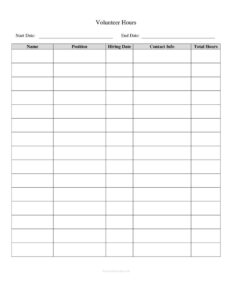
Volunteer Hours Tracker
Download a free Volunteer Hours Tracker template to log service dates, hours, and organizations accurately—free download in PDF and DOCX.
PDF
DOC
10 downloads
0
likes
Download Files
- DOC
A Volunteer Hours Tracker is a simple log used to record the dates, activities, and total hours someone spends volunteering for a nonprofit, school, religious group, or community organization. People most often use it to document service hours for graduation requirements, scholarship applications, court-ordered community service, or organizational reporting. You can download this Volunteer Hours Tracker free in both PDF and DOCX formats, with no signup required.
What Is a Volunteer Hours Tracker?
A Volunteer Hours Tracker is a record-keeping document that captures each volunteer session in one organized place. It is typically maintained by the volunteer and verified by a supervisor, coordinator, or organization representative. The tracker documents who volunteered, where and when the service took place, what tasks were performed, and how many hours were earned. Schools, courts, employers, and award programs frequently require this kind of documentation to confirm that service was actually completed. Because it consolidates many sessions into a single running log, the tracker makes it easy to tally total hours, spot gaps, and produce a credible summary when an official sign-off is needed.
When Do You Need a Volunteer Hours Tracker?
- School and graduation requirements: Students logging the community service hours required to graduate or to join honor societies.
- Scholarship and award applications: Applicants who must prove a minimum number of documented service hours.
- Court-ordered community service: Individuals fulfilling a court mandate who need verified proof of completed hours.
- Nonprofit volunteer management: Organizations tracking contributions from volunteers for grant reports and recognition programs.
- Corporate volunteer programs: Employees recording hours toward company matching or volunteer-time-off benefits.
- Personal records and resumes: Volunteers building a documented history of service to include on applications and CVs.
What a Volunteer Hours Tracker Should Have
A complete tracker balances detail with simplicity so it can be filled out quickly after each session. At minimum, it should identify the volunteer and the organization, then provide rows to log individual sessions. Each row should capture the date, a brief description of the activity or location, the start and end time or the number of hours, and a space for a supervisor’s verification. A running total of accumulated hours keeps the document useful at a glance. Because the log may be reviewed by a school, court, or grant officer, fields for a coordinator’s name, signature, and contact information add credibility and make the record verifiable.
How to Fill Out a Volunteer Hours Tracker
- Enter your name: Write the volunteer’s full legal name at the top so the log is clearly attributed.
- Add the organization: Record the name of the nonprofit, school, or group you are serving, along with its address or department if relevant.
- List a date for each entry: Use a consistent format such as MM/DD/YYYY for every session you log.
- Describe the activity: Briefly note what you did—for example, “food bank sorting” or “park cleanup”—so the entry is meaningful later.
- Log start and end times: Enter when you arrived and left, which lets anyone verify the hours independently.
- Calculate hours for the session: Subtract start from end time and write the total hours in the hours column.
- Capture supervisor verification: Have a coordinator sign or initial each entry, or sign a summary line confirming the totals.
- Update the running total: Add each session’s hours to your cumulative total so the current figure is always visible.
Tips for Keeping an Accurate Service Log
The most reliable trackers are filled out promptly. Record each session on the same day it happens rather than reconstructing hours from memory weeks later, which leads to errors and rounded guesses. Keep the description specific enough that a reviewer understands the nature of the work without needing to ask. If your program requires a minimum number of hours by a deadline, glance at your running total regularly so you can plan additional sessions before time runs out. When possible, ask your supervisor to verify entries in real time; chasing signatures months later is one of the most common headaches volunteers face. Finally, keep a backup—save a photo or scan of a paper log, or store the DOCX file in cloud storage so a single lost page does not erase your record.
How It Differs From a Timesheet
A Volunteer Hours Tracker resembles a work timesheet but serves a distinct purpose. A timesheet drives payroll and focuses on compensable hours, overtime, and pay rates. A volunteer tracker, by contrast, documents unpaid service and emphasizes the cause, the activity performed, and third-party verification rather than wages. Many institutions accept a volunteer tracker as standalone proof of service, while a timesheet alone usually would not satisfy a scholarship committee or court. If your organization needs both employee and volunteer records, keep them on separate documents to avoid confusion about which hours were paid.
Common Mistakes to Avoid
- Logging hours from memory: Waiting weeks to fill in sessions produces inaccurate totals and missing entries.
- Skipping supervisor verification: Unsigned hours may be rejected by schools, courts, or award programs.
- Vague activity descriptions: Entries like “helped out” give reviewers no way to assess the work.
- Inconsistent date or time formats: Mixing formats makes the log hard to total and audit.
- Math errors in the running total: Double-check additions so your cumulative figure matches the individual rows.
- No backup copy: Relying on a single paper sheet risks losing months of documented hours.
Frequently Asked Questions
What is a Volunteer Hours Tracker used for? It is used to record and verify the time someone spends volunteering for an organization. People rely on it to meet school service requirements, complete court-ordered community service, qualify for scholarships, or document contributions for nonprofit and corporate programs.
How do I fill out a Volunteer Hours Tracker? Start by entering your name and the organization, then add a row for each session with the date, activity, start and end times, and total hours. Have a supervisor sign or initial entries to verify them, and keep a running total of your accumulated hours.
Does a Volunteer Hours Tracker need to be signed? Most schools, courts, and award programs require some form of verification, typically a supervisor’s signature or initials confirming the hours. A signature is not always legally required, but unsigned hours are often rejected, so it is best practice to obtain verification.
Is a Volunteer Hours Tracker an official or legal document? On its own it is a personal record, but it becomes credible proof of service when an authorized representative verifies the entries. Courts and institutions generally accept a properly completed and signed tracker, though some may require their own form—check the specific requirements before you begin.
How much does this Volunteer Hours Tracker cost? Nothing. You can download the template here free in both PDF and DOCX formats with no signup or payment required, so you can print it or edit it on your computer right away.
Can I use one tracker for multiple organizations? Yes, but it is usually clearer to keep a separate tracker for each organization so the hours, activities, and verifying supervisor are easy to attribute. If you must combine them, label each entry with the organization name to avoid confusion when totals are reviewed.
This Volunteer Hours Tracker template is a general example provided for informational purposes only and is not legal, financial, or tax advice. Requirements for documenting and verifying service hours vary by school, court, employer, and jurisdiction—consult the relevant organization or a qualified professional to confirm what your situation requires.
Related Forms
- Sleepover Checklist
- Daily Music Practice Log
- Auction Buy List
- Inventory Control
- Stock Requisition Form
- Outgoing Mail Detailed Log
Browse more in Log and Inventory.