
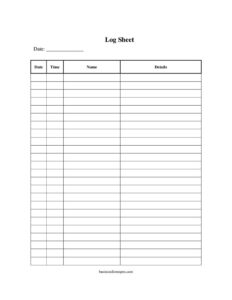
Log Sheet
Use our free Log Sheet template to record entries, times, and activity in a clear, consistent format—free download in PDF and DOCX, no signup required.
PDF
DOCX
11 downloads
0
likes
Download Files
- DOCX
A Log Sheet is a simple record-keeping document used to capture a running list of entries—dates, times, activities, names, or readings—in a consistent row-by-row format. People most often reach for a log sheet when they need a reliable, dated paper trail of recurring events. It’s free to download here in both PDF and DOCX, with no signup required.
What Is a Log Sheet?
A Log Sheet is a structured form, usually arranged in columns and rows, that lets one or more people document events as they happen. Each row is a single entry with the basic details—when it occurred, who recorded it, what took place, and any relevant notes. It is used by businesses, schools, facilities, drivers, security teams, and individuals to track everything from visitor sign-ins to equipment readings. The value of a log sheet lies in consistency: because every entry uses the same fields, the completed sheet becomes an easy-to-scan chronological record that can be reviewed, audited, or referenced long after the fact.
When Do You Need a Log Sheet?
A log sheet fits almost any situation where activity needs to be recorded in order over time. Common scenarios include:
- Visitor or sign-in tracking — recording who entered a building, when they arrived, who they visited, and when they left.
- Equipment and maintenance logs — noting inspections, meter readings, service dates, or repairs performed on machinery.
- Vehicle or mileage logs — capturing trips, odometer readings, fuel stops, and the driver responsible.
- Communication and call logs — documenting incoming or outgoing calls, the contact, the purpose, and follow-up actions.
- Time and activity tracking — logging hours worked, tasks completed, or shift handovers.
- Incident or observation logs — recording anything unusual along with the date, time, and the person who noted it.
Types of Log Sheets
Although the layout stays similar, log sheets adapt to many purposes. A daily log resets each day and tracks ongoing tasks; a visitor log emphasizes names, arrival, and departure times; a maintenance log centers on equipment IDs and readings; and a call or contact log focuses on who was reached and what was discussed. A blank, multipurpose log sheet like this one is flexible enough to relabel its columns for whichever use you have in mind, which is why a single template can serve so many teams.
What a Log Sheet Should Have
A complete, useful log sheet generally includes:
- A clear title or heading identifying the log’s purpose (for example, “Equipment Maintenance Log”).
- A date field and, when relevant, a time field for each entry.
- A column for the entry description or activity being recorded.
- A field for the person responsible or the name of whoever made the entry.
- A notes or comments column for context, follow-ups, or exceptions.
- Sequentially numbered rows so entries stay in order and none go missing.
- Optional totals, signatures, or initials for verification at the end of a period.
How to Fill Out a Log Sheet
Because this is a flexible, general-purpose template, follow these steps to complete it accurately:
- Add a heading. At the top, write the log’s purpose, the location or department, and the date range the sheet covers.
- Label your columns. Decide what each column should capture—commonly date, time, description, name, and notes—and write those headers across the top row.
- Record the date. For each new entry, enter the calendar date in the first column.
- Enter the time. Note when the event occurred or was recorded, using a consistent format (such as 24-hour or AM/PM) throughout.
- Describe the activity. In the main column, briefly state what happened—the task, reading, visitor, or event.
- Identify the person. Add the name or initials of whoever performed the action or made the entry.
- Add notes. Capture any extra detail, follow-up needed, or exceptions in the notes column.
- Number the row. Keep entries sequential so the chronological order is unmistakable.
- Sign or initial. If your process requires verification, sign at the bottom or have a supervisor review and initial the page.
Tips for Keeping an Accurate Log
The usefulness of a log depends entirely on discipline. Record entries in real time rather than from memory at the end of a shift—delayed logging is where errors creep in. Keep a consistent format for dates and times so the sheet sorts cleanly. Never leave blank rows between entries, since gaps suggest missing records. If you make a mistake, draw a single line through it, write the correction beside it, and initial it instead of erasing or overwriting; this preserves the integrity of the record. Finally, store completed sheets in chronological order and date-stamp each page so a multi-page log reads as one continuous history.
Paper vs. Digital Logs
A printable log sheet is reliable, requires no devices, and works anywhere—on a clipboard at a job site, beside a machine, or at a reception desk. The DOCX version of this template lets you customize column headers, add your organization’s name, or pre-fill recurring fields before printing. Many teams keep both: a paper sheet for on-the-spot recording and a digital copy for backup and easy searching. Whichever you choose, the underlying structure of clear, dated, attributable entries stays the same.
Common Mistakes to Avoid
- Skipping the time stamp when the sequence of events actually matters.
- Inconsistent formats—mixing date styles or abbreviations that make the log hard to read later.
- Leaving entries unsigned so there’s no accountability for who recorded what.
- Backfilling from memory instead of logging events as they occur.
- Erasing or overwriting errors rather than crossing them out and initialing the correction.
- Forgetting to title the sheet, which makes loose pages impossible to identify later.
Frequently Asked Questions
What is a log sheet used for? A log sheet is used to record a series of events, activities, or readings in chronological order. It creates a consistent, dated paper trail for things like visitor sign-ins, equipment maintenance, vehicle trips, or daily tasks. The format makes the completed record easy to scan and reference later.
How do I fill out a log sheet? Label your columns for what you’re tracking, then add one row per event with the date, time, a short description, and the name of the person recording it. Keep entries in order, use a consistent date and time format, and add notes where extra context is helpful. Sign or initial the page if your process requires verification.
Is a log sheet a legal document? A log sheet itself is simply a record, but it can carry significant weight as evidence of what happened and when, especially in maintenance, safety, or compliance contexts. To strengthen its reliability, record entries promptly, attribute each entry to a person, and avoid altering past entries. Whether a specific log is legally required depends on your industry and jurisdiction.
Does a log sheet need to be signed? Signing is optional and depends on your purpose. Many organizations have a supervisor sign or initial each completed page to confirm the entries were reviewed and are accurate. For informal personal logs, a signature usually isn’t necessary.
Can I customize this log sheet template? Yes. Download the DOCX version to relabel columns, add your company name or logo, and pre-fill recurring fields before printing. The PDF version is ideal if you want a ready-to-print sheet without editing.
How much does this log sheet template cost? It’s completely free to download from Business Forms Pro in both PDF and DOCX formats, with no signup or account required. You can print as many copies as you need and reuse the template for different tracking purposes.
This log sheet template is a general example provided for informational purposes only and does not constitute legal, financial, or compliance advice. Record-keeping and retention requirements vary by industry and jurisdiction—consult a qualified professional to ensure your logs meet any applicable obligations.
Related Forms
- Change Log
- Movie Inventory List
- Hotel Reservation Request
- Pool Maintenance Log
- Project Timeline
- Photo Log
Browse more in Log and Inventory.