
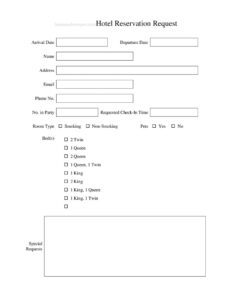
Hotel Reservation Request
Free hotel reservation request form template in PDF & DOCX to capture guest details, dates, room type, and preferences. Take bookings cleanly — download free.
PDF
DOCX
0
likes
Download Files
- DOCX
A hotel reservation request form is a simple document that captures everything needed to book a guest’s stay — arrival and departure dates, contact details, room type, and preferences. It gives front-desk and reservations staff one clean record to work from. Download this free template in PDF or DOCX and start taking organized bookings. No signup required.
What Is a Hotel Reservation Request Form?
A hotel reservation request form is the intake document a property uses to collect a guest’s booking details in one place. Whether a request comes in by phone, email, or in person, transferring it onto a standard form ensures nothing is missed: the right dates, the right room, the right number of guests, and any special preferences. For a small hotel, inn, or bed-and-breakfast, it’s an inexpensive way to keep reservations organized and avoid the double-bookings and missing details that frustrate guests and staff alike.
When Do You Need One?
- Taking a booking over the phone or by email and needing to capture every detail accurately.
- Running a small hotel, inn, motel, or B&B without a full reservation system.
- Recording guest preferences — bed type, smoking or non-smoking, pets — before arrival.
- Confirming a stay and having a single record to check the guest in against.
- Handling group or event bookings where details must be tracked carefully.
- Creating a consistent process so any staff member can take a reservation the same way.
What the Form Should Capture
A complete reservation form captures who, when, and what kind of room. That means the guest’s name and contact details (address, email, phone), the arrival and departure dates, the number in the party, the requested check-in time, the room type and bed configuration, and preferences such as smoking or non-smoking and whether pets are coming. Capturing these up front prevents surprises at check-in.
How to Fill Out the Reservation Request
- Enter the arrival date and departure date for the stay.
- Record the guest’s name, address, email, and phone number.
- Note the number in the party and the requested check-in time.
- Select the room type and bed configuration (for example, 2 twin, 1 queen, 2 queen, or 1 king).
- Mark smoking or non-smoking and whether the guest is bringing pets.
- Confirm availability, note any deposit or rate details, and file the request against the booking.
Tips for Smooth Reservations
Read the details back to the guest before you finish — a quick confirmation of dates, room type, and spelling of the name prevents most booking errors. Capture preferences early so housekeeping and the front desk can prepare the right room, and note any special requests in writing rather than relying on memory. Keep reservation forms organized by date so you can see occupancy at a glance and spot conflicts before they become double-bookings. If you take a deposit, record it on the form so check-in is seamless.
Common Mistakes to Avoid
- Missing or misheard dates — always confirm arrival and departure with the guest.
- Not capturing a reliable contact method for confirmations or changes.
- Leaving room type or bed configuration vague, leading to the wrong room at check-in.
- Forgetting to note smoking/non-smoking or pet requests that affect room assignment.
- Letting forms pile up unsorted, which invites double-bookings.
- Not recording a deposit or rate, causing confusion at check-in.
Confirming the Booking and Preparing for Arrival
Capturing the request is only the first half of a smooth reservation; confirming it and preparing for the guest is the second. Once you’ve taken the details, read the key points back to the guest — the spelling of their name, the arrival and departure dates, the room type, and any preferences — because a thirty-second confirmation prevents the great majority of booking errors. Then check the request against your availability before you commit, and record any deposit or rate agreed so there are no surprises at check-in. Send the guest a brief confirmation, whether by email or phone, noting the dates, room type, and your check-in and check-out times; this reassures them the booking is secure and gives them a reference if plans change. Behind the scenes, the captured preferences let your team prepare the right room: housekeeping can set up the correct bed configuration, the front desk can honor a smoking or non-smoking request, and staff can be ready for a pet or an early check-in. Keep your reservation forms organized by date so you can see occupancy at a glance and catch potential double-bookings before they happen. For group or event bookings, track each room’s details carefully and confirm the rooming list with the organizer ahead of arrival. Handled this way, a simple reservation form becomes the backbone of a confident, welcoming check-in — the guest arrives to find exactly the room they asked for, ready and waiting, which is the foundation of a good stay and a returning customer.
Frequently Asked Questions
What is a hotel reservation request form? It’s a form that captures a guest’s booking details — dates, contact information, room type, and preferences — in one record so staff can confirm and check the guest in accurately.
What information do I need to take a reservation? At minimum the guest’s name and contact details, arrival and departure dates, number of guests, room type, and key preferences like bed configuration and smoking or pets. The template above includes a field for each.
Can I use this for a small hotel or B&B? Yes — it’s ideal for properties without a full reservation system, giving you a consistent, organized way to take and track bookings.
How do I avoid double-bookings? Keep completed forms organized by date so you can see occupancy at a glance, and confirm availability before recording each reservation. Reading details back to the guest also catches errors.
Should I record a deposit on the form? Yes. Noting any deposit or rate on the reservation makes check-in seamless and prevents confusion about what’s already been paid.
Can I take reservations by phone with this form? Absolutely. Keep a few printed copies at the front desk and complete one as you talk, reading the details back to confirm. It works equally well for phone, email, and walk-in bookings.
How much does this template cost? Nothing — it’s free to download in PDF and DOCX, with no signup required.
Related Forms
- Monthly Editorial Calendar
- Trucker Log
- Job Application Tracker
- Coin Collector Log
- Auction Sell List
- Conference Room Schedule
Browse more in Log and Inventory.