
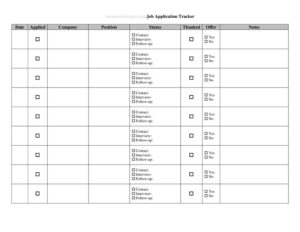
Job Application Tracker
Stay organized in your job search with a free Job Application Tracker template—log every application, status, and follow-up. Free download in PDF and DOCX.
PDF
DOCX
1 downloads
0
likes
Download Files
- DOCX
A Job Application Tracker is a simple log that lets you record every job you apply to, where you applied, the status of each application, and what your next step should be. People most often use it to stay organized during an active job search so no opportunity slips through the cracks. It’s free to download here in both PDF and DOCX formats, with no signup required.
What Is a Job Application Tracker?
A Job Application Tracker is a personal record-keeping tool used by job seekers to monitor their applications in one place. Instead of relying on memory or scattered emails, you list each role, the company, the date you applied, and the current stage—applied, interviewing, offer, or rejected. The tracker also captures contact details, deadlines, and follow-up reminders. Anyone searching for work can use it: recent graduates, career changers, freelancers seeking contracts, or experienced professionals juggling many openings. It documents the full lifecycle of each application so you always know who to follow up with, when an interview is scheduled, and which leads are still active.
When Do You Need a Job Application Tracker?
A tracker becomes essential the moment your job search grows beyond a handful of applications. Common situations include:
- Applying to many roles at once—when you submit ten, twenty, or more applications and need to remember which companies you contacted.
- Managing follow-ups—knowing when it’s appropriate to send a polite check-in email after a week or two of silence.
- Preparing for interviews—pulling up the job description, salary range, and contact name before a scheduled call.
- Avoiding duplicate applications—so you don’t accidentally apply to the same posting twice or contact the same recruiter again.
- Tracking outcomes for unemployment benefits—some programs require proof of job-search activity, and a dated log provides exactly that.
- Reflecting on your strategy—reviewing which industries respond, which sources produce interviews, and where to focus next.
What a Job Application Tracker Should Have
An effective tracker balances simplicity with enough detail to be useful. At minimum it should capture the company name, job title, application date, and current status. Beyond those essentials, strong trackers include the source where you found the listing (a job board, referral, or company site), a contact name and email or phone number, the salary or pay range if known, important deadlines, the interview date if one is set, and a notes column for context. A status field with consistent labels—such as Applied, Phone Screen, Interview, Offer, or Closed—lets you scan the whole list at a glance and instantly see where your energy should go next.
How to Fill Out a Job Application Tracker
- Company name: Enter the employer’s full name so you can identify it quickly, especially if you apply to several roles at the same organization.
- Job title and reference: Record the exact position title and any job ID or requisition number from the posting.
- Date applied: Log the day you submitted your application; this drives your follow-up timing.
- Source: Note where you found the role—LinkedIn, Indeed, a referral, or the company careers page.
- Contact: Add the recruiter or hiring manager’s name, email, and phone number if available.
- Status: Mark the current stage and update it as the process moves forward.
- Salary range: Enter any listed or negotiated compensation for comparison.
- Follow-up date: Set a reminder for when to check in.
- Interview date: Record scheduled calls or meetings.
- Notes: Capture details like dress code, key requirements, or how the conversation went.
Tips for Using Your Tracker Effectively
The tracker only helps if you keep it current. Build a habit of opening it every time you apply and updating it the moment something changes—an email reply, a scheduled interview, or a rejection. Use the notes column generously; small details like the interviewer’s name or a question they asked can make a follow-up email feel personal and memorable. Color-coding or sorting by status (if you use the editable DOCX version in a word processor or spreadsheet program) helps you spot which applications are stalling. Set a weekly routine to review every row marked “Applied” and decide whether it’s time to follow up or move on. Treating the tracker as a living document, rather than a one-time list, is what turns it into a genuine productivity tool.
How It Differs From a Resume or Cover Letter Log
A Job Application Tracker is not the same as the documents you submit to employers. Your resume and cover letter are outward-facing materials sent to hiring teams, while the tracker is a private, internal record you keep for yourself. Some job seekers maintain a separate version log of their resumes—tracking which tailored version they sent to which company—and that detail can live in the notes column of this tracker. Think of the tracker as your command center: it points to everything else and tells you the story of each opportunity from first click to final decision.
Common Mistakes to Avoid
- Letting it go stale: A tracker you never update quickly becomes useless and misleading.
- Vague status labels: Using inconsistent terms makes it hard to scan; pick a fixed set of statuses and stick to them.
- Forgetting the source: Without knowing where you found a role, you can’t tell which channels are working.
- Skipping the contact name: Following up to “Hiring Team” is far weaker than addressing a real person.
- No follow-up dates: Without reminders, promising leads silently expire.
- Storing it insecurely: The tracker holds personal contact details—keep the file somewhere private and backed up.
Frequently Asked Questions
What is a Job Application Tracker used for? It’s a personal log that helps you organize every job you apply to, including the company, role, application date, status, and follow-up plans. The main goal is to keep your search organized so you never lose track of an opportunity or miss a follow-up.
How do I fill out a Job Application Tracker? Add a new row each time you apply, filling in the company, job title, date, and source. Update the status field as each application progresses through phone screens, interviews, and final decisions, and use the notes column to capture useful context.
Is this Job Application Tracker free to download? Yes. You can download it here for free in both PDF and DOCX formats with no signup required. The editable DOCX version is ideal if you want to type entries or adapt the columns to your needs.
Should I use a printed or digital version? Either works—choose what fits your habits. A printed PDF is handy for jotting notes during calls, while the DOCX file lets you sort, filter, and update entries quickly on a computer.
Can I use this tracker as proof of job-search activity? A dated log can serve as a useful personal record of your applications, which some benefit programs request. Always confirm the exact documentation your program requires, since rules vary by location.
How many jobs should I track at once? There’s no fixed number—track every position you genuinely apply to. Many active job seekers keep dozens of entries open simultaneously, which is exactly why a single organized tracker is so helpful.
This Job Application Tracker template is a general example provided for informational purposes only and does not constitute legal, financial, or career advice. Documentation requirements for purposes such as unemployment benefits vary by jurisdiction—consult the relevant program or a qualified professional for guidance specific to your situation.
Related Forms
- Outgoing Mail Detailed Log
- Zombie Survival Checklist
- Side Hustle Expenses Log
- List of Home Services
- Restaurant Ban Form
- Observation Log
Browse more in Log and Inventory.