
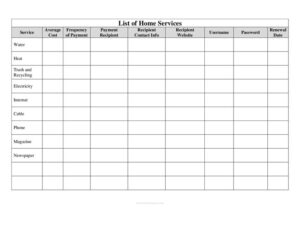
List of Home Services
Track every recurring home service, cost, and renewal date with our free List of Home Services template, available as a free PDF and DOCX download.
PDF
DOC
7 downloads
0
likes
Download Files
- DOC
A List of Home Services is a simple household log that captures every recurring service you pay for — from water and electricity to internet, cable, and magazine subscriptions — in one organized place. People use it most often to keep track of who they pay, how much it costs, and when each account renews so nothing slips through the cracks. It’s free to download here in both PDF and DOCX formats, with no signup required.
What Is a List of Home Services?
A List of Home Services is a reference document that consolidates all the ongoing services tied to your home into a single, easy-to-scan sheet. It records each service name, its average cost, how often you pay, the company or person you pay, and their contact details. It also includes login information and renewal dates so you can manage accounts efficiently. Homeowners, renters, and anyone managing a household use it to budget, compare costs, cancel unwanted services, and hand off information to a spouse, family member, or property manager. Rather than digging through emails and statements, you keep everything documented in one trustworthy place that’s quick to update and easy to share when needed.
When Do You Need a List of Home Services?
This log earns its keep in many everyday and high-stakes situations. Consider creating or updating one when:
- You’re moving into a new home or apartment and need to set up — or transfer — utilities like water, heat, electricity, and trash collection.
- You want to build a household budget and need a clear picture of your monthly and annual recurring costs.
- You’re reviewing subscriptions to cut back, such as canceling unused cable, magazine, or newspaper services.
- You’re sharing responsibilities with a spouse, roommate, or caretaker who may need to pay bills or contact a provider.
- You’re organizing important records for emergency preparedness or estate planning so loved ones can access account details.
- You’re shopping for better rates and want to compare your current providers against competitors at renewal time.
Types of Home Services to Track
The template is organized around the most common categories of household services, and you can add or remove rows to fit your situation. Typical entries include utilities such as water, heat, trash and recycling, and electricity; communications such as internet, cable, and phone; and media subscriptions such as magazines and newspapers. You might also extend the list to cover lawn care, pest control, security monitoring, streaming services, or HVAC maintenance. Grouping similar services together makes it easier to spot overlap — for example, paying for both cable and multiple streaming plans — and to prioritize what to keep when you trim expenses.
What a List of Home Services Should Have
A complete and useful log captures enough detail to manage each account without hunting for information elsewhere. The essentials include the service name, the average cost, the frequency of payment, the recipient you pay, and their contact information. To make the document truly functional, it should also include the provider’s website, your account username and password (kept secure), and the renewal or billing date. Together, these fields let you pay on time, reach the right person quickly, and make informed decisions at renewal.
How to Fill Out a List of Home Services
- Service: Write the name of the service, such as Water, Heat, Trash and Recycling, Electricity, Internet, Cable, Phone, Magazine, or Newspaper.
- Average Cost: Enter the typical amount you pay, noting whether it’s a flat fee or an estimate that varies seasonally.
- Frequency of Payment: Indicate how often the charge occurs — monthly, quarterly, or annually, for example.
- Payment Recipient: Record the company or individual who receives your payment.
- Recipient Contact Info: Add a phone number or email so you can reach support quickly.
- Recipient Website: Note the website where you log in or manage the account.
- Username: Enter the login name associated with the account.
- Password: Add the password if you choose to store it; keep this copy secure and updated.
- Renewal Date: List the date the contract renews or the billing cycle resets so you can review or renegotiate ahead of time.
Repeat these steps for each service in your household, and revisit the list periodically to keep costs and contact details current.
Tips for Keeping Your List Secure and Current
Because this log can contain usernames and passwords, treat it as sensitive. Store the file in an encrypted folder or a password manager rather than leaving it on a shared desktop, and avoid printing copies that could be lost. If you’d rather not record passwords directly, leave that column blank and reference your password manager instead. Set a calendar reminder to update the list every few months — especially after a price increase, a provider switch, or a renewal — so the numbers stay accurate. A quick quarterly review also helps you catch services you no longer use and renegotiate rates before they automatically renew.
Common Mistakes to Avoid
- Storing passwords carelessly — never email the completed file or leave it where others can read it.
- Letting the list go stale — outdated costs and renewal dates defeat the purpose of tracking.
- Forgetting smaller services — magazines, newspapers, and seasonal services add up and are easy to overlook.
- Recording only the company name without contact info or a website, which slows you down when you need support.
- Missing renewal dates and getting locked into another term at a higher rate.
- Not noting payment frequency, which makes it hard to convert costs into an accurate monthly or annual budget.
Frequently Asked Questions
What is a List of Home Services used for? It’s used to organize every recurring home service in one place, including utilities, communications, and subscriptions. The list helps you budget, pay on time, reach providers quickly, and decide what to keep or cancel.
How do I fill out the template? Add one row per service and fill in the service name, average cost, payment frequency, recipient, contact info, website, login details, and renewal date. Work through your billing statements and account emails to gather the information, then keep it updated as things change.
Is it safe to store passwords on this form? The form has a password field, but you should only store login details in a secure, encrypted location or password manager. If you have any doubt about file security, leave the password field blank and reference your password manager instead.
Can I add services that aren’t listed? Yes. The template includes common categories like water, heat, electricity, internet, cable, phone, and subscriptions, but you can add rows for lawn care, security systems, streaming, or any other recurring service.
How often should I update the list? Review it every few months and any time a price changes, you switch providers, or a service renews. Regular updates keep your budget accurate and help you act before automatic renewals.
How much does this template cost? It’s completely free to download from Business Forms Pro in both PDF and DOCX formats, with no signup required. You can print it or edit it on your computer.
This template is a general example provided for informational purposes only and does not constitute legal, financial, or tax advice. Account terms, renewal rules, and consumer protections vary by provider and jurisdiction — consult the relevant service agreements or a qualified professional for guidance specific to your situation.
Related Forms
- Flood Emergency Checklist
- Weekly Music Practice Log
- Bird Strike Form
- Hospital Comparison
- Home Inventory List of Possessions
- Circuit Breakers
Browse more in Log and Inventory.