
Circuit Breakers
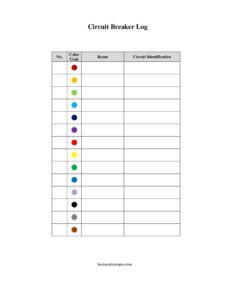
Use this free circuit breaker log template to map every breaker, color code, room, and circuit for fast, safe panel identification — free download in PDF and DOCX.
PDF
DOCX
2 downloads
0
likes
Download Files
- DOCX
A circuit breaker log is a simple chart that records what each breaker in your electrical panel controls, so anyone can quickly identify and shut off the right circuit. People most often use it to label a confusing or unmarked breaker panel so they no longer have to guess which switch kills power to a given room or outlet. This template is free to download in both PDF and DOCX, with no signup required.
What Is a Circuit Breaker Log?
A circuit breaker log is a record that maps every breaker in your electrical panel to the area or equipment it powers. It is typically filled out by a homeowner, property manager, maintenance technician, or electrician who walks the building, tests each breaker, and notes what it controls. The log documents the breaker number, an optional color code for grouping, the room served, and a clear description of the circuit. Posted inside or near the panel door, it turns a row of identical-looking switches into a usable reference — saving time during repairs, renovations, troubleshooting, and emergencies when fast, accurate shutoff matters.
When Do You Need a Circuit Breaker Log?
This log is useful any time you need to know exactly what a breaker controls without trial and error. Common situations include:
- Moving into a new home or office where the panel is unlabeled or has faded, illegible handwriting.
- Planning electrical work or DIY repairs and needing to safely de-energize a specific outlet, light, or appliance before touching wiring.
- Managing rental or commercial properties where multiple units, tenants, or zones share a panel and need clear separation.
- After a renovation or addition that added new circuits, requiring an updated map of the panel.
- During an emergency — a flooded room, sparking outlet, or overheating appliance — when you need to cut power instantly to one area.
- For inspections and handoffs, giving inspectors, contractors, or new owners an accurate guide to the system.
What a Circuit Breaker Log Should Have
A complete log makes the panel readable at a glance. The essentials are a unique number for every breaker that matches its physical position in the panel, an optional color-coding scheme so related circuits stand out (for example, all kitchen circuits in one color), the room or zone each breaker serves, and a plain-language description of the specific circuit. The best logs also note the breaker amperage where space allows, distinguish single-pole from double-pole (240-volt) breakers, and flag any breaker that controls critical equipment such as a furnace, sump pump, or medical device. Clarity and accuracy matter far more than detail — a short, correct entry beats a long, confusing one.
How to Fill Out a Circuit Breaker Log
Work methodically and test as you go. Follow these steps:
- No.: Enter the number printed beside each breaker, or assign your own sequential numbers that match the physical layout from top to bottom. Number every breaker, including unused or spare positions.
- Color Code: Optionally assign a color to group related circuits — for example, blue for bedrooms, green for outdoor circuits, or red for high-priority equipment. Apply matching colored dots or labels on the panel itself.
- Room: Record the room or zone the breaker serves, such as “Master Bedroom,” “Kitchen,” “Garage,” or “Exterior.” Be specific when a room has more than one circuit.
- Circuit Identification: Describe exactly what the breaker controls — “Kitchen counter outlets,” “Dishwasher,” “Hallway lights,” or “Central AC.” Test by switching the breaker off and noting which devices lose power, then switch it back on.
When finished, keep the completed log inside the panel door or in a binder near the panel for easy reference.
Tips for Accurate Circuit Mapping
Mapping a panel is much easier with a simple system. Bring a helper with a phone or radio so one person flips breakers while the other walks the building reporting which outlets, lights, and appliances go dead. Plug a lamp or an inexpensive outlet tester into each receptacle to confirm results. Turn off and reset sensitive electronics — computers, alarm systems, and entertainment gear — before testing so a sudden power loss does not corrupt data or settings. Work one breaker at a time and label as you go rather than trying to remember everything at the end. For double-pole breakers serving 240-volt equipment like dryers, ranges, and water heaters, note both positions and the appliance they feed.
Keeping the Log Current
An electrical panel is not static. Renovations, added outlets, swapped appliances, and rewiring all change what a breaker controls. Treat the log as a living document: review it whenever electrical work is done and update the affected entries immediately. If you use the color-coding column, keep a small legend on the same page so future readers understand the scheme. When you sell or hand off the property, leave the most recent version with the panel — it is one of the most appreciated, low-cost conveniences a new owner can inherit. Storing a backup copy digitally also protects against the posted sheet being damaged or removed.
Common Mistakes to Avoid
- Skipping the test: guessing what a breaker controls instead of physically switching it off and verifying leads to dangerous mistakes.
- Numbering that doesn’t match the panel: log numbers must correspond to the actual breaker positions, or the chart is useless.
- Vague descriptions: “Lights” or “Outlets” without a room is too generic — specify the location and device.
- Forgetting spares and double-pole breakers: leaving blanks creates confusion about whether a position is unused or simply unmapped.
- Never updating after changes: an outdated log can be worse than none because it gives false confidence.
- Using a color code with no legend: colors only help if a reader knows what each one means.
Frequently Asked Questions
What is a circuit breaker log used for? It is used to record what every breaker in an electrical panel controls so you can quickly identify and shut off the correct circuit. This is valuable for repairs, renovations, troubleshooting, and emergencies, and it spares you from flipping random breakers to find the right one.
How do I figure out which breaker controls what? Switch one breaker off at a time and check which lights, outlets, and appliances lose power, ideally with a helper or an outlet tester. Record the result in the Room and Circuit Identification columns, then switch the breaker back on before moving to the next one.
Do I need to use the color code column? No, the color code is optional. It is helpful for grouping related circuits visually — such as all outdoor circuits in one color — but you can leave it blank and rely on the number, room, and circuit description alone.
Is this circuit breaker log free to download? Yes. You can download this template for free in both PDF and DOCX formats with no signup required. Print the PDF to fill it in by hand, or edit the DOCX on your computer before printing.
Where should I keep the completed log? The most useful place is taped inside or just beside the panel door so anyone needing to cut power can read it instantly. Keep a backup copy in a maintenance binder or digital file in case the posted sheet is damaged or removed.
Should an electrician fill out the log? A licensed electrician can complete it accurately during installation or service, but a careful homeowner or property manager can also map the panel safely by simply switching breakers and observing the results. Always hire a qualified electrician for any actual wiring, panel work, or anything that requires opening the panel cover.
This circuit breaker log template is a general example provided for informational purposes only and is not professional electrical advice. Electrical codes, labeling requirements, and safety practices vary by jurisdiction, and any wiring or panel work should be performed or verified by a qualified, licensed electrician.
Related Forms
- Tips Tracker
- Wagering Tracker
- Home Food Storage Inventory Card
- Equipment Inventory
- Monthly Editorial Calendar
- Observation Log
Browse more in Log and Inventory.